
WHITEPAPER
Step-by-step to choose your perfect authoring tool

Brain
The first AI trained to teach

Author
The #1 AI-powered authoring tool on the market

Factory
Custom e-learning content factory

Skills
Comprehensive power skills course catalog

LMS
All-in-one LMS platform with AI

Engage
App for managing frontline teams
FEATURES

AINew
Unlock your full potential and speed up course creation with artificial intelligence.

Accessibility
Automatically meet accessibility guidelines—without sacrificing interactivity!

Interactivity
Boost engagement with interactive, ready-to-use activities that make learning fun.

Course Creation
Reduce the time it takes to create your e-learning courses with our authoring tool.

Distribution
We offer you different distribution options, so that nothing can stop you.

SCORM
Publish your course in SCORM format and share it on any LMS.
SERVICES

Instrucional Design
Surprise your students with multimedia and interactive content.

Custom Courses
We create e-learning courses for you—tailored to your needs and hassle-free!

Virtual Reality
Turn learning into an immersive experience.

Custom Avatars
Give your courses and videos a unique touch with personalized avatars.

Audiovisual FactoryNew
Turn training into something dynamic and visual with engaging videos.
CATALOG

Course catalog
Over 600 skills and competency courses to help you adapt to your team's needs.
Microsoft Copilot AcademyNew
Your professionals will learn how to apply Copilot AI to key processes within your organization.

Artificial Intelligence Academy
Train your teams in the practical use of AI to boost productivity and innovation in your company.

Cybersecurity Academy
Capacita a tu empresa con el catálogo más completo en seguridad digital corporativa.

Use cases
Choose the solution that best fits your needs

Industries
Solutions for all types of industries
USE CASES

Onboarding
Facilitate the onboarding process, productivity and engagement of your new employees.

Upskilling
Boost your team's skills and prepare them for the challenges of the future with upskilling.

Microlearning
Discover all the advantages of microlearning and boost your training results.

Gamification
Enjoy addictive training that will get your professionals hooked.

Internal Communication
Improve communication in your company and enjoy an aligned and committed team.

Mobile learning
Agile, flexible, and interactive learning—built for today’s digital-first workforce.
INDUSTRIES

Banking and financial services
Training in compliance, cybersecurity, customer service, and key skills development.

Pharmaceuticals and healthcare
Digital onboarding, regulatory updates, and ongoing training for healthcare staff.

Retail and consumer
Agile and scalable training for in-store, operational, and customer service teams.

Industry and manufacturing
Training in processes, safety, and corporate culture for distributed teams.

Education and training
Digital solutions for training centers, internal academies, and corporate universities.

Technology and telecommunications
Development of technical talent, digital skills, and upskilling and reskilling programs.
CLIENTS

MAPFRE
How MAPFRE turn e-learning into sales with isEazy

Pepco
A personalised learning experience for a growing team.

BBVA
Digitisation and creation of high quality e-learning content.

Shiseido
We increase the engagement of the training with a social and gamified app.

Telefónica
Large-scale reskilling for the company's digital transformation.

Vodafone
A personalised learning experience for a growing team.
More than 1,000 companies already rely on isEazy.


MEET ISEAZY

Events
Discover our upcoming events and connect with the future of e-learning.

News
Find out the latest news about isEazy: press releases, partnerships, updates...

Contact
Leave us your personal details and we will contact you as soon as possible.
About isEazyNew
Find out more about our company.

Careers
We are looking for the best talent, join our team!

Partners
Become our partner and grow your business.
INTERESTING RESOURCES

Blog
The best content on e-learning: trends, tools and key strategies.

Whitepapers
Gain valuable insights and stay ahead of industry trends.

Product releases
The latest news and releases of our e-learning products and solutions.

Glossary
Definitions of the most commonly used terms and key industry concepts.

Guides
Discover the best step-by-step tips and tricks to optimize your L&D strategy.

Webinars
Video sessions on our products, trends and more

Comparatives
Compare e-learning solutions available on the market and choose the most suitable one.

Create professional courses in minutes, now for less.

Stay up to date with all our latest news
 Subscribe to our newsletter
Stay up to date with all our latest news

November 3, 2026

CONTENT CREATED BY:

Table of contents
Learning objects are reusable units of digital content — a video, an interactive infographic, a quiz, a simulation — that are combined to build courses. What defines them is not the format but the reuse: the same object can go into five different courses and be updated only once.
In this guide you’ll see exactly what they are, what the standard that governs them says, how they relate to virtual learning objects, their elements and characteristics, seven real examples by use case and — something that almost never gets said — when modularizing isn’t worth it.
Learning objects are units of digital content that provide specific information and are designed to support teaching and learning. They are short pieces or small fragments that can include text, images, videos, interactive simulations or animations, and whose purpose — together or separately — is to make content easier to absorb and retain.
In practice they work as blocks of information that can be reused and combined. They are built into learning materials, online courses or learning management systems (LMS) to enrich the learner’s experience, and they serve to explain complex concepts, give practical examples or assess progress. Their flexibility is what makes them adaptable to very different audiences.
The reference definition came from David Wiley in 2000, in his chapter Connecting learning objects to instructional design theory: a learning object is any digital resource that can be reused to support learning. It is deliberately broad — it includes anything that can be delivered over a network, large or small — and it is still the most cited definition twenty-five years later.
On top of it sits a standard that formalizes the idea: IEEE 1484.12.1-2020, Standard for Learning Object Metadata, in force since November 2020. It’s worth understanding what it governs and what it doesn’t: it doesn’t say what the object’s content should be, but how it is described — title, author, language, level, rights, keywords — so that a system can find it, evaluate it and exchange it with others. Put differently: metadata isn’t red tape, it’s half the invention. An object nobody can locate never gets reused, however good it is.
And here is the warning worth knowing before modularizing anything. Wiley himself formulated what is known as the reusability paradox, and he did it without hedging: reusability and pedagogical effectiveness are orthogonal to each other.
The reasoning is uncomfortable and hard to refute. What makes something understandable is context: the concrete example, the case from your industry, the figure from your company. But context is exactly what stops that same material from working anywhere else. Hence a highly contextualized object teaches very well and can’t be reused, while a very generic one travels everywhere and teaches little.
The practical conclusion isn’t to give up on learning objects, but to stop chasing maximum reuse as if it were the goal. For each piece you have to decide up front whether it’s one of the ones that travel or one of the ones that teach. There’s a table further down to help make that call.
If you arrived looking for virtual learning objects, or VLOs, the short answer is yes: it’s the same concept under another name. The term is used above all in Latin American academia — it’s common in universities in Colombia, Mexico or Peru — while “learning object” dominates in corporate settings and in English-language literature.
Where there is a difference, it’s one of scope rather than nature. A VLO tends to be described as a complete resource: its objectives, its content, its practical activity and its assessment, packaged for a specific subject or classroom. The corporate learning object tends to be smaller and more atomized, because it’s meant to fit into several different learning paths and to be replaced piece by piece.
For everything that really matters — how they’re designed, what metadata they carry, how they’re packaged, how they’re reused — they are the same thing, and the same IEEE standard and the same paradox from the previous section apply to both.
Learning objects are made up of several elements that work together to deliver a complete learning experience. These elements, carefully designed and selected, exist mainly to support the design of complete, effective learning resources. The most important are:
Learning objectives clearly and specifically define the skills and competencies the learner should acquire. They act as a guide to what the learner will be able to do once a module or course is finished, and at the same time they are what makes it possible to measure how effective the object is.
Educational content is a crucial element in learning object design. It is all the knowledge or concepts you intend to convey, and it can be delivered in many formats: videos, images, presentations or games that enrich the experience.
Learning objects should include activities or exercises that let learners test, practice and apply what they’ve learned. Some of the most common in e-learning are simulations, interactive videos and fill-in, matching, linking or multiple-choice exercises.

Assessments make it possible to measure how well knowledge has been understood and retained. They are useful, important tools that provide the feedback a learner needs in order to know their weak points and their strengths along the way. They can include quizzes, tests or practical projects.
Finally, every learning object should carry its general information: title, author, keywords or any other data that makes it easier to classify and find within the platform where it lives. This is the element governed by the IEEE standard mentioned earlier, and the one that decides whether the object ever gets used again or stays buried.
For a digital resource to become a learning object it has to meet certain conditions. Learning objects should be:

Although both aim to support learning, there are underlying differences that explain why learning objects fit today’s corporate environment better:
| Characteristic | Learning objects | Traditional learning resources |
|---|---|---|
| Structure | Modular and self-contained | Linear and sequential |
| Length | 2–10 minutes | 30 minutes – 2 hours |
| Reuse | High – designed to be reused | Low – specific to one course |
| Updating | Fast and modular | Requires redoing the whole piece |
| Interoperability | Works with multiple LMS (SCORM, xAPI) | Often limited to one platform |
| Personalization | Multimedia and interactive | Mostly text and slides |
| Creation cost | Higher upfront, lower maintenance | Lower upfront, higher maintenance |
Wiley’s paradox has a very concrete consequence for anyone who has to produce content: not everything should become a reusable object. Modularizing costs time — you have to write metadata, peel the content away from its context, standardize the style so it fits into any course — and that cost is only recovered if the object gets used several times.
This table helps you decide before you start:
| Situation | Worth making it a reusable object? | Why |
|---|---|---|
| A regulation or procedure that affects several departments | Yes, this is the ideal case. | When the rule changes you update it once, instead of across six different courses. |
| Transferable skills: communication, safety, office software | Yes. | They apply equally in any area, so the object travels without losing meaning along the way. |
| Product training with a short life cycle | Yes, but with a review date in the metadata. | The object ages fast: with no expiry it will end up teaching something that is no longer true. |
| Onboarding specific to a small team | No. | It will only be used in one place, so the cost of abstracting away the context is never recovered. |
| A case study tied closely to one client or campaign | No. | This is exactly what the paradox describes: what makes it effective is what stops it being reused. |
| Content that changes every quarter | Depends on the volume. | With three pieces, redoing them is cheaper than maintaining the reuse machinery. |
The quick rule, if you don’t want to think it through every time: if you can’t name at least two courses the object is going into, don’t build it as a reusable object. Build it as course content and save yourself the abstraction.
In an environment where training and skills development are decisive for an organization’s success, learning objects make it possible to offer more personalized, more adaptive approaches.
Because they are modular and reusable, these resources are a cost-effective way to train employees. They can be designed for specific needs, addressing particular skill areas or business challenges, which makes programs more relevant and more effective for each person in the organization.
With a flexible structure and the ability to be updated, they help an organization stay agile and adapt quickly to market changes. And there is another, less obvious advantage: their ability to encourage collaboration and knowledge sharing. By building in interactive elements and even social learning activities, they promote a collaborative learning environment where teams share experiences and solve problems together.
Learning objects can be used in very different ways to enrich the learning experience:
They are built into courses, seminars, workshops or online training programs as additional or primary resources to explain key concepts, give practical examples or present case studies.
They are fundamental components of any e-learning course. They are used to design interactive modules, multimedia presentations, practical activities and formative assessments, which lets people access the content flexibly and at their own pace.
They also serve to create resources of all kinds: video tutorials, interactive infographics, simulations and educational games.
They slot easily into learning management platforms (LMS) to organize and administer content, assign tasks and track progress far more efficiently.

Interactive objects — online quizzes, practical exercises, reinforcement activities — make self-assessment easier and give immediate feedback. They let you track progress, identify areas to improve and consolidate what has been learned.
There are many types of learning object. These are the most common:
Whether tutorials, animations or dramatizations, videos are extremely valuable learning objects for engagement. They can be watched as many times as needed, paused, skipped forward or rewound.

These are classic e-learning elements that aren’t limited to text: they can include images, video or audio. They are easy to create and an excellent way to summarize information and make it more appealing.
Interactive learning objects are the best way to encourage participation and engagement. There are plenty to enrich content with: cards, interactive videos, grouping or matching exercises, and branching scenes.
To create them effectively it pays to follow a structured development process: define the learning objectives, select the relevant content and choose the right technology, keeping accessibility, usability and an engaging design in mind.

Images are powerful tools in e-learning course design, because they strengthen comprehension and the visual impact of the content. Well integrated, they convey complex concepts simply and attractively.
Key benefits of images as learning objects:

Seeing real implementations helps you understand what learning objects can do. Below are common use cases in corporate training, applicable to sectors such as tech, banking, retail, manufacturing or consumer goods.
Type of object: onboarding plan with built-in interaction and assessment.
Where it’s used: new-hire onboarding (corporate, IT, hybrid teams).
How it works:
Why it works: it speeds up the learning curve and cuts the time spent on live training.

Type of object: interactive simulation with decision-based scenarios.
Where it’s used: consultative selling, customer service, negotiation.
How it works:
Why it works: it trains real skills (communication, handling objections) without depending on in-person trainers.

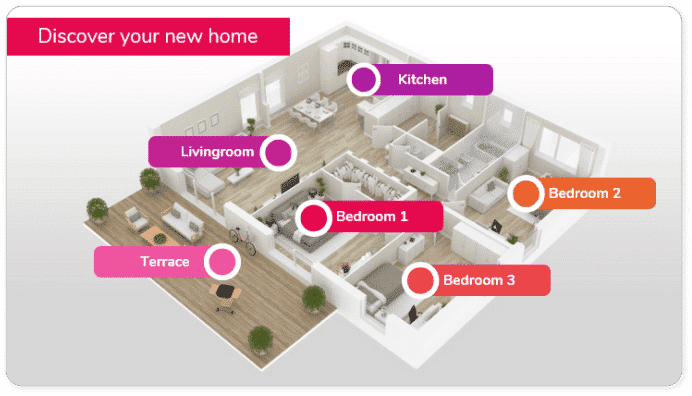
Type of object: infographic with hotspots and expandable content.
Where it’s used: compliance, prevention, internal policies, audits.
How it works:
Type of object: mini-games and exercises.
Where it’s used: IT security, phishing, passwords, privacy.
How it works:
Why it works: it raises participation and turns a “mandatory” topic into a habit.
Type of object: audio capsules with transcript.
Where it’s used: leadership, communication, productivity, time management.
How it works:
Why it works: it fits profiles with little time and reinforces continuous learning.

Type of object: immersive procedure simulations.
Where it’s used: plants, logistics, maintenance, health and safety.
How it works:
Why it works: it trains operational skills in realistic conditions, without stopping production.
Type of object: contextualized adaptive quiz.
Where it’s used: internal certifications, product, recurring compliance.
How it works:
Why it works: it validates knowledge objectively and leaves an audit trail (very useful in audits).
The tool you choose is decisive for creating learning objects that are effective, reusable and compatible with your training systems. These are the best options depending on what you need:
| Main need | Recommended tool | Why |
|---|---|---|
| A complete solution for a company | isEazy Author | The right balance of ease, quality and price |
| Software simulations | Adobe Captivate | Specialized in screen captures and demos |
| Zero budget | H5P | Fully open source |
| Video tutorials | Camtasia | Best ease-to-result ratio for video |
Ideal for: training teams looking for speed, professional quality and AI integration
Standout features:
Advantages:
Best for: companies that want to professionalize their training quickly and create high-quality learning objects without a specialized technical team.
And this isn’t theory. Konecta, a global customer care provider with more than 130,000 employees across 10 countries, needed to keep its training up to date without depending on an external supplier every time something changed. By building its own library of reusable content it went from an average of 5 courses a month to more than 10, doubling its in-house production capacity, and has already accumulated more than 250 training assets created by its own teams.
Bringing learning objects into curriculum design has clear advantages. Because they can be reused in different contexts, they increase the efficiency of the teaching process: whoever designs the training can focus on personalizing and adapting the instruction instead of creating content from scratch every time.
They also help people retain information better, make it possible to build personalized learning paths and fit the modern learner, who is always short on time and prefers content in small doses.
They also encourage active participation by giving access to interactive, visually appealing resources, make immediate feedback easier and allow each person’s progress to be tracked.
That said, remember the warning from the start: the goal isn’t to modularize everything, but to modularize what will genuinely be used again. Not sure where to begin? Request a demo of isEazy Author, our authoring tool for quickly and independently creating engaging, accessible, dynamic e-learning courses in minutes.
Learning objects are units of digital content designed to support teaching and learning through specific fragments of information. Their purpose is to provide learning resources that are reusable, modular and adaptive, enabling an interactive and personalized learning experience.
In corporate training, learning objects are built into online courses, training programs and learning management systems (LMS). They are used to explain complex concepts, provide practical examples and assess employee progress, enabling more flexible and effective training that adapts to the organization’s specific needs.
The essential elements of a learning object include clear learning objectives, relevant educational content, practical activities and assessments. They should also come with metadata that makes them easier to classify, find and reuse in different learning contexts.
To be effective, learning objects should be reusable, modular, independent, interoperable, durable and accessible. This ensures they can be built into a variety of e-learning content, used on their own or together with other materials, and updated easily so they stay relevant.
There are several types of learning object, such as videos, presentations, interactive elements and images. To create them effectively, it is important to define the learning objectives clearly, select relevant content and use the right technology. Accessibility and an appealing design are also crucial for keeping learners interested.
Learning objects offer numerous benefits, such as increasing the efficiency of the teaching process, improving information retention and making it possible to build personalized learning paths. They also encourage learner participation and support immediate feedback and progress tracking, contributing to more effective learning.
It is the same concept as a learning object, under a name that is more common in Latin American academia. Where there is a difference, it is one of scope: a VLO tends to be described as a complete resource, with its objectives, content, activity and assessment, designed for a classroom or a subject, while the corporate learning object tends to be smaller and more atomized so it can fit into several learning paths. In essence — design, metadata, reuse — they are the same thing.
IEEE 1484.12.1, Standard for Learning Object Metadata (LOM), whose current version dates from November 2020 and replaces the 2002 one. It does not govern the object’s content, but how it is described — title, author, language, level, rights, keywords — so that systems can locate it, evaluate it and exchange it. This is what makes reuse technically possible: an object nobody can find never gets reused, however good it is.

Creating spectacular e-learning courses doesn't have to be complicated
Create and share accessible, engaging, and interactive e-learning courses in just minutes with isEazy Author



Create AI-powered courses with 30% off
This Black Friday, get the market's #1 AI-powered authoring tool at an unbeatable price.