CASE STUDY
We multiplied x3 the productivity in the creation of e-learning courses at Vodafone

Brain
The first AI trained to teach

Author
The #1 AI-powered authoring tool on the market

Factory
Custom e-learning content factory

Skills
Comprehensive power skills course catalog

LMS
All-in-one LMS platform with AI

Engage
App for managing frontline teams
Product

What is Brain?
Everything you need to know about the first AI trained to teach.

How does it work?
Adaptive, conversational, and contextual. That’s learning with Brain.

Security
Why your company’s knowledge never leaves your environment or trains other models.

Comparison
Discover what sets isEazy Brain apart from other AI solutions.

Frequently Asked Questions
Want to learn more? Find answers to all your questions about isEazy Brain here.
FEATURES

AINew
Unlock your full potential and speed up course creation with artificial intelligence.

Accessibility
Automatically meet accessibility guidelines—without sacrificing interactivity!

Interactivity
Boost engagement with interactive, ready-to-use activities that make learning fun.

Course Creation
Reduce the time it takes to create your e-learning courses with our authoring tool.

Distribution
We offer you different distribution options, so that nothing can stop you.

SCORM
Publish your course in SCORM format and share it on any LMS.
SERVICES

Instrucional Design
Surprise your students with multimedia and interactive content.

Custom Courses
We create e-learning courses for you—tailored to your needs and hassle-free!

Virtual Reality
Turn learning into an immersive experience.

Custom Avatars
Give your courses and videos a unique touch with personalized avatars.

Audiovisual FactoryNew
Turn training into something dynamic and visual with engaging videos.
CATALOG

Course catalog
Over 600 skills and competency courses to help you adapt to your team's needs.
Microsoft Copilot AcademyNew
Your professionals will learn how to apply Copilot AI to key processes within your organization.

Artificial Intelligence Academy
Train your teams in the practical use of AI to boost productivity and innovation in your company.

Cybersecurity Academy
Capacita a tu empresa con el catálogo más completo en seguridad digital corporativa.
FEATURES

Learning platform
Manage all your training from one place

Analitycs
Measure the impact of your training

Learning Experience
Offer a unique learning experience to your team
Content Library
Choose from hundreds of expert-created courses
Authoring Tool
Create your own content—faster than ever

Use cases
Choose the solution that best fits your needs

Industries
Solutions for all types of industries
USE CASES

Onboarding
Facilitate the onboarding process, productivity and engagement of your new employees.

Upskilling
Boost your team's skills and prepare them for the challenges of the future with upskilling.

Microlearning
Discover all the advantages of microlearning and boost your training results.

Gamification
Enjoy addictive training that will get your professionals hooked.

Internal Communication
Improve communication in your company and enjoy an aligned and committed team.

Mobile learning
Agile, flexible, and interactive learning—built for today’s digital-first workforce.
INDUSTRIES

Banking and financial services
Training in compliance, cybersecurity, customer service, and key skills development.

Pharmaceuticals and healthcare
Digital onboarding, regulatory updates, and ongoing training for healthcare staff.

Retail and consumer
Agile and scalable training for in-store, operational, and customer service teams.

Industry and manufacturing
Training in processes, safety, and corporate culture for distributed teams.

Education and training
Digital solutions for training centers, internal academies, and corporate universities.

Technology and telecommunications
Development of technical talent, digital skills, and upskilling and reskilling programs.
CLIENTS

MAPFRE
How MAPFRE turn e-learning into sales with isEazy

Pepco
A personalised learning experience for a growing team.

BBVA
Digitisation and creation of high quality e-learning content.

Shiseido
We increase the engagement of the training with a social and gamified app.

Telefónica
Large-scale reskilling for the company's digital transformation.

Vodafone
A personalised learning experience for a growing team.
More than 1,000 companies already rely on isEazy.





MEET ISEAZY

Events
Discover our upcoming events and connect with the future of e-learning.

News
Find out the latest news about isEazy: press releases, partnerships, updates...

Contact
Leave us your personal details and we will contact you as soon as possible.
About isEazyNew
Find out more about our company.

Careers
We are looking for the best talent, join our team!

Partners
Become our partner and grow your business.
INTERESTING RESOURCES

Blog
The best content on e-learning: trends, tools and key strategies.

Whitepapers
Gain valuable insights and stay ahead of industry trends.

Product releases
The latest news and releases of our e-learning products and solutions.

Glossary
Definitions of the most commonly used terms and key industry concepts.

Guides
Discover the best step-by-step tips and tricks to optimize your L&D strategy.

Webinars
Video sessions on our products, trends and more

Comparatives
Compare e-learning solutions available on the market and choose the most suitable one.


WEBINAR
Master AI in isEazy Author in under an hour.




GUIDE
Prepare your organization to comply with the new AI regulations

Stay up to date with all our latest news
 Subscribe to our newsletter
 Stay up to date with all our latest news

May 4, 2026

CONTENT CREATED BY:

Table of contents
Learning resources in e-learning are the digital materials specifically designed to facilitate online learning: interactive videos, simulations, infographics, quizzes, branching scenarios and much more. They are the heart of any well-built corporate course and, to a large extent, determine whether employees actually learn or simply click through until the module ends.
In this article you will find the main types of digital learning resources, concrete examples applied to corporate training and a practical guide on how to create them with the right tools.
A learning resource is any material created with a clear pedagogical intention: to help the learner acquire knowledge, develop a skill or change a behaviour. In the digital context, these resources take the form of multimedia, interactive or evaluative files that can be distributed through an LMS or directly from a browser.
It is important to differentiate them from generic content. A YouTube video can be entertaining and informative, but it is not a learning resource until it is designed with defined learning objectives, a pedagogical structure and assessment mechanisms. The same applies to a PowerPoint presentation: its conversion into a digital learning resource involves adding interactivity, feedback and traceability.
According to the LinkedIn Learning Workplace Learning Report, 90% of organisations that invest in corporate training consider the quality of learning resources as a critical factor in the return on investment of their L&D programmes. Without well-designed resources, even the best LMS and the most motivated employees fail to achieve the expected results.

There is no single type of learning resource valid for all situations. The key is to choose the right format according to the learning objective, the learner profile and the context of use. These are the main types used in corporate training:
Video is the most consumed resource in corporate e-learning. It can be explanatory (an expert speaks to camera), animated (motion graphics for abstract concepts) or screencast (screen recording for software). Its main advantage is a high retention rate: according to a University of Rochester study, people remember 65% of information presented in audiovisual format compared to 10% from plain text. It is especially recommended for onboarding, product training and communicating company values.
They are the most versatile format and the starting point for most corporate courses. Unlike a static PDF, an interactive presentation includes clicks, navigation between sections, pop-ups, hotspots and embedded assessments. Tools like isEazy Author allow them to be created in minutes from an existing PowerPoint, adding interactivity without starting from scratch.
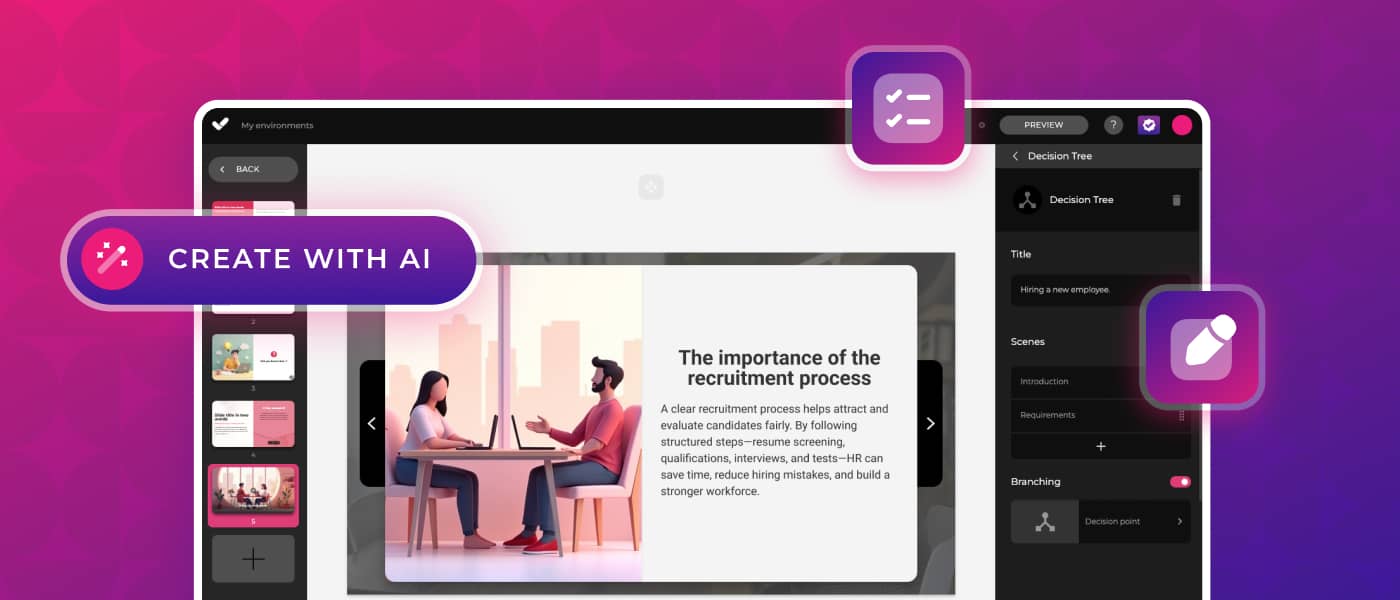
Simulations reproduce real work situations — a customer service call, a sales conversation, an emergency protocol — where the learner must make decisions and receive immediate feedback. They are the most effective resource for developing procedural skills, since learning by doing in a safe environment produces significantly better results than passive explanation. Their production has become more accessible thanks to authoring tools that include visual editors for decision trees.
They transform static data into explorable content. Instead of displaying a process as a linear list, an interactive infographic allows the learner to click on each step to expand information, see examples or access related resources. They are especially useful for compliance, regulatory content and complex processes where the learner needs to explore at their own pace.
Assessments are not an add-on: they are a core component of any learning resource. Well-designed quizzes — with specific feedback for each answer option, not just “correct/incorrect” — reinforce the learning of key concepts and allow L&D teams to measure actual comprehension. They can be used as pre-tests (to detect prior knowledge), formative assessments (throughout the course) or certifications (at the end).
Microlearning pills are short, specific resources focused on a single learning objective. Their optimal duration is between 3 and 7 minutes. They are designed for consumption in the flow of work: between tasks, on mobile, without requiring a long block of time. They are the most used format for performance support and reinforcement after a main training programme.
Although less common, audio resources are gaining ground in corporate training for their flexibility of consumption. An explanatory podcast on a regulatory update, an audio interview with a company expert or audio narration of a process can be consumed during commutes or parallel activities. They are especially useful for leadership content and soft skills, where listening to real voices and conversations adds value that text cannot replicate.

The following table summarises the main types of learning resources according to their objective, level of interactivity and recommended moment of use in corporate training:
| Resource type | Main objective | Recommended moment of use |
|---|---|---|
| Training video | Transmit information, context or values | Onboarding, product launch, internal communication |
| Interactive presentation | Develop extensive knowledge | Technical training, processes, company policies |
| Simulation / scenario | Practise skills or decision-making | Sales, compliance, customer service, leadership |
| Interactive infographic | Visualise data, processes or comparisons | Microlearning, reinforcement, KPI communication |
| Assessment / quiz | Measure and consolidate learning | Pre-test, formative assessment, certification |
| Microlearning pill | Focused and fast learning | Reinforcement at the point of work, just-in-time learning |
| Podcast / audio | Reinforcement or complement on the go | Commuting, non-digital tasks, leadership |
Seeing how these resources are applied in real scenarios helps to understand what each one contributes. Here are four representative examples:
A fashion chain with 300 points of sale needs to train its sales network in cross-selling techniques. Instead of a PDF manual, it designs a branching scenario where the learner plays the role of the salesperson and must respond to different customer profiles. Each decision generates a consequence and immediate feedback. Result: training that can be applied on the same day, without requiring a physical trainer at each store.
A bank launches a regulatory update. Instead of a lengthy email or a PDF that no one reads to the end, it creates an interactive infographic that maps the new rules on a visual process flow. The learner can click on each step to expand the detail, view examples and complete a mini-quiz at the end. The infographic is distributed through the LMS and records completion for auditing purposes.
A SaaS company needs to reduce the ramp-up time for new hires from 45 to 20 days. It designs a microlearning programme of 12 pills of 5 minutes each, distributed across the first two weeks. Each pill covers a specific topic: product, processes, culture, tools. The format allows new employees to progress at their own pace from any device, without blocking hours of their working day.
A logistics operator with teams distributed across multiple warehouses needs to update its safety protocols every quarter. Instead of face-to-face sessions that require shutting down operations, it creates short interactive videos with embedded quizzes, accessible from mobile. Each employee completes the content in less than 10 minutes and the LMS records evidence of completion, eliminating the paper tracking that previously generated administrative errors.

Vodafone is one of the best examples of how a well-designed learning resources strategy can transform the productivity of an L&D team. By adopting isEazy Author as a creation tool, it tripled its productivity in e-learning content production, drastically reducing development times without sacrificing the quality of resources. Discover how they did it →
CASE STUDY
We multiplied x3 the productivity in the creation of e-learning courses at Vodafone


Creating quality learning resources does not require being a graphic designer or a programmer. With a clear process and the right tools, any content expert can produce materials that really work. These are the fundamental steps:
Before thinking about the format, answer this question: what should the learner be able to do at the end of this resource that they could not do before? A well-written objective follows the ABCD formula (Audience, Behaviour, Condition, Degree): “The new hire (A) will be able to manage a customer return (B) following the internal protocol (C) with a customer satisfaction rate above 80% (D)”.
Use the resource type table in this article as a reference. Do not choose the format out of habit or ease of production: choose the one that best fits the learning objective. A common mistake is to use video for everything when what is needed is practice, or to use long text when a three-minute microlearning pill would be more effective.
Any effective learning resource follows a basic structure: hook (why does this matter?), content (what do you need to know?), application (how do you apply it?) and assessment (have you understood?). This structure can be adapted to any format: a video that opens with a real problem, a simulation that presents a challenging context, a microlearning pill that starts with a question to resolve.
Interactivity is not decoration: it is the mechanism that transforms passive consumption into active learning. Add decision points, questions, hotspots or branching paths. Make sure each interactive element has specific feedback — not just “incorrect”, but “incorrect because… and the correct answer is… because…”. The quality of feedback is as important as the quality of the initial content.
Before uploading a resource to the LMS, test it with a real sample of the target audience. Identify navigation points that generate confusion, questions that are poorly understood or sections that are too long. A 15-minute test with 3 real people will save hours of revisions after launch.
A learning resource is not finished when it is published: it is finished when the data confirms it works. Use the LMS metrics — completion rate, average score, time spent per section — to identify where learners drop off or fail systematically. Iterate based on that data, not on assumptions.
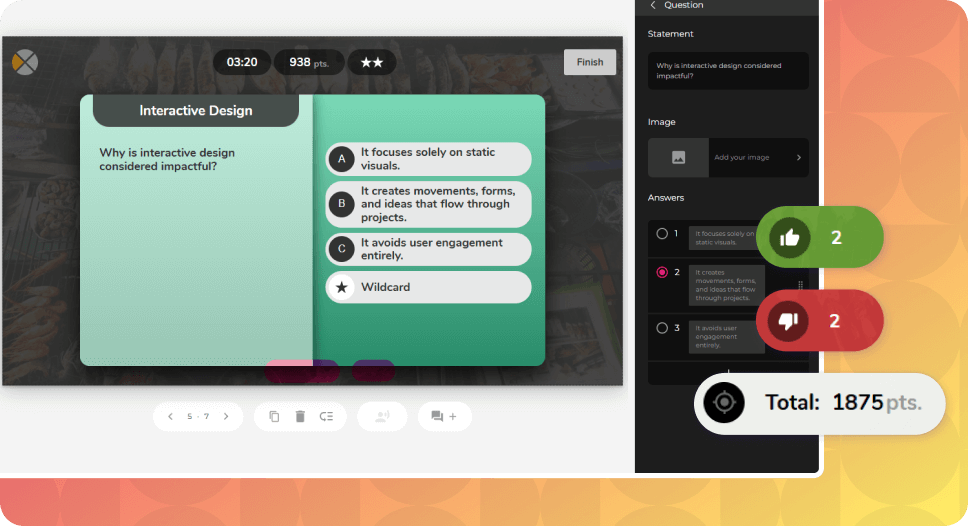
isEazy Author is an authoring tool designed for corporate L&D teams. Its differentiating proposition lies in the combination of a highly accessible visual interface with artificial intelligence features that automate the most costly parts of the creation process.
The workflow with isEazy Author is this straightforward:
The result is a professional, interactive resource, compatible with any LMS, produced in a fraction of the time a traditional production would take.

The authoring tool market has grown significantly in recent years. Below you can compare isEazy Author with other options on the market to find the one that best fits your L&D team’s needs:

Features
Benefits
Pricing
Accessibility
Awards
Features
Benefits
Pricing
Accessibility
Awards

Key Features
Benefits
Pricing
Key Features
Benefits
Pricing

Key Features
Benefits
Pricing
Key Features
Benefits
Pricing

Key Features
Benefits
Pricing
Key Features
Benefits
Pricing

Key Features
Benefits
Pricing
Key Features
Benefits
Pricing
Learning resources in e-learning are not a production detail: they are the piece that decides whether training actually impacts real performance or remains a formality that employees complete without engagement. Choosing the right type of resource according to the learning objective, designing it with a solid pedagogical structure and relying on a tool that allows it to be produced with agility is what separates training programmes that work from those that simply exist.
The good news is that today creating interactive, attractive learning resources compatible with any LMS is within reach of any L&D team, without the need for designers or developers. Tools like isEazy Author allow you to go from document to interactive course in minutes, with AI that automates the most repetitive tasks and a result that competes in quality with resources produced with much greater investment.
If your team needs to create more resources, in less time and with better results, discover what isEazy Author can do for you.
A learning resource is any material designed to facilitate learning: videos, infographics, simulations, quizzes or interactive presentations. E-learning content, on the other hand, is the structured set of resources that forms a complete learning unit (a course, a module). In other words, learning resources are the building blocks used to create e-learning content. In corporate training, working with well-designed resources is what determines whether a course produces real results or is simply completed as an obligation.
It depends on the learning objective and the learner profile. For procedural or high-risk content (safety, regulatory compliance), simulations and interactive scenarios have a greater impact because the learner practises in a safe environment. For transmitting information quickly or reinforcing key concepts, video or interactive infographics are more efficient. In corporate training, the golden rule is to combine types: use video for explanation, interactivity for practice and assessments to measure retention. A single resource in isolation rarely produces the same impact as a well-designed sequence.
SCORM (Sharable Content Object Reference Model) is a technical standard that allows digital learning resources to communicate with an LMS: they send progress data, time spent, score and completion status. In practice, a learning resource in SCORM format can be hosted on any compatible platform and automatically record learner performance. Creating resources in SCORM does not require programming if you use an authoring tool like isEazy Author, which exports directly in this format with a single click and guarantees compatibility with the majority of LMS platforms on the market.
An authoring tool is specialised software for creating digital learning resources without the need for programming. It allows you to design interactive presentations, videos with active elements, assessments, simulations and export them in standard formats (SCORM, xAPI, HTML5). Modern authoring tools like isEazy Author incorporate artificial intelligence that automates tasks such as generating quizzes, structuring content from existing documents or creating branching scenarios, dramatically reducing production time. They are the recommended option for L&D teams that need to scale resource creation without relying on external developers.

WEBINAR
Master AI in isEazy Author in under an hour.
Register Now


Looking for an easy, agile and efficient authoring tool?
Create accessible, engaging and dynamic e-learning courses with artificial intelligence in minutes.

Looking for an easy, agile and efficient authoring tool?
Create accessible, engaging and dynamic e-learning courses with artificial intelligence in minutes.