WHITEPAPER
Looking for the perfect tool to create interactive courses? Here's how to choose it

Brain
The first AI trained to teach

Author
The #1 AI-powered authoring tool on the market

Factory
Custom e-learning content factory

Skills
Comprehensive power skills course catalog

LMS
All-in-one LMS platform with AI

Engage
App for managing frontline teams
Product

What is Brain?
Everything you need to know about the first AI trained to teach.

How does it work?
Adaptive, conversational, and contextual. That’s learning with Brain.

Security
Why your company’s knowledge never leaves your environment or trains other models.

Comparison
Discover what sets isEazy Brain apart from other AI solutions.

Frequently Asked Questions
Want to learn more? Find answers to all your questions about isEazy Brain here.
FEATURES

AINew
Unlock your full potential and speed up course creation with artificial intelligence.

Accessibility
Automatically meet accessibility guidelines—without sacrificing interactivity!

Interactivity
Boost engagement with interactive, ready-to-use activities that make learning fun.

Course Creation
Reduce the time it takes to create your e-learning courses with our authoring tool.

Distribution
We offer you different distribution options, so that nothing can stop you.

SCORM
Publish your course in SCORM format and share it on any LMS.
SERVICES

Instrucional Design
Surprise your students with multimedia and interactive content.

Custom Courses
We create e-learning courses for you—tailored to your needs and hassle-free!

Virtual Reality
Turn learning into an immersive experience.

Custom Avatars
Give your courses and videos a unique touch with personalized avatars.

Audiovisual FactoryNew
Turn training into something dynamic and visual with engaging videos.
CATALOG

Course catalog
Over 600 skills and competency courses to help you adapt to your team's needs.
Microsoft Copilot AcademyNew
Your professionals will learn how to apply Copilot AI to key processes within your organization.

Artificial Intelligence Academy
Train your teams in the practical use of AI to boost productivity and innovation in your company.

Cybersecurity Academy
Capacita a tu empresa con el catálogo más completo en seguridad digital corporativa.
FEATURES

Learning platform
Manage all your training from one place

Analitycs
Measure the impact of your training

Learning Experience
Offer a unique learning experience to your team
Content Library
Choose from hundreds of expert-created courses
Authoring Tool
Create your own content—faster than ever

Use cases
Choose the solution that best fits your needs

Industries
Solutions for all types of industries
USE CASES

Onboarding
Facilitate the onboarding process, productivity and engagement of your new employees.

Upskilling
Boost your team's skills and prepare them for the challenges of the future with upskilling.

Microlearning
Discover all the advantages of microlearning and boost your training results.

Gamification
Enjoy addictive training that will get your professionals hooked.

Internal Communication
Improve communication in your company and enjoy an aligned and committed team.

Mobile learning
Agile, flexible, and interactive learning—built for today’s digital-first workforce.
INDUSTRIES

Banking and financial services
Training in compliance, cybersecurity, customer service, and key skills development.

Pharmaceuticals and healthcare
Digital onboarding, regulatory updates, and ongoing training for healthcare staff.

Retail and consumer
Agile and scalable training for in-store, operational, and customer service teams.

Industry and manufacturing
Training in processes, safety, and corporate culture for distributed teams.

Education and training
Digital solutions for training centers, internal academies, and corporate universities.

Technology and telecommunications
Development of technical talent, digital skills, and upskilling and reskilling programs.
CLIENTS

MAPFRE
How MAPFRE turn e-learning into sales with isEazy

Pepco
A personalised learning experience for a growing team.

BBVA
Digitisation and creation of high quality e-learning content.

Shiseido
We increase the engagement of the training with a social and gamified app.

Telefónica
Large-scale reskilling for the company's digital transformation.

Vodafone
A personalised learning experience for a growing team.
More than 1,000 companies already rely on isEazy.





MEET ISEAZY

Events
Discover our upcoming events and connect with the future of e-learning.

News
Find out the latest news about isEazy: press releases, partnerships, updates...

Contact
Leave us your personal details and we will contact you as soon as possible.
About isEazyNew
Find out more about our company.

Careers
We are looking for the best talent, join our team!

Partners
Become our partner and grow your business.
INTERESTING RESOURCES

Blog
The best content on e-learning: trends, tools and key strategies.

Whitepapers
Gain valuable insights and stay ahead of industry trends.

Product releases
The latest news and releases of our e-learning products and solutions.

Glossary
Definitions of the most commonly used terms and key industry concepts.

Guides
Discover the best step-by-step tips and tricks to optimize your L&D strategy.

Webinars
Video sessions on our products, trends and more

Comparatives
Compare e-learning solutions available on the market and choose the most suitable one.


WEBINAR
Master AI in isEazy Author in under an hour.




GUIDE
Prepare your organization to comply with the new AI regulations

Stay up to date with all our latest news
 Subscribe to our newsletter
 Stay up to date with all our latest news

January 15, 2026

CONTENT CREATED BY:
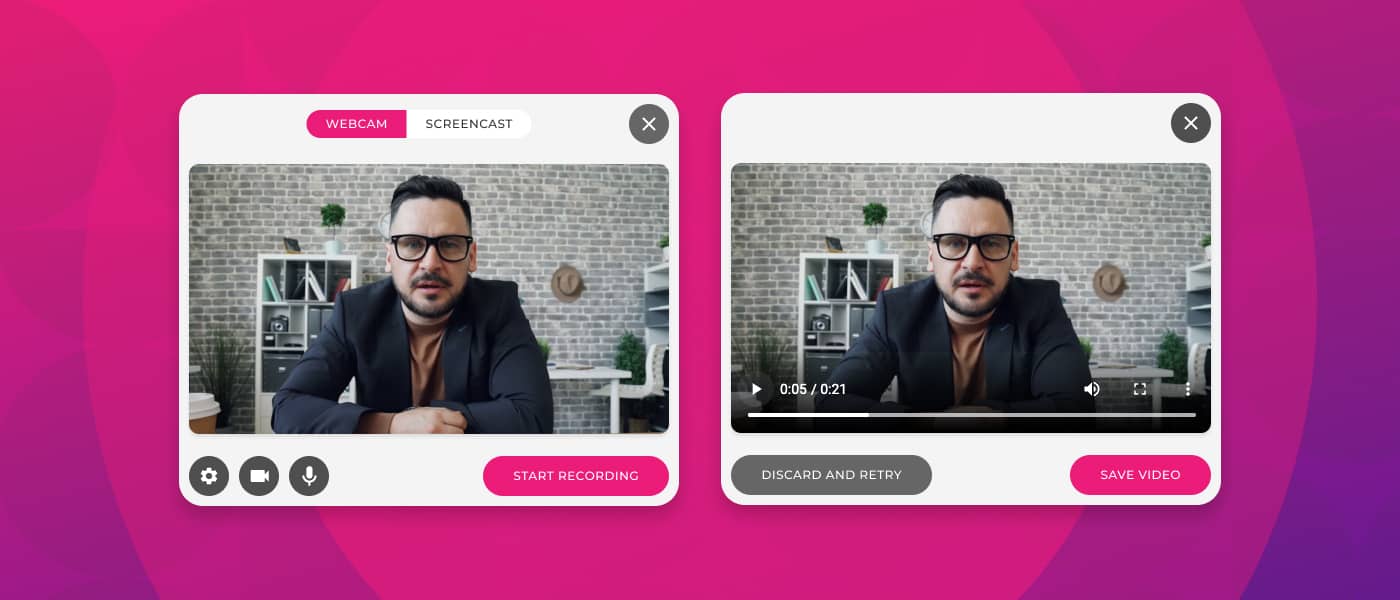
Table of contents
Have you ever tried to explain something complex in writing and realized it would be much easier to simply show it? You’re not alone. Video tutorials have become the preferred way to learn for millions of people around the world—and that’s no coincidence.
Think about it: when you want to learn how to cook a new recipe, set up your phone, or master a work tool, what do you do? Exactly—you look for a video. And that’s because seeing how something is done, step by step, is infinitely more effective than reading about it. This applies both to everyday life and to traditional and corporate training.
That’s why, in this guide, we’re going to walk you through everything you need to know to create video tutorials that actually work and help you get your projects off the ground. From what they are and why they’re so effective, to how you can create them quickly and professionally—even if you’ve never edited a video in your life.
A video tutorial is an instructional video that explains how to do something specific in a visual, step-by-step way. Unlike a written manual or a simple presentation, a video tutorial shows the process in action, making it much easier to understand and follow.
What’s interesting is that video tutorials aren’t just for teaching how to use software or digital tools. You can find them covering everything from how to change a tire to how to prepare the perfect pizza dough, as well as how to analyze complex data or implement a marketing strategy.
The key lies in the combination of visual elements, explanatory audio, and—often—real-time demonstrations. This mix creates a much richer and more effective learning experience than other traditional formats.
Not all video tutorials are the same, and depending on what you want to teach, some formats work better than others. Here are the main types so you can choose the one that best fits your content.
This is the most popular format for teaching software, applications, or digital processes. Basically, you record what’s happening on your screen while explaining what you’re doing. It’s perfect for:
Here, you are the main focus, speaking directly to the camera. This format works especially well for content where personal connection is important:

The perfect combination: these videos usually show what’s happening on the screen while the presenter appears in a small window explaining. This is the most complete format because it combines the best of both worlds:
An innovative format that uses avatars, animations, graphics, moving icons, and designed visual elements. It is ideal for:

Numbers don’t lie. Statistics show that video is the preferred format for consuming educational content, and there are very solid reasons behind this preference.
To begin with, our brains process visual information 60,000 times faster than text. When you see something in action, your brain isn’t just processing words—it’s also processing movement, color, gestures, and context. All of this helps information stick much more effectively.
In addition to everything we’ve already covered, there are many more advantages to using video in your courses:
Now let’s look at exactly how to create a professional video tutorial—without technical jargon or complicated steps. Best of all, you don’t need to be a video editing expert or have thousands of dollars’ worth of professional equipment.
Before you record a single second of video, you need to be very clear about two things: what exactly you want to teach and who you’re teaching it to.
Creating a tutorial for absolute beginners is not the same as creating one for advanced users. Your language, pacing, and level of detail will change completely.
Once you have clear answers, you’ll be able to create a much more effective and focused video tutorial. Remember: it’s better to create several short, specific videos than one very long video that tries to cover too much.
This is where many people get it wrong. They think, “I’ll just get in front of the camera and improvise.” Mistake. The best video tutorials look natural and spontaneous, but in reality they’re very well planned.
You don’t need to write a word-for-word script (unless that helps you), but you do need a clear structure of what you’re going to cover.
Introduction (5–10% of the video)
Main content (80–85% of the video)
Conclusion (5–10% of the video)
A golden tip: write your script and then read it out loud. If it sounds robotic or too formal, rewrite it using more conversational language. Remember, you’re talking to real people—not writing a technical manual.
Here’s the good news: you don’t need a $3,000 professional camera or a recording studio to create quality video tutorials. With the right basic equipment, you can achieve professional results.
Now it’s time for the moment of truth: recording. But before you hit the record button, let’s make sure everything is in place so you don’t have to repeat it a thousand times.
Find a quiet place where you won’t be interrupted. Let the people around you know you’re recording. Close windows if there’s outside noise. Mute notifications on your phone and computer. These small details make the difference between a smooth recording and an editing nightmare.
If you’re recording your screen, close all tabs and programs you don’t need. Clean up your digital desktop. Increase font size if necessary so everything is easy to see. Set your screen to the correct resolution.
WHITEPAPER
Looking for the perfect tool to create interactive courses? Here's how to choose it


Creating video tutorials doesn’t have to be complicated or require external tools. With isEazy Author, you can record your own videos directly within the course—whether by recording your screen, your webcam, or both—and use them immediately as training resources.
The process is very simple. From the interactive video elements, instead of uploading an external file, you just need to choose the Recording option and click Create your recording. At that point, a window opens where you decide how you want to record: using your webcam or capturing your screen.
If you choose to record with your webcam, you can quickly set the video quality, select the camera and microphone you want to use, and start recording with a single click. While recording, you’ll clearly see when the recording is active. When you’re done, you can save the video directly to the course or discard it and record again if it didn’t turn out as expected.
If you prefer to record your screen, the process is just as intuitive. Before starting, you choose the video quality and microphone, and then decide whether you want to record a specific browser tab, a window, or your entire screen. This is ideal for creating step-by-step video tutorials, software demos, or visual explanations of processes. When you’re finished, you can save the clip and reuse it in your content, or record it again if needed.
Once saved, the video is integrated into the course’s video element, ready to be used, downloaded, or deleted. All without leaving the tool or relying on external software.
To ensure smooth performance, it’s recommended to use up-to-date browsers such as Chrome. From there, all that’s left to do is record, explain, and turn your knowledge into clear, practical, and easy-to-consume video tutorials for your learners.

Even the most experienced creators make mistakes. The good news is that if you know these mistakes in advance, you can avoid them and save yourself a lot of frustration.
We mentioned this earlier, but it’s worth repeating because it’s the most common—and most costly—mistake. If you don’t know who you’re speaking to, you’ll end up creating content that’s too basic for some and too advanced for others.
Research your audience. Read the comments on similar videos. Ask your community directly what they need to learn. The better you understand your audience, the more effective your video tutorials will be.
It’s tempting to want to explain everything about a topic in one super-comprehensive video. But the reality is that long videos have much higher drop-off rates, and your audience can feel overwhelmed.
It’s far better to create a series of short, focused videos than one marathon video. Think in terms of “microlearning“: each video should teach one specific thing—and do it well.
We’ve said it before, but it deserves a place on this list because it’s critical. People will forgive average video quality, but they rarely forgive bad audio. Distorted sound, excessive background noise, or inconsistent audio will cause your audience to abandon the video—no matter how good the content is.
Invest in a decent microphone. Record in a quiet space. Run audio tests before recording the entire video. This is an area you simply can’t neglect.
When you’ve mastered a topic, it’s easy to forget that your audience is learning it for the first time. You click here and there, and it’s obvious to you—but your audience gets lost.
Slow down. Verbalize every action. “Now I’m going to click the options button, which is in the top-right corner.” It may seem obvious to you, but your audience will appreciate it.
Theory is fine, but people learn by doing. If your video tutorial is all theory with no real-world, practical examples, your audience will struggle to apply what they’re learning.
Include real use cases. Show concrete examples. If possible, invite your audience to follow along and do the exercise with you while watching the video. Active learning is far more effective than passive learning.
Not everyone consumes content in the same way. Some people watch videos on mute during their commute. Others have hearing impairments. If you don’t include subtitles and visual elements that complement your audio, you’re excluding a significant portion of your potential audience.
Adding subtitles not only makes your content more accessible, but also significantly improves your SEO and overall engagement. Fortunately, tools like isEazy Author are designed with accessibility in mind from the start, so you can automatically add AI-generated subtitles in as many languages as you need—and effortlessly comply with accessibility regulations and legislation without duplicating production time or costs.

Not sure what content to turn into video tutorials? Here are some ideas that work exceptionally well in video format and have high search demand.
This is the king of video tutorials. Anything related to software, applications, or digital tools works perfectly on video. People want to see exactly where to click, which options to select, and what the result looks like.
From Excel tutorials to how to use design tools, social media platforms, or productivity software, the possibilities are endless. If you use a tool professionally, there’s an audience waiting to learn from you.
Any process with multiple steps benefits enormously from the video format. Technical setups, administrative processes, work methodologies, approval workflows—these are all much easier to understand when you see them in action.
For example, a video tutorial on “How to set up a complete email marketing campaign” will be infinitely more valuable than a text document with the same steps.
If you work in training or human resources, video tutorials are pure gold. Onboarding processes, internal tool training, safety protocols, company policies—all of these can be turned into video tutorials that new employees can consume at their own pace.
The advantage is that you drastically reduce the time trainers spend explaining the same things over and over again, while ensuring consistency in the message.
If you’re a teacher, trainer, or online course creator, video tutorials are your primary format. You can explain complex concepts visually, show experiments, solve problems live, and create a rich, complete learning experience.
The combination of verbal explanation, visual demonstrations, and practical examples creates a learning experience that is far more effective than traditional classes.
Do your customers or users keep asking the same questions? Turn those answers into video tutorials. “How to reset your password,” “How to update your billing information,” “How to export your data.”
Not only do you reduce the workload on your support team, but you also improve the user experience by providing instant, visual, and easy-to-follow answers.
Technology is advancing quickly, and the world of video tutorials is no exception. What just a few years ago required expensive equipment and advanced technical knowledge is now within anyone’s reach thanks to artificial intelligence and new creation tools.
Not all video tutorials need to be recorded in front of a camera. In e-learning, what’s often needed is clear explanations, sustained attention, and the ability to update content quickly. This is where AI-generated avatars come into play.
With isEazy Author, you can create video tutorials using virtual presenters that narrate the content for you. These are digital characters that simulate human gestures and expressions and act as learning guides within the course—whether to introduce a topic, explain a process, or walk learners through each step.
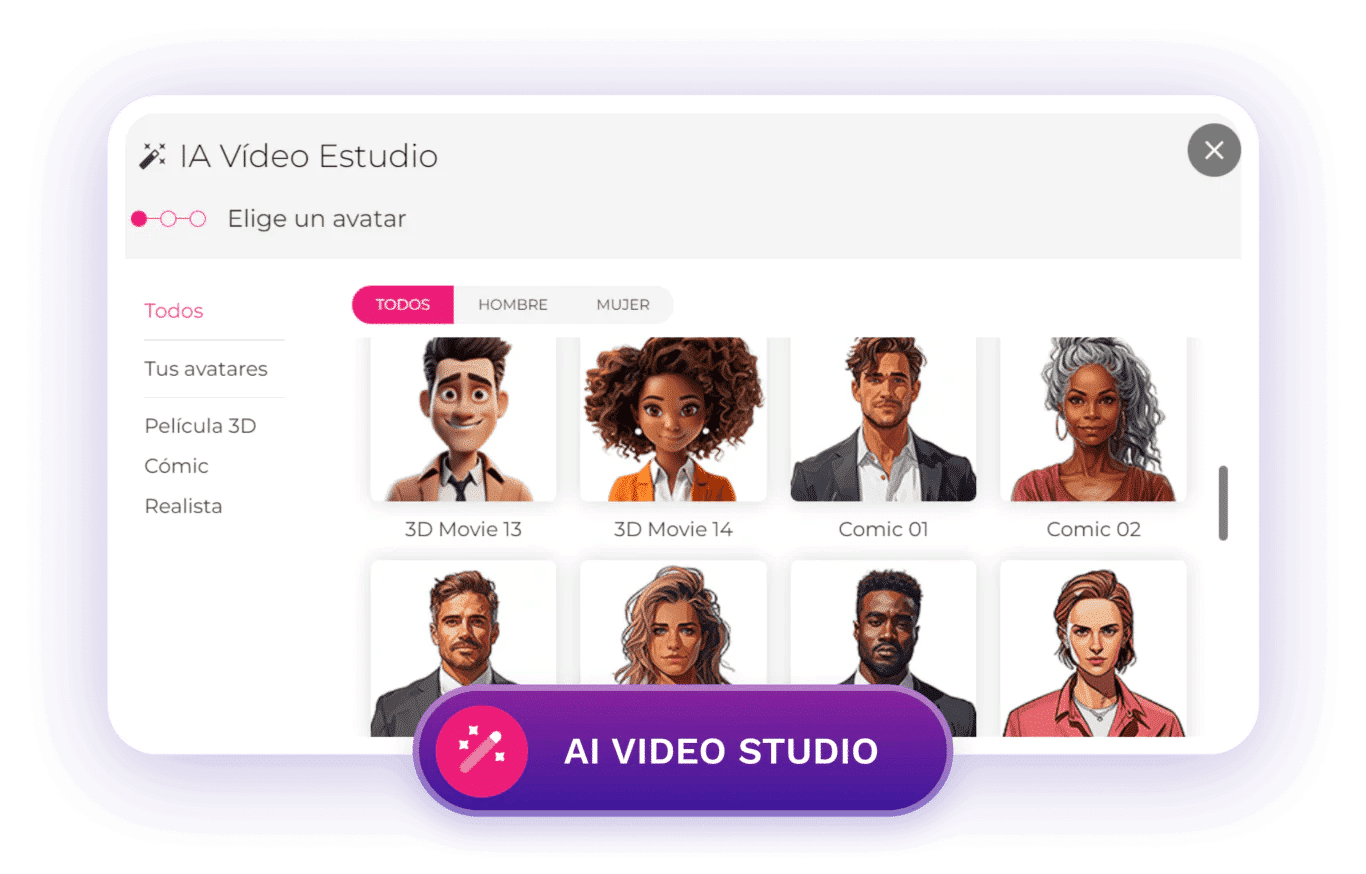
The big advantage is that you don’t need to record yourself or set up a video studio. Simply choose an interactive video element, select the AI Video option, and create your avatar-based video. From there, you select the visual style that best fits your brand and define the narration: you can either write the text you want the avatar to read or upload an audio file if you already have one recorded.
If you choose text, the system allows you to select the language and locale, which is especially useful for creating multilingual video tutorials without duplicating effort. Throughout the process, you can fine-tune the content, switch avatars, or adjust their mood until the result matches the tone of your training.
This approach adds significant value in corporate environments because it saves time and resources, makes content updates easier, and enables you to scale video tutorial production without relying on real recordings. In addition, avatars add dynamism and a human touch, making content easier to follow and more engaging.
In isEazy Author, you have access to a catalog of AI-generated avatars in different styles—realistic, 3D, comic, or emoji—all royalty-free, so you can use them without limitations in your courses. And if you need an extra level of customization, it’s also possible to work with custom avatars aligned with your organization’s brand image.

Creating effective video tutorials isn’t rocket science, but it does require planning, the right tools, and a genuine desire to help others learn. The good news is that you now have all the knowledge you need to get started.
Don’t wait until you have the perfect equipment or ideal conditions. Start with what you have. Record that first video tutorial. It won’t be perfect—and that’s okay. What matters is taking the first step.
With tools like isEazy Author, the process is easier than ever. You can record your screen and webcam in minutes, use AI avatars if you don’t want to appear on camera, and create professional content without needing to be a technical expert.
The demand for educational video content will only continue to grow. People will keep preferring to watch a tutorial rather than read a manual. Your knowledge and experience have value, and video tutorials are the perfect way to share them with the world. So stop putting it off and start creating. Your first video tutorial is waiting to be recorded. What are you waiting for? Try isEazy Author for free.
There is no single ideal length for every case, but in e-learning the most effective videotutorials tend to be short and highly focused. Ideally, each video should solve a specific task or explain a single concept, usually between 3 and 7 minutes. If the topic is more complex, it is better to split it into several short videotutorials rather than one long video, as this improves attention, retention, and completion rates.
It depends on the objective of the content. Screen recording is ideal for teaching software or digital processes step by step. Webcam works best when you want to create a sense of closeness or explain theoretical concepts. AI-generated avatars are an excellent alternative when you do not want to appear on camera, need to scale content, create multilingual videotutorials, or update information frequently. In many e-learning courses, combining several formats is the most effective approach.
No. Today, there are tools designed for non-technical profiles that make it very easy to create videotutorials. Platforms like isEazy Author integrate screen and webcam recording directly into the course, without the need for external software or editing knowledge. The focus is on the content and the explanation, not on technical complexity.
Yes, and significantly. Videotutorials make it easier to understand processes, reduce errors, and improve knowledge retention, especially in corporate environments. By showing how something is done rather than just explaining it, the learning curve is shortened and the need for repetitive support is reduced. This is why they are a key element in onboarding, internal tool training, and continuous upskilling.
For a videotutorial to be accessible, it should include subtitles, clear narration, and visual aids that reinforce the message. This not only helps people with hearing difficulties, but also those who consume content without sound or in different contexts. In addition, subtitles improve SEO and engagement. Using tools that integrate automatic captioning and multilingual options makes it easier to meet accessibility criteria without increasing production time or costs.

WEBINAR
Master AI in isEazy Author in under an hour.
Register Now


Create visual, interactive courses that drive real impact
Discover isEazy Author, the most intuitive authoring tool to turn your content into engaging and effective learning experiences.

Create visual, interactive courses that drive real impact
Discover isEazy Author, the most intuitive authoring tool to turn your content into engaging and effective learning experiences.