CASE STUDY
How ING centralized all its training and communication into a single app.

Brain
The first AI trained to teach

Author
The #1 AI-powered authoring tool on the market

Factory
Custom e-learning content factory

Skills
Comprehensive power skills course catalog

LMS
All-in-one LMS platform with AI

Engage
App for managing frontline teams
FEATURES

AINew
Unlock your full potential and speed up course creation with artificial intelligence.

Accessibility
Automatically meet accessibility guidelines—without sacrificing interactivity!

Interactivity
Boost engagement with interactive, ready-to-use activities that make learning fun.

Course Creation
Reduce the time it takes to create your e-learning courses with our authoring tool.

Distribution
We offer you different distribution options, so that nothing can stop you.

SCORM
Publish your course in SCORM format and share it on any LMS.
SERVICES

Instrucional Design
Surprise your students with multimedia and interactive content.

Custom Courses
We create e-learning courses for you—tailored to your needs and hassle-free!

Virtual Reality
Turn learning into an immersive experience.

Custom Avatars
Give your courses and videos a unique touch with personalized avatars.

Audiovisual FactoryNew
Turn training into something dynamic and visual with engaging videos.
CATALOG

Course catalog
Over 600 skills and competency courses to help you adapt to your team's needs.
Microsoft Copilot AcademyNew
Your professionals will learn how to apply Copilot AI to key processes within your organization.

Artificial Intelligence Academy
Train your teams in the practical use of AI to boost productivity and innovation in your company.

Cybersecurity Academy
Capacita a tu empresa con el catálogo más completo en seguridad digital corporativa.

Use cases
Choose the solution that best fits your needs

Industries
Solutions for all types of industries
USE CASES

Onboarding
Facilitate the onboarding process, productivity and engagement of your new employees.

Upskilling
Boost your team's skills and prepare them for the challenges of the future with upskilling.

Microlearning
Discover all the advantages of microlearning and boost your training results.

Gamification
Enjoy addictive training that will get your professionals hooked.

Internal Communication
Improve communication in your company and enjoy an aligned and committed team.

Mobile learning
Agile, flexible, and interactive learning—built for today’s digital-first workforce.
INDUSTRIES

Banking and financial services
Training in compliance, cybersecurity, customer service, and key skills development.

Pharmaceuticals and healthcare
Digital onboarding, regulatory updates, and ongoing training for healthcare staff.

Retail and consumer
Agile and scalable training for in-store, operational, and customer service teams.

Industry and manufacturing
Training in processes, safety, and corporate culture for distributed teams.

Education and training
Digital solutions for training centers, internal academies, and corporate universities.

Technology and telecommunications
Development of technical talent, digital skills, and upskilling and reskilling programs.
CLIENTS

MAPFRE
How MAPFRE turn e-learning into sales with isEazy

Pepco
A personalised learning experience for a growing team.

BBVA
Digitisation and creation of high quality e-learning content.

Shiseido
We increase the engagement of the training with a social and gamified app.

Telefónica
Large-scale reskilling for the company's digital transformation.

Vodafone
A personalised learning experience for a growing team.
More than 1,000 companies already rely on isEazy.





MEET ISEAZY

Events
Discover our upcoming events and connect with the future of e-learning.

News
Find out the latest news about isEazy: press releases, partnerships, updates...

Contact
Leave us your personal details and we will contact you as soon as possible.
About isEazyNew
Find out more about our company.

Careers
We are looking for the best talent, join our team!

Partners
Become our partner and grow your business.
INTERESTING RESOURCES

Blog
The best content on e-learning: trends, tools and key strategies.

Whitepapers
Gain valuable insights and stay ahead of industry trends.

Product releases
The latest news and releases of our e-learning products and solutions.

Glossary
Definitions of the most commonly used terms and key industry concepts.

Guides
Discover the best step-by-step tips and tricks to optimize your L&D strategy.

Webinars
Video sessions on our products, trends and more

Comparatives
Compare e-learning solutions available on the market and choose the most suitable one.


WEBINAR
Master AI in isEazy Author in under an hour.


AUTHORING TOOL
Create courses automatically and generate interactive activities, games, translations, and multimedia resources in seconds.

Stay up to date with all our latest news
 Subscribe to our newsletter
 Stay up to date with all our latest news

July 3, 2026

CONTENT CREATED BY:

Table of contents
Mobile learning has transformed the way companies train their teams. In a world where smartphones are omnipresent in all professional profiles, learning through mobile devices is no longer a trend — it’s a reality that allows employees to learn anywhere, at any time, without disrupting their working day.
Mobile learning, or mLearning, is a learning modality that uses mobile devices — smartphones and tablets — to deliver educational and training content. Unlike traditional e-learning, which typically requires a desktop or laptop computer, mobile learning allows users to access training materials at any time, promoting flexibility and convenience in the learning process.
This type of learning has established itself over the past decade thanks to three key factors: the expansion of smartphone access across all professional profiles, fast and stable 4G/5G networks, and new content consumption habits based on immediacy and short formats.
Although both are part of digital training, they operate under different logics and complement each other in a complete corporate learning strategy:
| Criteria | Traditional e-learning | Mobile learning |
|---|---|---|
| Primary device | Desktop or laptop computer | Smartphone or tablet |
| Typical session length | 30–60 minutes | 5–15 minutes (short pills) |
| Content design | Structured, complete courses | Microcontents and brief modules |
| Access flexibility | High (on any screen device) | Maximum (anywhere, anytime) |
| Engagement | Depends on the platform | Higher thanks to notifications and gamification |
| Ideal for | Full training programs and certifications | Reinforcement, onboarding, and continuous learning |
Mobile learning has several characteristics that make it a powerful tool for corporate education. Here are the most relevant ones:
One of the most notable features of mLearning is its flexibility. Using mobile devices, employees can access training content at any time and place — on public transport, between meetings, or during a break. This is especially useful for geographically distributed teams or those with irregular schedules.
Mobile learning stands out for its interactivity and multimodality. It combines different types of media — videos, quizzes, podcasts, infographics, and interactive games — that keep employees engaged and support better knowledge retention. It also naturally integrates the microlearning methodology, based on 2- to 5-minute pills that fit into any moment of the day.
Mobile learning enables content to be adapted to each employee’s profile, role, and pace. Modern platforms can send personalized notifications, suggest relevant content based on learning history, and adapt the difficulty of materials in real time, approaching an adaptive learning model.
Unlike classroom training, mobile learning does not interrupt the working day — it integrates into it. An employee can complete a learning pill while waiting for a meeting to start, or review a safety procedure just before carrying it out on site.
According to LinkedIn Learning’s 2024 Workplace Learning Report, 58% of employees prefer to learn at their own pace and in small segments of time. Mobile learning responds directly to this demand. Here are the main benefits for organizations:
Applying mobile learning in corporate training doesn’t require reinventing the entire training strategy. In most cases, it is about adapting existing content to mobile format and leveraging the LMS platform’s capabilities to distribute it effectively.
Some of the most common use cases in companies are:
Understanding the learning styles of your teams is key to defining what type of mobile content will work best in each training context.
Successfully implementing mobile learning requires more than choosing an app or platform. It is necessary to design a strategy that considers content, technology, and the real behavior of employees. Here are the key steps:
Content is the core of mobile learning. While the platform matters, what determines whether employees actually learn is the quality and suitability of the training material. These are the most effective practices:
Mobile learning and microlearning are natural allies. Design each unit as an independent pill with a single learning objective: the employee should be able to complete it in 3 to 5 minutes and leave with something concrete to apply. If your company wants to compare the best tools for this, check out our comparison of the best microlearning apps.
Video is the most consumed format on mobile devices. Videos under 3 minutes with subtitles (for those who can’t turn on sound) have significantly higher completion rates than long text. Combine explanatory videos with quick tests at the end to verify comprehension.
The smartphone is the perfect platform for gamification in corporate training: points systems, peer rankings, achievement badges, or weekly challenges increase participation and turn training into something employees want to return to, not something they must complete out of obligation.

Allow employees to comment, rate, and share the content they found most valuable. Peer learning is one of the most powerful mechanisms for knowledge transfer in organizations — as Bandura’s social learning theory has shown. Platforms with a social feed feature multiply training engagement.
Many employees — especially in sectors such as logistics, construction, or retail — work in environments with limited connectivity. Make sure the most critical content can be downloaded for offline consultation.
An effective mobile learning strategy doesn’t start with technology — it starts with understanding how people in your organization really learn. These are the principles that make the difference between a program that gets abandoned and one that generates impact:
ING is a great example of how a large organization can integrate mobile learning to bring training, communication, and gamification to all its employees in a single digital environment. With isEazy Engage, ING built a social, gamified, and mobile-accessible platform that transformed the training experience for their teams. Find out how they did it →
Frontline workers — operators, store staff, logistics teams, healthcare workers, or field workers — represent the largest percentage of the workforce in many organizations and yet are the ones with the least access to traditional corporate training: they have no corporate email, don’t work at a computer, and their available time for training is measured in minutes, not hours.
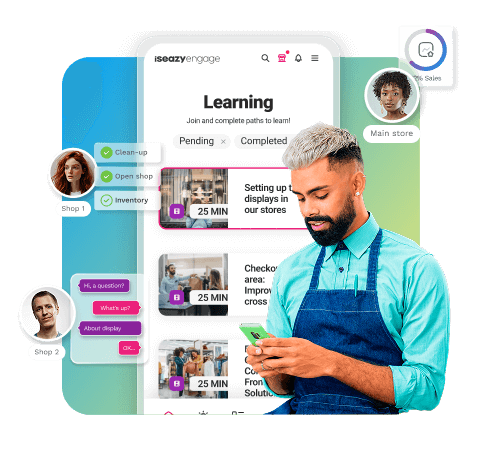
isEazy Engage is the mobile learning platform designed specifically for these teams. Built to be used from the employee’s personal mobile device, it offers:
If your company trains teams distributed across multiple stores, offices, or work centers, isEazy Engage lets you bring training to every employee’s pocket. Discover isEazy’s mobile learning solution →
Mobile learning differs from traditional e-learning primarily in terms of access flexibility. While traditional e-learning typically takes place on desktop or laptop computers, mobile learning is designed for mobile devices such as smartphones and tablets. This allows employees to learn anywhere and at any time, making the learning process more convenient and accessible. Additionally, mobile learning often uses shorter content formats, known as microlearning, which are better suited to short learning sessions on mobile devices.
To integrate mobile learning into a corporate training strategy, it is important to first assess the specific needs of the company and its employees. From there, it is possible to develop microlearning content, optimize the training platform for mobile devices, and use gamified learning tools. Additionally, the use of these mobile solutions should be promoted among employees and their impact should be measured regularly to adjust the strategy as needed.
Mobile learning is compatible with a wide range of devices, including smartphones, tablets, and laptops. Most modern mobile learning platforms are designed to be responsive, meaning they automatically adapt to the screen size of the device being used. This ensures a consistent and high-quality learning experience regardless of the device the employee prefers to use.
The effectiveness of a mobile learning strategy can be measured through several key indicators. These include completion rates, assessment scores, participation rates, and employee satisfaction. In addition, it is important to track performance improvements in the workplace and compare them with the learning objectives set at the beginning of the program. LMS platforms provide analytics tools that help collect and analyze this data to continuously optimize the mobile learning strategy.
Common challenges when implementing mobile learning in a company include lack of adequate technological infrastructure, resistance to change among employees, and difficulty creating relevant and engaging content for mobile devices. It can also be challenging to ensure a consistent learning experience across different devices and operating systems. To address these challenges, it is recommended to invest in a robust mobile learning platform, provide training and support for employees, and develop a clear strategy that includes defined goals and regular evaluations.
There are several highly recommended platforms for developing mobile learning. isEazy Engage is one of the most complete options, specifically designed for frontline workers and distributed teams. It offers a mobile-first experience with gamification, social learning, push notifications, and real-time analytics. Other factors to consider when choosing a platform include ease of use, content customization capabilities, integration with existing LMS systems, and the quality of analytics tools available.
Mobile learning can be adapted to suit different types of employees, though its implementation may vary depending on their specific needs and circumstances. For example, employees who work remotely or travel frequently may benefit more from the flexibility mobile learning offers. However, for employees who work in environments with limited internet access or who are not comfortable with technology, additional support or alternative formats may be needed. It is important to consider the diversity of the workforce and tailor the mobile learning strategy to meet the individual needs of each employee.

Bring all your team's communication, training, and task management together in one place.
Request a demoTry it free


Bring together all information, communications, and training in one app
Discover isEazy Engage


Bring together all information, communications, and training in one app
Discover isEazy Engage