WHITEPAPER
Looking for the perfect tool to create interactive courses? Here's how to choose it

Brain
The first AI trained to teach

Author
The #1 AI-powered authoring tool on the market

Factory
Custom e-learning content factory

Skills
Comprehensive power skills course catalog

LMS
All-in-one LMS platform with AI

Engage
App for managing frontline teams
Product

What is Brain?
Everything you need to know about the first AI trained to teach.

Learning agent: CompanionNew
Supports learners and answers their questions right inside the course, without breaking the audit trail.

How does it work?
Adaptive, conversational, and contextual. That’s learning with Brain.
FEATURES

AINew
Unlock your full potential and speed up course creation with artificial intelligence.

Accessibility
Automatically meet accessibility guidelines—without sacrificing interactivity!

Interactivity
Boost engagement with interactive, ready-to-use activities that make learning fun.

Course Creation
Reduce the time it takes to create your e-learning courses with our authoring tool.

Distribution
We offer you different distribution options, so that nothing can stop you.

SCORM
Publish your course in SCORM format and share it on any LMS.
SERVICES

Instrucional Design
Surprise your students with multimedia and interactive content.

Custom Courses
We create e-learning courses for you—tailored to your needs and hassle-free!

Virtual Reality
Turn learning into an immersive experience.

Custom Avatars
Give your courses and videos a unique touch with personalized avatars.

Audiovisual FactoryNew
Turn training into something dynamic and visual with engaging videos.
CATALOG

Course catalog
Over 600 skills and competency courses to help you adapt to your team's needs.
Microsoft Copilot AcademyNew
Your professionals will learn how to apply Copilot AI to key processes within your organization.

Artificial Intelligence Academy
Train your teams in the practical use of AI to boost productivity and innovation in your company.

Cybersecurity Academy
Capacita a tu empresa con el catálogo más completo en seguridad digital corporativa.
FEATURES

Learning platform
Manage all your training from one place

Analitycs
Measure the impact of your training

Learning Experience
Offer a unique learning experience to your team
Content Library
Choose from hundreds of expert-created courses
Authoring Tool
Create your own content—faster than ever

Use cases
Choose the solution that best fits your needs

Industries
Solutions for all types of industries
USE CASES

Onboarding
Facilitate the onboarding process, productivity and engagement of your new employees.

Upskilling
Boost your team's skills and prepare them for the challenges of the future with upskilling.

Microlearning
Discover all the advantages of microlearning and boost your training results.

Gamification
Enjoy addictive training that will get your professionals hooked.

Internal Communication
Improve communication in your company and enjoy an aligned and committed team.

Mobile learning
Agile, flexible, and interactive learning—built for today’s digital-first workforce.
INDUSTRIES

Banking and financial services
Training in compliance, cybersecurity, customer service, and key skills development.

Pharmaceuticals and healthcare
Digital onboarding, regulatory updates, and ongoing training for healthcare staff.

Retail and consumer
Agile and scalable training for in-store, operational, and customer service teams.

Industry and manufacturing
Training in processes, safety, and corporate culture for distributed teams.

Education and training
Digital solutions for training centers, internal academies, and corporate universities.

Technology and telecommunications
Development of technical talent, digital skills, and upskilling and reskilling programs.
CLIENTS

MAPFRE
How MAPFRE turn e-learning into sales with isEazy

Pepco
A personalised learning experience for a growing team.

BBVA
Digitisation and creation of high quality e-learning content.

Shiseido
We increase the engagement of the training with a social and gamified app.

Telefónica
Large-scale reskilling for the company's digital transformation.

Vodafone
A personalised learning experience for a growing team.
More than 1,000 companies already rely on isEazy.





MEET ISEAZY

Events
Discover our upcoming events and connect with the future of e-learning.

News
Find out the latest news about isEazy: press releases, partnerships, updates...

Contact
Leave us your personal details and we will contact you as soon as possible.
About isEazyNew
Find out more about our company.

Careers
We are looking for the best talent, join our team!

Partners
Become our partner and grow your business.
INTERESTING RESOURCES

Blog
The best content on e-learning: trends, tools and key strategies.

Whitepapers
Gain valuable insights and stay ahead of industry trends.

Product releases
The latest news and releases of our e-learning products and solutions.

Glossary
Definitions of the most commonly used terms and key industry concepts.

Guides
Discover the best step-by-step tips and tricks to optimize your L&D strategy.

Webinars
Video sessions on our products, trends and more

Comparatives
Compare e-learning solutions available on the market and choose the most suitable one.


WEBINAR
Master AI in isEazy Author in under an hour.




GUIDE
Prepare your organization to comply with the new AI regulations


AUTHORING TOOL
Create courses automatically and generate interactive activities, games, translations, and multimedia resources in seconds.

Stay up to date with all our latest news
 Subscribe to our newsletter
 Stay up to date with all our latest news

February 23, 2026

CONTENT CREATED BY:
Table of contents
In training, one of the most common reasons a course fails is not the content, but the design. Topics that are too broad, endless blocks of information, unclear objectives, or zero practice. The result: employees “complete it,” but they don’t apply it.
That’s where the concept of a training module comes in. A module is the minimum unit that allows you to turn a topic into real learning: focused, structured, easy to consume, and, above all, measurable. It is the most effective way to move from “we need to train on this” to “we already know what to teach, how to teach it, and according to which evaluation criteria.”
In addition, the term is used in two different worlds. In formal vocational education, a module has an official definition, assigned hours, and defined learning outcomes. In corporate e-learning, the concept is more flexible, but the logic is the same: dividing learning into coherent pieces that can be completed, assessed, and updated without having to redesign an entire course.
In this post, you’ll see what a training module is, how it differs from a training program, what types exist, which elements cannot be missing, and how to create one step by step so that it’s not just “content,” but a tool that impacts performance.
A training module is a structured learning unit that addresses a specific topic or competency within a broader training program. Its function is to break down content into manageable and coherent blocks, making it easier for learners to progressively acquire knowledge and skills.
In the context of formal vocational education, a training module is equivalent to a subject within a vocational program or professional certificate. It has a defined number of hours, specific learning outcomes, and evaluation criteria established by the National Qualifications System.
In the context of corporate e-learning, the term is used more broadly to refer to any digital content unit that is part of a course or learning path.
Although they are often confused, they are not the same. A training program is the complete program (for example, Marketing and Advertising Technician), while a training module is each of the subjects or blocks that make it up (Market Research, Visual Merchandising, etc.). In other words: the program is the whole, and the module is one of its parts.
| Aspect | Training Module | Training Program |
|---|---|---|
| What it is | A learning unit that covers a specific competency or subject. | A complete training program that leads to an official qualification. |
| Scope | It is part of the program. It has specific objectives and content. | It is the set of all modules required to obtain the qualification. |
| Example | Market Research, Visual Merchandising, Sales Management. | Marketing and Advertising Technician, Administration and Finance Technician. |
There is no single model. Depending on the context and the learning objective, training modules can take different formats:
WHITEPAPER
Looking for the perfect tool to create interactive courses? Here's how to choose it


Before you start creating content, it is important to verify that your module includes these essential elements:
They must specify what the learner will know or be able to do by the end of the module. Use specific action verbs: analyze, identify, apply, demonstrate. Well-defined objectives guide both the content design and the assessment.
Include only what is necessary to achieve the objectives. Excess information creates cognitive overload and reduces retention. Ask yourself: is this content essential for the role or competency I want to develop?
Dividing the module into thematic blocks facilitates navigation and allows learners to resume the content where they left off. The progression should move from general to specific, from theory to practice.
Modules that incorporate active elements, quizzes, exercises, and scenarios achieve higher engagement and better transfer of learning to the workplace.

A visually clean and consistent module improves the learner experience and conveys professionalism. Design is not an accessory: it directly impacts motivation to complete the training.

Without assessment, there is no data on learning. Include at least one checkpoint within the module, not just at the end of the course.
Subtitles in videos, appropriate contrast, mobile compatibility. A training module must be able to be completed from any device and be accessible to all employee profiles.

Designing an effective training module is not a matter of inspiration, but of method. When a clear sequence is followed—from identifying the need to final validation—the result stops being “informational content” and becomes applicable learning. These are the key steps to build a module with real impact on performance:
Before creating content, understand what knowledge or skill gap exists. What are employees unable to do that they should be able to do? Is it a knowledge issue, a skill issue, or a motivation issue? The answer determines the module’s approach.
Objectives must be specific, measurable, achievable, relevant, and time-bound. An objective such as “improve communication” is too vague. One like “the employee will be able to handle a customer complaint by following the protocol in under 5 minutes” is actionable and measurable.

Organize the content into blocks or sections. A typical structure includes: introduction with context → theoretical development → example or case study → activity or exercise → summary and closing. Avoid units longer than 20–30 minutes: microlearning improves completion rates and retention.
The format should serve the objective. To develop a procedure, a simulation or step-by-step video works better than text. To convey regulations, a structured infographic may be more effective than an extensive manual.
Do not leave assessment until the end of the course. Insert knowledge-check questions within the module itself. Branching scenarios are especially useful for simulating real situations and helping learners make decisions in a safe environment.

Before publishing, have a small group of employees complete the module and gather their feedback. Is the duration appropriate? Is the content clear? Are the activities relevant? This step saves time and costs in the long term.
Creating the module is only half the work. Measuring its impact is just as important. Some key indicators include:
Today, it is no longer necessary to code or have advanced technical knowledge to create high-quality training modules. Modern authoring tools allow you to develop interactive, structured, and visually appealing content in a matter of hours.
isEazy Author is an authoring tool specifically designed for training and L&D teams. It allows you to organize content into sections and subsections, add interactive elements, videos, and assessments, and publish modules accessible from any device—without requiring technical expertise. If you want to create professional training modules quickly and without complications, you can try it for free.

Features
Benefits
Pricing
Accessibility
Awards
Features
Benefits
Pricing
Accessibility
Awards
Other tools available on the market are:

Features
Benefits
Pricing
Features
Benefits
Pricing

Features
Benefits
Technology, compatibility, and integration
Pricing
Features
Benefits
Technology, compatibility, and integration
Pricing
Designing an effective training module does not depend solely on methodology. The tool you use also plays a key role. When the technical environment is complex or unintuitive, much of the time is spent formatting instead of designing the learning experience.
With isEazy Author, the process is simplified and focused on what truly matters: the instructional structure and the learner experience.
Before you begin, define the most appropriate format based on the duration and objective.
With isEazy Author, you can create:
This choice determines the module architecture and the learner experience.

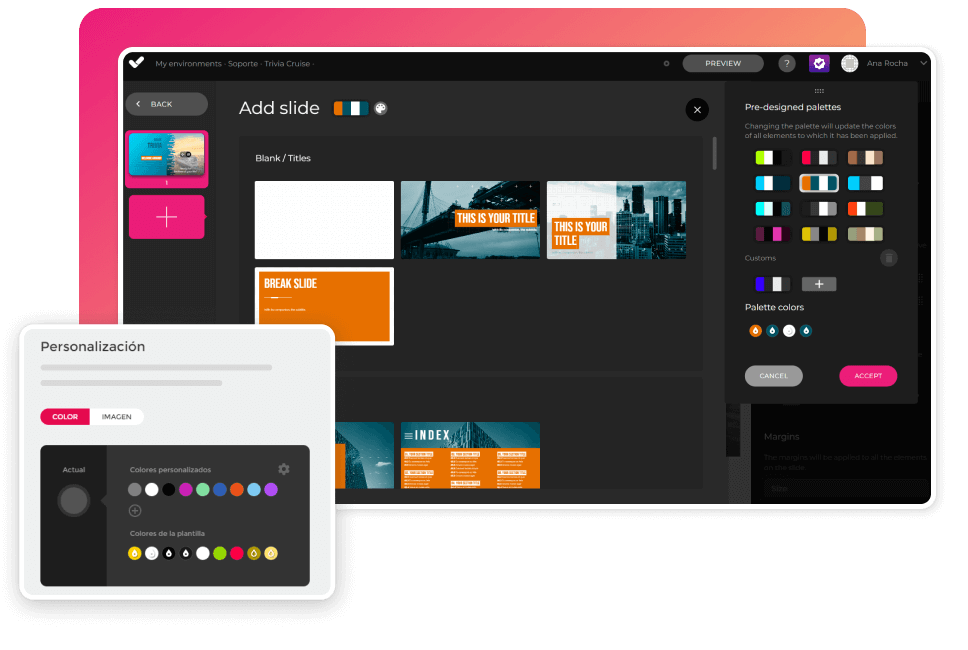
Design directly impacts motivation and completion rates. The tool works through slides that act as a canvas on which you can incorporate content and resources.
You can:
This way, each module maintains visual consistency without requiring design expertise.
Once the style is defined, it’s time to organize the content into sections and subsections.
You can:
The structure can follow a classic scheme: context → development → example → practice → closing. The tool makes this organization seamless, without technical friction.

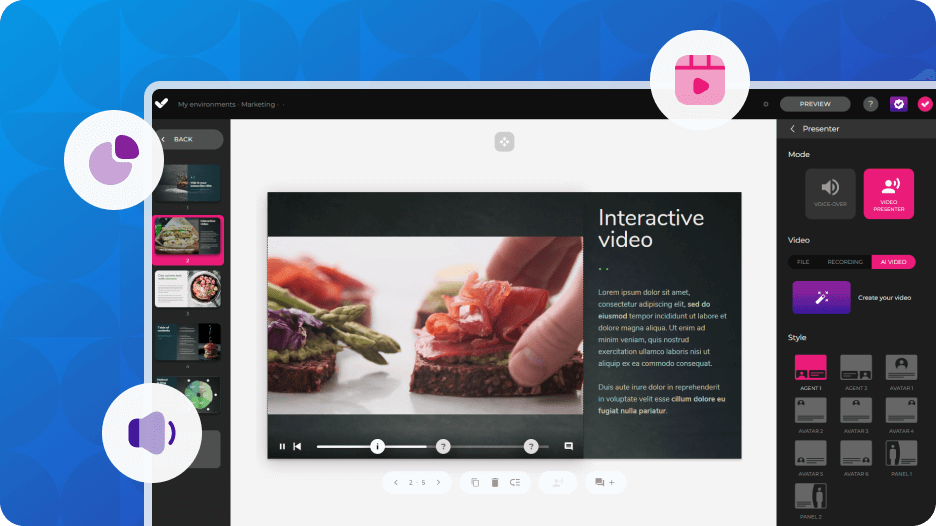
Interactivity is key to ensuring transfer to the workplace. On each slide, you can add:
These resources not only increase engagement, but also turn the learner into an active participant in their own learning. In addition, they allow you to provide immediate feedback and reinforce key concepts within the module itself.
Once completed, you can:
The module is ready to track progress, results, and completion without requiring additional technical development.
The result is a structured, interactive, and measurable training module, created in hours instead of weeks.
CASE STUDY
Discover how fischer streamlined course creation with the perfect authoring tool.


Creating a training module is not just about writing content, but about structuring it with instructional logic. That is the stage where training teams invest the most time: organizing ideas, deciding which resource to use at each moment, and giving overall coherence to the module.
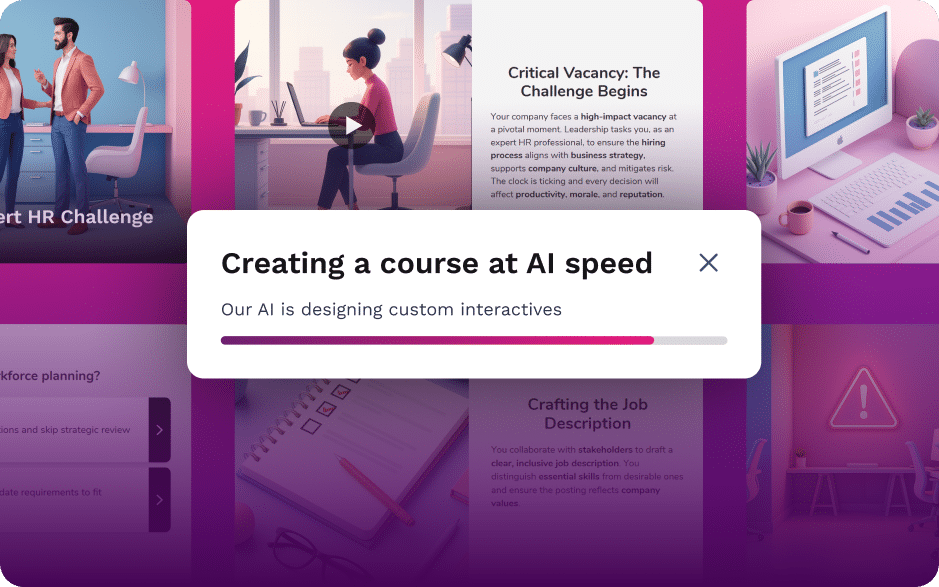
AI Autopilot automates precisely that phase. Starting from an idea or your own corporate documentation, it generates a complete instructional structure in minutes, with modules, lessons, activities, and interactivity aligned with the learning objective. It does not just produce text: it proposes a training architecture with real pedagogical logic.
Visual design, progressive content organization, and accessibility standards are also integrated from the start. And, as always, final control remains yours: you can reorganize, edit, or adjust any part before publishing.
Instead of starting from a blank page, you begin with a solid foundation ready to validate and optimize.
Do you already have a training plan in place, or are you just starting to structure learning in your company? isEazy Author can help you move from scattered content to coherent, engaging, and measurable training modules. Try the #1 AI-powered authoring tool on the market today.
A training module is a structured learning unit that focuses on a specific competency, topic, or skill within a broader training program. It can be part of an official vocational qualification or a corporate e-learning course. Its purpose is to organize content into coherent blocks with clearly defined objectives, practical activities, and evaluation criteria that allow learning outcomes to be measured effectively.
A training program is the complete educational pathway that leads to a formal qualification or comprehensive learning outcome, while a training module is one of the individual units or subjects that make up that program. In other words, the program is the whole, and the module is one of its components. In corporate training contexts, the term “module” is used more flexibly, but it still refers to a self-contained unit within a larger learning journey.
There is no single standard duration, as it depends on the objective and context. In formal education, modules often have a predefined number of instructional hours. In corporate e-learning, it is generally recommended that a module last no more than 20–30 minutes if designed as microlearning, or be divided into clearly structured sections if longer. The key is to maintain learner attention and enable practical application without creating cognitive overload.
An effective training module should include clear learning objectives, relevant and up-to-date content, a well-organized structure, practical activities that encourage participation, and integrated assessment. It is also essential to pay attention to visual design and accessibility, incorporating elements such as subtitles, appropriate color contrast, and mobile compatibility to ensure that all learners can complete the module without barriers.
The success of a training module can be measured through several indicators, including completion rates, assessment results, learner satisfaction, and, most importantly, knowledge transfer to the workplace. It is also advisable to analyze business performance metrics, such as error reduction, process improvement, or sales growth, since these data points demonstrate whether the learning initiative has generated tangible impact.
Today, authoring tools make it possible to design professional training modules without advanced technical skills. These platforms allow instructional designers to organize content into sections, incorporate interactive elements, and export courses in LMS-compatible formats such as SCORM or xAPI. When selecting a tool, organizations should consider usability, customization capabilities, interactivity features, and reporting options to ensure effective learning measurement.

WEBINAR
Master AI in isEazy Author in under an hour.
Register Now


Looking for an easy, agile and efficient authoring tool?
Create accessible, engaging and dynamic e-learning courses with artificial intelligence in minutes.

Looking for an easy, agile and efficient authoring tool?
Create accessible, engaging and dynamic e-learning courses with artificial intelligence in minutes.