CASE STUDY
We multiplied x3 the productivity in the creation of e-learning courses at Vodafone

Brain
The first AI trained to teach

Author
The #1 AI-powered authoring tool on the market

Factory
Custom e-learning content factory

Skills
Comprehensive power skills course catalog

LMS
All-in-one LMS platform with AI

Engage
App for managing frontline teams
Product

What is Brain?
Everything you need to know about the first AI trained to teach.

How does it work?
Adaptive, conversational, and contextual. That’s learning with Brain.

Security
Why your company’s knowledge never leaves your environment or trains other models.

Comparison
Discover what sets isEazy Brain apart from other AI solutions.

Frequently Asked Questions
Want to learn more? Find answers to all your questions about isEazy Brain here.
FEATURES

AINew
Unlock your full potential and speed up course creation with artificial intelligence.

Accessibility
Automatically meet accessibility guidelines—without sacrificing interactivity!

Interactivity
Boost engagement with interactive, ready-to-use activities that make learning fun.

Course Creation
Reduce the time it takes to create your e-learning courses with our authoring tool.

Distribution
We offer you different distribution options, so that nothing can stop you.

SCORM
Publish your course in SCORM format and share it on any LMS.
SERVICES

Instrucional Design
Surprise your students with multimedia and interactive content.

Custom Courses
We create e-learning courses for you—tailored to your needs and hassle-free!

Virtual Reality
Turn learning into an immersive experience.

Custom Avatars
Give your courses and videos a unique touch with personalized avatars.

Audiovisual FactoryNew
Turn training into something dynamic and visual with engaging videos.
CATALOG

Course catalog
Over 600 skills and competency courses to help you adapt to your team's needs.
Microsoft Copilot AcademyNew
Your professionals will learn how to apply Copilot AI to key processes within your organization.

Artificial Intelligence Academy
Train your teams in the practical use of AI to boost productivity and innovation in your company.

Cybersecurity Academy
Capacita a tu empresa con el catálogo más completo en seguridad digital corporativa.
FEATURES

Learning platform
Manage all your training from one place

Analitycs
Measure the impact of your training

Learning Experience
Offer a unique learning experience to your team
Content Library
Choose from hundreds of expert-created courses
Authoring Tool
Create your own content—faster than ever

Use cases
Choose the solution that best fits your needs

Industries
Solutions for all types of industries
USE CASES

Onboarding
Facilitate the onboarding process, productivity and engagement of your new employees.

Upskilling
Boost your team's skills and prepare them for the challenges of the future with upskilling.

Microlearning
Discover all the advantages of microlearning and boost your training results.

Gamification
Enjoy addictive training that will get your professionals hooked.

Internal Communication
Improve communication in your company and enjoy an aligned and committed team.

Mobile learning
Agile, flexible, and interactive learning—built for today’s digital-first workforce.
INDUSTRIES

Banking and financial services
Training in compliance, cybersecurity, customer service, and key skills development.

Pharmaceuticals and healthcare
Digital onboarding, regulatory updates, and ongoing training for healthcare staff.

Retail and consumer
Agile and scalable training for in-store, operational, and customer service teams.

Industry and manufacturing
Training in processes, safety, and corporate culture for distributed teams.

Education and training
Digital solutions for training centers, internal academies, and corporate universities.

Technology and telecommunications
Development of technical talent, digital skills, and upskilling and reskilling programs.
CLIENTS

MAPFRE
How MAPFRE turn e-learning into sales with isEazy

Pepco
A personalised learning experience for a growing team.

BBVA
Digitisation and creation of high quality e-learning content.

Shiseido
We increase the engagement of the training with a social and gamified app.

Telefónica
Large-scale reskilling for the company's digital transformation.

Vodafone
A personalised learning experience for a growing team.
More than 1,000 companies already rely on isEazy.





MEET ISEAZY

Events
Discover our upcoming events and connect with the future of e-learning.

News
Find out the latest news about isEazy: press releases, partnerships, updates...

Contact
Leave us your personal details and we will contact you as soon as possible.
About isEazyNew
Find out more about our company.

Careers
We are looking for the best talent, join our team!

Partners
Become our partner and grow your business.
INTERESTING RESOURCES

Blog
The best content on e-learning: trends, tools and key strategies.

Whitepapers
Gain valuable insights and stay ahead of industry trends.

Product releases
The latest news and releases of our e-learning products and solutions.

Glossary
Definitions of the most commonly used terms and key industry concepts.

Guides
Discover the best step-by-step tips and tricks to optimize your L&D strategy.

Webinars
Video sessions on our products, trends and more

Comparatives
Compare e-learning solutions available on the market and choose the most suitable one.


WEBINAR
Master AI in isEazy Author in under an hour.




GUIDE
Prepare your organization to comply with the new AI regulations

Stay up to date with all our latest news
 Subscribe to our newsletter
 Stay up to date with all our latest news

September 23, 2026

CONTENT CREATED BY:

Table of contents
The e-learning sector is advancing at an impressive pace. Just a few years ago, creating a high-quality online course required specialized vendors or a technical team of designers, programmers, and experts in complex tools. That has changed dramatically, thanks to e-learning authoring tools — and above all, thanks to their templates.
Online course templates are a kind of canvas onto which you can add interactive elements, multimedia, graphics, or exercises to deliver a better learning experience to your students. They handle the visual design and layout so you can invest all your time and energy in creating content.
The e-learning course templates available in the best authoring tools already have an established structure and design, built to cover many pedagogical needs — from formal and corporate training to more dynamic, modern styles. According to a Brandon Hall Group report, using pre-designed templates in course creation can reduce e-learning production time by up to 60%, without compromising quality.
Want to know more? Read on for everything you need to know about them. If you also want to explore how to structure your training from the ground up, check out our complete guide on how to create an online course.
In general, using online course templates is an excellent option for anyone who wants to create high-quality training in the shortest possible time and without technical experience. Here are the main advantages:
Templates already have an established structure and design, so you don’t have to start from scratch. Just choose the one that best fits the content you want to convey and customize it with your information. The time savings are especially significant for L&D teams managing large volumes of training content.
These resources are usually designed by professionals, ensuring that the visual appearance of your course will be high quality and engaging for learners. Using pre-designed templates also ensures that all visual elements across the course — colors, typography, images — maintain consistency that improves the overall learning experience.
Templates are very easy to set up. You don’t need to be an expert in graphic design or programming to create a high-quality online course. The best authoring tools also include interactive elements that enrich the content: quizzes, drag-and-drop exercises, branching scenarios, and knowledge games. The result: more dynamic, more interactive, and more varied courses.
One of the biggest concerns about templates is losing brand identity. Good authoring tools allow you to customize colors, fonts, and images so the final result faithfully reflects corporate branding. With advanced plans, you can even create your own custom templates and share them across your entire organization.
Thanks to templates, training teams can create and update courses independently, without relying on external vendors or specialized technical teams. This speeds up production cycles and allows you to respond quickly to changes in content or training needs.
This is something generic presentation designers (Canva, PowerPoint) simply don’t cover: templates from a specialized e-learning content tool generate courses exportable in SCORM or xAPI, compatible with any corporate LMS. This means your courses don’t just look great — they also work technically within your training infrastructure.
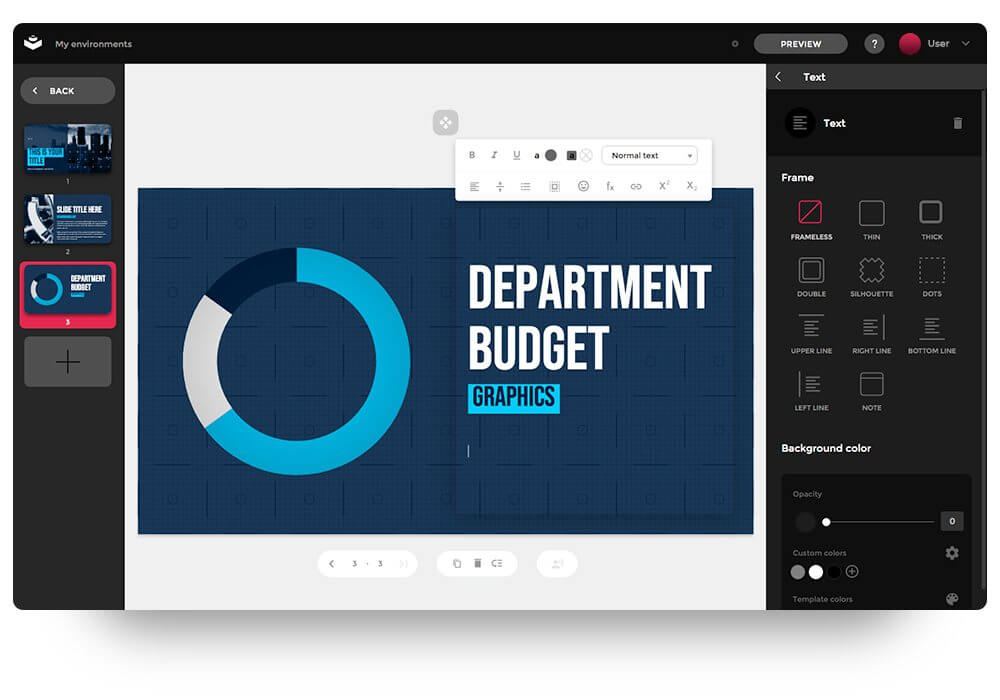
Fluor template: Specially designed for companies or organizations that want to create courses with a professional look and feel aligned with their corporate identity.
Not all templates serve the same purpose. When choosing, the most important thing is to be clear about your course’s learning objective. Below are the most common types in corporate training and when to use each one. If you want to go deeper into how to structure content before choosing a template, we recommend reading our article on how to create an effective course outline.
| Template type | Primary use case | Best for |
|---|---|---|
| Onboarding | New employee induction | HR, corporate culture, internal processes |
| Compliance | Mandatory regulatory training | Legal, risk prevention, GDPR |
| Product / sales | Product or service training | Sales teams, customer service |
| Technical skills | Procedures and software | IT, operations, specialized technical training |
| Soft skills | Communication, leadership, teamwork | Management, professional development, upskilling |

Contrast template: Opt for a bold visual style, using color and contrast to highlight key messages and keep learners engaged.
Choosing the right template is not just an aesthetic decision — it’s a pedagogical one. Here are five key criteria to help you make the best choice:
Good instructional design starts before you open the tool: knowing what you want to teach and how you want to teach it is what turns a template into a truly effective course.

Vodafone is a great example of what templates from a professional authoring tool can bring to an L&D team. By adopting isEazy Author with its system of pre-designed, customizable templates, Vodafone’s training team tripled their productivity in e-learning course creation, dramatically reducing production time without sacrificing visual quality or content interactivity. Discover how they did it →
CASE STUDY
We multiplied x3 the productivity in the creation of e-learning courses at Vodafone


Looking for a slide to present to your team? Need to create an onboarding course in record time? Or perhaps a compliance module that your employees will actually complete? With isEazy Author you have hundreds of ready-to-use templates, organized by use case and fully customizable.
isEazy Author includes multiple features designed for L&D teams:
With the Enterprise plan, you can also create your own custom templates with your corporate branding and share them across your entire organization, so anyone on the team can create courses aligned with your visual identity. Want to learn more about how AI can automate e-learning content creation? Discover more on our blog.
Yes. Modern e-learning authoring tools include templates specifically designed to structure training content in a clear, pedagogically effective way. In isEazy Author, for example, you have access to dozens of templates organized by slide type: introduction, content development, assessment, wrap-up, and more. Each template already includes the recommended visual structure and narrative flow, so you don’t need to start from scratch or have instructional design expertise to build a well-structured course. Simply choose the template that best fits your learning objective, add your content, and customize the visual elements to match your brand.
Specialized e-learning authoring tools are the best place to find professional templates for product training courses, as they are designed specifically for corporate learning. In isEazy Author you will find templates tailored to different content types: product courses, onboarding, compliance, sales training, and technical skills. Unlike generic design tools (such as Canva or PowerPoint), templates from an e-learning authoring tool already include interactive elements, SCORM and xAPI compliance, and options to customize corporate branding. This means you can create professional product training courses that can be published directly to your LMS without any additional conversion steps.
To choose the best platform for creating online courses, you should evaluate three key criteria: ease of use, template variety, and compatibility with your technical infrastructure. For ease of use, look for a tool that allows you to create courses without programming or design knowledge, ideally with pre-designed templates and a visual drag-and-drop editor. For templates, verify that the platform offers enough variety to cover different content types and use cases (onboarding, product, soft skills). Finally, make sure the exported courses are compatible with SCORM or xAPI so you can publish them to your corporate LMS. isEazy Author meets all three criteria: an intuitive interface, more than 300 professional templates, and full compatibility with the leading LMS platforms on the market.
An online course platform is a software tool that allows you to design, develop, and publish digital training content without advanced technical knowledge. Unlike an LMS (Learning Management System), whose main function is to manage and distribute training, a course creation platform — also called an authoring tool — focuses on content production: text, videos, interactive exercises, quizzes, and assessments. The best platforms include pre-designed templates, visual editors, and export options compatible with e-learning standards such as SCORM or xAPI. Some solutions, like isEazy Author, combine both functions: authoring tool and publishing management, allowing you to create and distribute courses from a single platform.

GUIDE
Prepare your organization to comply with the new AI Regulations
Download guide


Creating spectacular e-learning courses doesn't have to be complicated
Create and share accessible, engaging, and interactive e-learning courses in just minutes with isEazy Author

Creating spectacular e-learning courses doesn't have to be complicated
Create and share accessible, engaging, and interactive e-learning courses in just minutes with isEazy Author