Find out how much you can save by creating courses compared to other tools

Brain
The first AI trained to teach

Author
The #1 AI-powered authoring tool on the market

Factory
Custom e-learning content factory

Skills
Comprehensive power skills course catalog

LMS
All-in-one LMS platform with AI

Engage
App for managing frontline teams
Discover isEazy Brain


Product
What is Brain?
Everything you need to know about the first AI trained to teach.
How does it work?
Adaptive, conversational, and contextual. That’s learning with Brain.
Security
Why your company’s knowledge never leaves your environment or trains other models.
Comparison
Discover what sets isEazy Brain apart from other AI solutions.
Frequently Asked Questions
Want to learn more? Find answers to all your questions about isEazy Brain here.
Discover isEazy Author


 See all features
FEATURES
AINew
Unlock your full potential and speed up course creation with artificial intelligence.
Accessibility
Automatically meet accessibility guidelines—without sacrificing interactivity!
Interactivity
Boost engagement with interactive, ready-to-use activities that make learning fun.
Course Creation
Reduce the time it takes to create your e-learning courses with our authoring tool.
Distribution
We offer you different distribution options, so that nothing can stop you.
SCORM
Publish your course in SCORM format and share it on any LMS.
Discover isEazy Factory


SERVICES
Instrucional Design
Surprise your students with multimedia and interactive content.
Custom Courses
We create e-learning courses for you—tailored to your needs and hassle-free!
Virtual Reality
Turn learning into an immersive experience.
Custom Avatars
Give your courses and videos a unique touch with personalized avatars.
Audiovisual FactoryNew
Turn training into something dynamic and visual with engaging videos.
Discover isEazy Skills


CATALOG
Course catalog
Over 600 skills and competency courses to help you adapt to your team's needs.
Microsoft Copilot AcademyNew
Your professionals will learn how to apply Copilot AI to key processes within your organization.
Artificial Intelligence Academy
Train your teams in the practical use of AI to boost productivity and innovation in your company.
Cybersecurity Academy
Capacita a tu empresa con el catálogo más completo en seguridad digital corporativa.
Discover isEazy LMS


FEATURES
Learning platform
Manage all your training from one place
Analitycs
Measure the impact of your training
Learning Experience
Offer a unique learning experience to your team
Content Library
Choose from hundreds of expert-created courses
Authoring Tool
Create your own content—faster than ever

Use cases
Choose the solution that best fits your needs

Industries
Solutions for all types of industries
See all solutions


 See all solutions
USE CASES
Onboarding
Facilitate the onboarding process, productivity and engagement of your new employees.
Upskilling
Boost your team's skills and prepare them for the challenges of the future with upskilling.
Microlearning
Discover all the advantages of microlearning and boost your training results.
Gamification
Enjoy addictive training that will get your professionals hooked.
Internal Communication
Improve communication in your company and enjoy an aligned and committed team.
Mobile learning
Agile, flexible, and interactive learning—built for today’s digital-first workforce.
Discover our industries


 View all industries
INDUSTRIES
Banking and financial services
Training in compliance, cybersecurity, customer service, and key skills development.
Pharmaceuticals and healthcare
Digital onboarding, regulatory updates, and ongoing training for healthcare staff.
Retail and consumer
Agile and scalable training for in-store, operational, and customer service teams.
Industry and manufacturing
Training in processes, safety, and corporate culture for distributed teams.
Education and training
Digital solutions for training centers, internal academies, and corporate universities.
Technology and telecommunications
Development of technical talent, digital skills, and upskilling and reskilling programs.
CLIENTS

MAPFRE
How MAPFRE turn e-learning into sales with isEazy

Pepco
A personalised learning experience for a growing team.

BBVA
Digitisation and creation of high quality e-learning content.

Shiseido
We increase the engagement of the training with a social and gamified app.

Telefónica
Large-scale reskilling for the company's digital transformation.

Vodafone
A personalised learning experience for a growing team.
More than 1,000 companies already rely on isEazy.





MEET ISEAZY

Events
Discover our upcoming events and connect with the future of e-learning.

News
Find out the latest news about isEazy: press releases, partnerships, updates...

Contact
Leave us your personal details and we will contact you as soon as possible.
About isEazyNew
Find out more about our company.

Careers
We are looking for the best talent, join our team!

Partners
Become our partner and grow your business.
INTERESTING RESOURCES

Blog
The best content on e-learning: trends, tools and key strategies.

Whitepapers
Gain valuable insights and stay ahead of industry trends.

Product releases
The latest news and releases of our e-learning products and solutions.

Glossary
Definitions of the most commonly used terms and key industry concepts.

Guides
Discover the best step-by-step tips and tricks to optimize your L&D strategy.

Webinars
Video sessions on our products, trends and more

Comparatives
Compare e-learning solutions available on the market and choose the most suitable one.


WEBINAR
AI-powered course creation, step by step
Master AI in isEazy Author in under an hour.

05/11/2026

11:00 AM ET



GUIDE
Does your training plan comply with the EU AI Act?
Prepare your organization to comply with the new AI regulations

Subscribe to our newsletter
Stay up to date with all our latest news
 Subscribe to our newsletter
 Stay up to date with all our latest news

April 13, 2026
Instructional design: what it is, models and how to apply it in e-learning

CONTENT CREATED BY:
Fernando González Zurita
User Acquisition Manager at isEazy

Table of contents
Instructional design is the systematic process of planning, structuring and developing learning experiences based on pedagogical principles. Its goal is to ensure that training does not merely transmit information, but produces real changes in people’s performance.
Instructional design is the process of transforming knowledge into effective, measurable learning experiences aligned with business objectives. It is the difference between a course that gets consumed and training that truly transforms.
What is instructional design?
Instructional design is the process of planning, structuring and developing learning experiences based on pedagogical principles. Its aim is to facilitate the acquisition of knowledge, skills and competencies in an effective, measurable, and results-oriented way.
In practice, instructional design adds a pedagogical layer to content: it is not just about what to teach, but how to structure that knowledge so that learners acquire, retain and apply it. According to a study by the Association for Talent Development (ATD, 2023), organisations that apply a formal instructional design process achieve learning transfer rates up to 40% higher than those that produce content without a defined pedagogical methodology.
In a corporate training context, instructional design is the discipline that connects business objectives with learning objectives, ensuring that training delivers a measurable return on investment. A corporate instructional designer does not ask “what do I need to teach?” but rather “what performance problem do I need to solve, and how can training help?”.
x
Key concepts in instructional design
To work with any instructional design model, it is essential to master the field’s core terminology. These are the concepts every L&D team needs to know:
- Learning objectives: statements that describe what learners must be able to do by the end of the training. They should be written using observable and measurable verbs (Bloom’s taxonomy): analyze, apply, evaluate, create. A vague objective — “understand the importance of X” — is not a real learning objective.
- Bloom’s taxonomy: a reference framework that classifies cognitive objectives into six levels of increasing complexity: remember, understand, apply, analyze, evaluate, and create. It is the most widely used tool for aligning learning objectives with the actual complexity level of the content.
- Training needs analysis: a process carried out before design that identifies the gap between current and expected performance. It is the starting point of any rigorous instructional project and the foundation of the ADDIE model.
- Cognitive load: the brain’s limited capacity to process new information at once. Effective instructional design manages cognitive load by breaking content into manageable chunks, removing irrelevant information, and using multiple sensory channels in a coherent way (Sweller, 1988).
- Learning transfer: the learner’s ability to apply what they have learned in real-world situations beyond the training environment. It is the most relevant indicator of training effectiveness and the ultimate goal of instructional design.
- Formative assessment: ongoing evaluation that takes place throughout the learning process—not just at the end—with the goal of identifying gaps and adjusting the design. It includes check questions, decision-making scenarios, and practice activities.
- Scaffolding: an instructional technique that provides temporary support to learners as they acquire a new skill, gradually removing it as they gain autonomy. It is especially useful in technical or high-complexity content.
- Content mapping: a visual representation of the structure and sequence of training content, including its relationships and dependencies. It is the central artifact of the design phase in ADDIE and ensures alignment between objectives, content, and assessment.
Instructional design as a bridge between knowledge and performance
Having expert content is not enough for training to work. Without adequate instructional design, knowledge gets trapped in the material: learners consume it during the course but neither integrate nor apply it in their work.
Instructional design acts as a bridge across three key dimensions:
- Motivation and context: people learn better when they understand why they need to learn something and how it will help them at work. Good design always starts from the learner’s real work context, not from a list of abstract content topics.
- Prior knowledge: effective learning builds on what the learner already knows. Instructional design maps prior knowledge and defines anchor points for new information.
- Cognitive load: cognitive load theory (Sweller, 1988) demonstrates that the human brain has limited processing capacity. Well-executed instructional design distributes content in a way that does not overload working memory: chunking, progression from simple to complex, and eliminating irrelevant information are central strategies in this process.

Main instructional design models
There are several methodological frameworks for approaching instructional design. Each responds to a different context, urgency and level of resources. These are the most widely used in corporate environments:
ADDIE model
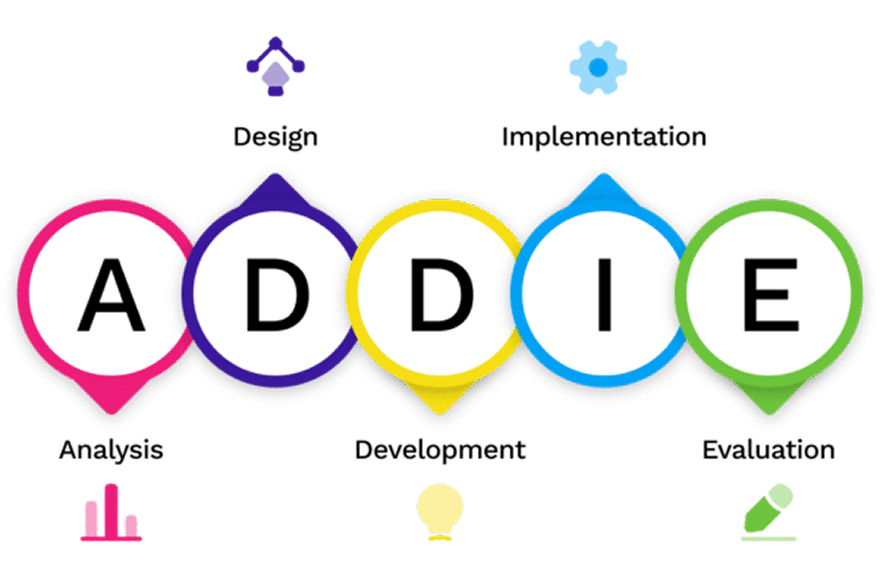
It is the most widespread and recognised model in corporate training. Its five phases — Analysis, Design, Development, Implementation and Evaluation — offer a clear, structured process that ensures coherence between objectives, content and assessment. It is the ideal starting point for complex or long-term projects. You can explore its application in depth in our complete guide to the ADDIE model.
SAM model (Successive Approximation Model)
Developed by Michael Allen as an agile alternative to ADDIE, the SAM model of instructional design works with short iterative cycles: prototype quickly, test with real users, and refine continuously. It is especially suited when time-to-launch is critical or when the team needs to validate hypotheses before investing in full production.
ASSURE model
Designed specifically to integrate media and technology into training, ASSURE is ideal when the delivery channel is a determining factor. Its phases include learner analysis, selection of technological media, and assessment of learning. It is commonly used in e-learning and blended learning environments.
Dick and Carey model
The most systematic and comprehensive model. It begins with a detailed identification of terminal and enabling objectives and defines with surgical precision every component of the instructional process. It requires a greater investment of time in the analysis phase, but produces training that is extremely well aligned with objectives. Recommended for critical programmes (safety, compliance, certifications).
Merrill’s Principles of Instruction (MPI)
Proposed by David Merrill in 2002, this model is based on 5 core principles that give the instructional designer the keys to guarantee learning:
- Task-centred principle: training should focus on real-world problems, adapted to the learner’s actual needs and how to solve them.
- Activation principle: training should stimulate the existing knowledge base, helping learners connect what they already knew with what they are about to acquire.
- Demonstration principle: training should present knowledge in a way that engages different regions of the brain, so that it is retained for longer.
- Application principle: training should provide the necessary tools for learners to apply new information on their own, practising and learning from their mistakes.
- Integration principle: training should offer opportunities to integrate knowledge into real situations through reflection, discussion and creation.
Gagné’s 9 Events of Instruction
Robert Gagné proposed nine events of instruction that must occur in any effective learning experience: gaining attention, informing learners of the objective, stimulating recall of prior learning, presenting the content, providing learning guidance, eliciting performance, providing feedback, assessing performance, and enhancing retention and transfer.
The value of this model in corporate instructional design is its universal applicability: it does not depend on a specific format, and works equally well in e-learning courses, face-to-face sessions, or blended programmes. Each event corresponds to a specific cognitive process that facilitates the integration and consolidation of learning.
| Model | Approach | Best for |
|---|---|---|
| ADDIE | Sequential and structured. 5 phases: Analysis, Design, Development, Implementation, Evaluation | Complex or long-term projects with stable requirements |
| SAM | Iterative and agile. Short prototyping and revision cycles | Projects with tight deadlines or requirements that evolve throughout the process |
| ASSURE | Media and technology-oriented. Focus on the delivery channel | Digital or blended training where technology is central |
| Dick and Carey | Systematic and exhaustive. Defines every component with surgical precision | Critical programmes: compliance, safety, certifications |
| Gagné | Based on cognitive events. Universal sequence of 9 events of instruction | Design of instructional units in any format or modality |
| Merrill (MPI) | Principle-centred: task, activation, demonstration, application and integration | Any project that prioritises the practical application of knowledge in real contexts |
How to choose the right instructional design model for your organisation
There is no universally superior model: the right choice depends on four variables you should evaluate before starting any training project:
- Urgency and time available: if you need to launch within weeks, SAM is the best option. If you have months and the project is strategic, ADDIE or Dick and Carey offer greater robustness.
- Content complexity: the more technical, regulated or critical the content (compliance, safety, certified skills), the more rigorous the model needs to be. Dick and Carey is particularly well-suited here.
- Team size and resources: iterative models like SAM require prototyping capability and rapid feedback cycles. Small L&D teams may find ADDIE more manageable for long-term projects.
- Digital maturity of the organisation: if you already have an LMS in place and established training processes, ADDIE will fit well within your structure. If you are building from scratch or in exploratory mode, SAM or ASSURE offer greater flexibility.

ADDIE model phases applied to corporate training
Although multiple models exist, ADDIE remains the most widely used reference framework in corporate L&D teams. Here are its five phases applied to a real organisational context:
1. Analysis
Training needs, the target audience, prior knowledge, technical constraints and the business objectives that training must support are all identified. A thorough analysis prevents producing irrelevant content. Key question: what must employees be able to do that they currently cannot?
2. Design
Learning objectives are defined (using Bloom’s taxonomy verbs), along with content sequencing, practice activities, assessment criteria, and the most appropriate delivery formats. This is the most strategic phase: errors here are amplified in subsequent stages.
3. Development
Materials are produced: scripts, videos, interactive modules, activities, assessments. This is where instructional design becomes real content. The quality of this phase depends directly on the soundness of the preceding ones.
4. Implementation
Training is made available to learners: via the LMS, in person, or in a hybrid format. This includes technical configuration, communication with participants, and support throughout the process.
5. Evaluation
Results are measured across four levels (Kirkpatrick): satisfaction, learning, transfer and business impact. Evaluation is not the end of the process: it is the starting point for continuous programme improvement.

Learner-centred instructional design
The learner-centred approach rests on a simple but powerful premise: content is not the centre of training — the learner is. This means designing with the learner in mind, not around what is being taught.
In practice, this approach translates into three design decisions that make all the difference:
- Grounding in real work context: examples, case studies and practice scenarios must be anchored in situations the learner recognises from their everyday work. A salesperson learns better through a simulation of real objections than through theory about sales techniques.
- Activating prior knowledge: before introducing new information, instructional design must create connections with what the learner already knows. This reduces cognitive load and accelerates the integration of new knowledge.
- Designing for action, not information: the goal is not for learners to know more, but for them to do something differently. Every module should end with an application activity that requires the learner to mobilise what has been learned in a practical context.
Instructional design and current e-learning formats
Instructional design does not exist in isolation from the format in which training is delivered. New digital formats offer pedagogical possibilities that classic models could not leverage, but they also require instructional design to adapt to their particularities.
Microlearning and learning pathways
Breaking content into short capsules (5–10 minutes) enables flexibility, reduces cognitive load per session, and reinforces retention through spaced repetition. The instructional design of a microlearning pathway must define the sequence of capsules, reinforcement points, and progression criteria.
Social and collaborative learning
Fostering peer exchange spaces (forums, group challenges, collaborative projects) extends the impact of training beyond formal content. Instructional design must anticipate how to integrate these interactions into the learning flow.
Gamification applied to design
Incorporating game mechanics (points, badges, levels, leaderboards) into instructional design increases motivation and engagement — provided they are aligned with learning objectives and do not become an end in themselves.
Accessibility and mobile first
Updated instructional design must factor in accessibility (WCAG 2.1) and mobile experience from the outset. This is not a final adaptation step: it must be a design constraint from the very beginning of the project.

The importance of instructional design in creating effective courses
Instructional design plays a crucial role in the effectiveness of any training programme. It is not an optional phase or a luxury reserved for large organisations: it is the necessary condition for training to produce measurable results.
Here is why instructional design is so decisive:
- It aligns training with business objectives: without a formal analysis and design process, courses frequently address perceived needs rather than real ones. Instructional design forces you to define the expected impact first, then design the path to achieve it.
- It improves retention and transfer: Ebbinghaus’s forgetting curve shows that without active reinforcement, we forget up to 70% of what we learn within 24 hours. Instructional design incorporates spaced retrieval strategies, active practice and contextual application that counteract this process.
- It reduces production time and cost: well-defined design before production prevents costly revisions during development. The time invested in design is recovered many times over during production.
- It increases completion and engagement: courses designed with instructional design principles have significantly higher completion rates. Learner-centred design, with real context and application activities, creates perceived relevance — the primary driver of engagement.



Common mistakes in instructional design (and how to avoid them)
Even with the best models available, there are recurring mistakes that undermine training effectiveness. Identifying them is the first step to avoiding them:
- Skipping the analysis: the most frequent mistake. Going straight to content production without having identified real needs, the target audience and performance objectives produces irrelevant courses that nobody completes. Analysis is not a bureaucratic formality: it is the investment that makes all subsequent phases worthwhile.
- Vague learning objectives: “the learner will understand the importance of X” is not a learning objective — it is an intention. Objectives must use observable and measurable verbs from Bloom’s taxonomy (analyse, apply, evaluate, create) and specify the expected performance level.
- Content without practice activities: presenting information with no opportunities for active application is the digital equivalent of a four-hour lecture. Practice is what converts information into competence.
- Ignoring the learner’s context: designing without knowing the audience profile — prior experience, work context, motivation, time constraints — produces generic training that does not resonate with those who need to learn it.
- Not measuring results: training without impact evaluation is a black box. Defining how to measure success must be part of the design from the outset, not an afterthought.
Instructional design in practice: the Vodafone case
Vodafone shows how a strong instructional design approach, supported by tools that streamline workflows, can transform the way e-learning content is created. With isEazy Author, the company tripled its course creation productivity, reducing production time and enabling teams to focus on what really matters: designing more effective, engaging, and scalable learning experiences. Discover how they did it →
CASE STUDY
We multiplied x3 the productivity in the creation of e-learning courses at Vodafone


The best tools for applying instructional design
Choosing the right model is only half the work. You need a tool that lets you put it into practice efficiently. Here is a comparison of the options most commonly used by L&D teams:

isEazy Author
The Leading AI Authoring Tool on the Market
Features
Benefits
Pricing
Accessibility
Awards
- AI features: generate images, games and exercises, automatic subtitles, voiceovers, advanced interactive elements, avatars, and AI video presenters to bring your content to life.
- AI Autopilot: automatic course creation from documents or ideas, with pedagogical structure, interactive resources, and applied visual identity. Transform any content into a publish-ready course in minutes.
- Templates: over 25 ready-to-use interactive templates, editable and customizable with corporate colors, typography, and logo via the Smart Colors feature.
- Drag-and-drop editor: visual editing to create courses with no technical, programming, or design knowledge required.
- Automatic responsive design: courses adapt to any device without manual adjustments, with dual mode so each learner can access content in their preferred format.
- Multi-format: export in SCORM 1.2, SCORM 2004, xAPI, and HTML5, compatible with any LMS on the market.
- Automatic translation: full AI-powered course translation into over 40 languages, with no need for external translators.
- Text to speech: professional voiceovers automatically generated from content, with selection of gender, language, and voice variation.
- PowerPoint import: convert presentations into interactive e-learning courses in just a couple of clicks.
- Real-time collaboration: simultaneous collaborative work on the same course with integrated comments, change tracking, and automatic saving with restore points.
- Brand customization: styles, colors, typography, and logo to maintain corporate consistency across all content.
- Gamification: points, badges, and leaderboards to motivate learners and increase engagement.
- Assessments and quizzes: multiple question types and answer logic, with AI-powered automatic generation of final assessment tests based on course content.
- Multimedia library: built-in bank of images, videos, icons, and graphic resources, with AI image generation adapted to your course style.
- Integrations: connection with LMS platforms (SCORM, xAPI), external platforms, and management systems. A built-in learning environment is also available without leaving isEazy Author.
- AI-powered: automates key creation tasks and drastically reduces production time. Over 36,000 users and 120,000 projects created in more than 90 countries speak for themselves.
- Intuitive and visual interface: everything is edited intuitively with no learning curve, with pre-configured ready-to-use resources.
- Real collaborative experience: distributed teams can work in parallel with real-time feedback, ideal for content factories and L&D teams.
- Total flexibility: ideal for both occasional creators and large-scale production teams. Compatible with any LMS and 100% cloud-based.
- Visual and professional courses: no designers or developers needed, with quality results recognized by Training Industry and eLearning Industry 2026.
- Cost savings: less need for external resources and greater efficiency in content creation. Calculate your savings with the AI Autopilot ROI calculator.
- Constantly evolving: new features released regularly and agile multilingual support, with real accessibility up to WCAG level AA and 80% of level AAA.
- FREE plan: free forever. Ideal for exploring the tool with no commitment.
- Professional: from €80/month. 1 author and up to 5 GB of storage.
- Business: from €208/month. 2 authors and up to 12 GB of storage. The most popular plan.
- Enterprise: custom authors and storage. Contact us for pricing.
- Real standards compliance: courses compatible with level AA (100%) and up to 80% of level AAA of the Web Content Accessibility Guidelines (WCAG), and with Section 508 of the U.S. Rehabilitation Act.
- Dual mode: create a single SCORM course and your learners can access it in their preferred mode, with or without accessibility adaptations, without duplicating production work.
- Accessible interactive elements: all interactive resources in isEazy Author are designed to provide the same learning experience to all learners, regardless of their needs.
- Contextual editor guidance: tips and guides built into the editor so any author can create quality accessible content easily, with no prior technical knowledge required.
- Without sacrificing design or interactivity: accessibility in isEazy Author does not mean compromising visual impact or content richness. Accessible, attractive, and effective courses all at once.
- Training Industry 2026: Top 20 AI Content Creation.
- eLearning Industry 2026: Best AI-Powered Authoring Tool and Learning & Skills Development.
- Training Industry 2025: Top 20 AI Content Creation.
- eLearning Industry 2025: Best e-Learning Authoring Tool.
- Brandon Hall 2024: Excellence Awards.
- eLearning Industry 2024: Best Game Design and AI Watchlist.
- G2 2024: Momentum Leader, High Performer, and High Performer Mid-Market.
- Crozdesk 2024: Quality Choice, Trusted Vendor, and Happiest Users.
- Software Advice 2024: FrontRunners.
- Software Suggest 2024: Category Leader.
Features
- AI features: generate images, games and exercises, automatic subtitles, voiceovers, advanced interactive elements, avatars, and AI video presenters to bring your content to life.
- AI Autopilot: automatic course creation from documents or ideas, with pedagogical structure, interactive resources, and applied visual identity. Transform any content into a publish-ready course in minutes.
- Templates: over 25 ready-to-use interactive templates, editable and customizable with corporate colors, typography, and logo via the Smart Colors feature.
- Drag-and-drop editor: visual editing to create courses with no technical, programming, or design knowledge required.
- Automatic responsive design: courses adapt to any device without manual adjustments, with dual mode so each learner can access content in their preferred format.
- Multi-format: export in SCORM 1.2, SCORM 2004, xAPI, and HTML5, compatible with any LMS on the market.
- Automatic translation: full AI-powered course translation into over 40 languages, with no need for external translators.
- Text to speech: professional voiceovers automatically generated from content, with selection of gender, language, and voice variation.
- PowerPoint import: convert presentations into interactive e-learning courses in just a couple of clicks.
- Real-time collaboration: simultaneous collaborative work on the same course with integrated comments, change tracking, and automatic saving with restore points.
- Brand customization: styles, colors, typography, and logo to maintain corporate consistency across all content.
- Gamification: points, badges, and leaderboards to motivate learners and increase engagement.
- Assessments and quizzes: multiple question types and answer logic, with AI-powered automatic generation of final assessment tests based on course content.
- Multimedia library: built-in bank of images, videos, icons, and graphic resources, with AI image generation adapted to your course style.
- Integrations: connection with LMS platforms (SCORM, xAPI), external platforms, and management systems. A built-in learning environment is also available without leaving isEazy Author.
Benefits
- AI-powered: automates key creation tasks and drastically reduces production time. Over 36,000 users and 120,000 projects created in more than 90 countries speak for themselves.
- Intuitive and visual interface: everything is edited intuitively with no learning curve, with pre-configured ready-to-use resources.
- Real collaborative experience: distributed teams can work in parallel with real-time feedback, ideal for content factories and L&D teams.
- Total flexibility: ideal for both occasional creators and large-scale production teams. Compatible with any LMS and 100% cloud-based.
- Visual and professional courses: no designers or developers needed, with quality results recognized by Training Industry and eLearning Industry 2026.
- Cost savings: less need for external resources and greater efficiency in content creation. Calculate your savings with the AI Autopilot ROI calculator.
- Constantly evolving: new features released regularly and agile multilingual support, with real accessibility up to WCAG level AA and 80% of level AAA.
Pricing
- FREE plan: free forever. Ideal for exploring the tool with no commitment.
- Professional: from €80/month. 1 author and up to 5 GB of storage.
- Business: from €208/month. 2 authors and up to 12 GB of storage. The most popular plan.
- Enterprise: custom authors and storage. Contact us for pricing.
Accessibility
- Real standards compliance: courses compatible with level AA (100%) and up to 80% of level AAA of the Web Content Accessibility Guidelines (WCAG), and with Section 508 of the U.S. Rehabilitation Act.
- Dual mode: create a single SCORM course and your learners can access it in their preferred mode, with or without accessibility adaptations, without duplicating production work.
- Accessible interactive elements: all interactive resources in isEazy Author are designed to provide the same learning experience to all learners, regardless of their needs.
- Contextual editor guidance: tips and guides built into the editor so any author can create quality accessible content easily, with no prior technical knowledge required.
- Without sacrificing design or interactivity: accessibility in isEazy Author does not mean compromising visual impact or content richness. Accessible, attractive, and effective courses all at once.
Awards
- Training Industry 2026: Top 20 AI Content Creation.
- eLearning Industry 2026: Best AI-Powered Authoring Tool and Learning & Skills Development.
- Training Industry 2025: Top 20 AI Content Creation.
- eLearning Industry 2025: Best e-Learning Authoring Tool.
- Brandon Hall 2024: Excellence Awards.
- eLearning Industry 2024: Best Game Design and AI Watchlist.
- G2 2024: Momentum Leader, High Performer, and High Performer Mid-Market.
- Crozdesk 2024: Quality Choice, Trusted Vendor, and Happiest Users.
- Software Advice 2024: FrontRunners.
- Software Suggest 2024: Category Leader.

iSpring Suite
Key Features
Benefits
Pricing
- PowerPoint integration: convert existing presentations into interactive e-learning courses in just a few clicks, without leaving the familiar PowerPoint environment.
- Screen recording and simulations: tools for recording screens with automatic click and keystroke detection, adding voiceovers, and creating interactive simulations and role-plays.
- Quizzes and assessments: tests with multiple question types, branching logic, and answer flows to assess learner knowledge.
- Video lessons: create presentations synchronized with a presenter video for a more engaging and personal learning experience.
- SCORM, xAPI, and cmi5 compatibility: export courses in standard formats for integration with any LMS on the market.
- Content library: over 2,500 locations, 3,600+ icons, templates, characters, backgrounds, and reusable graphic resources to enrich course design.
- AI features: text generation, automatic translation into 70+ languages, text-to-speech with natural ElevenLabs voices, and AI image generation.
- Low learning curve: ideal for users already familiar with PowerPoint. No technical knowledge or prior training required.
- Fast course production: transform existing presentations into interactive training content quickly, with video publishing up to 1.5x faster.
- LMS compatibility: ensures progress and results tracking across multiple platforms via clean, standards-compliant SCORM packages compatible with any LMS.
- All tools in one suite: quizzes, video, simulations, screen recordings, AI features, and a content library all in a single environment.
- iSpring Suite: from $970 USD/year per author. Includes PowerPoint authoring tool, quizzes, video lessons, simulations, and technical support.
- iSpring Suite AI: from $1,290 USD/year per author. Includes all iSpring Suite features plus AI capabilities, iSpring Cloud AI, advanced content library, and updates included.
- 14-day free trial available. Discounts for freelancers and academics available on request.
Key Features
- PowerPoint integration: convert existing presentations into interactive e-learning courses in just a few clicks, without leaving the familiar PowerPoint environment.
- Screen recording and simulations: tools for recording screens with automatic click and keystroke detection, adding voiceovers, and creating interactive simulations and role-plays.
- Quizzes and assessments: tests with multiple question types, branching logic, and answer flows to assess learner knowledge.
- Video lessons: create presentations synchronized with a presenter video for a more engaging and personal learning experience.
- SCORM, xAPI, and cmi5 compatibility: export courses in standard formats for integration with any LMS on the market.
- Content library: over 2,500 locations, 3,600+ icons, templates, characters, backgrounds, and reusable graphic resources to enrich course design.
- AI features: text generation, automatic translation into 70+ languages, text-to-speech with natural ElevenLabs voices, and AI image generation.
Benefits
- Low learning curve: ideal for users already familiar with PowerPoint. No technical knowledge or prior training required.
- Fast course production: transform existing presentations into interactive training content quickly, with video publishing up to 1.5x faster.
- LMS compatibility: ensures progress and results tracking across multiple platforms via clean, standards-compliant SCORM packages compatible with any LMS.
- All tools in one suite: quizzes, video, simulations, screen recordings, AI features, and a content library all in a single environment.
Pricing
- iSpring Suite: from $970 USD/year per author. Includes PowerPoint authoring tool, quizzes, video lessons, simulations, and technical support.
- iSpring Suite AI: from $1,290 USD/year per author. Includes all iSpring Suite features plus AI capabilities, iSpring Cloud AI, advanced content library, and updates included.
- 14-day free trial available. Discounts for freelancers and academics available on request.

Articulate 360
Key Features
Benefits
Pricing
- Storyline 360: authoring tool for creating custom courses with advanced interactions, complex branching logic, and tailored simulations.
- Rise 360: web-based editor for creating responsive courses visually and quickly, with no software installation or prior technical knowledge required.
- AI features: transform documents, videos, or presentations into interactive courses in minutes. Includes automatic translation into 80+ languages and AI-powered content generation.
- Content Library: access to a library of templates, characters, backgrounds, and graphic resources ready to use in any course.
- Review 360: collaborative platform for course review and feedback, with requests, reviews, and comment resolution all in one place throughout the creation process.
- Screen recording and editing: tools to record videos and screencasts directly from the platform.
- SCORM, AICC, xAPI, and cmi5 compatibility: export in standard formats for integration with any LMS, with web distribution also available without complex configurations.
- Two authoring approaches: choose between a visual and fast environment (Rise 360) or a more technical and customizable one (Storyline 360) depending on project needs.
- Creative potential: ideal for courses with advanced logic, complex interactions, and gamification, with full design freedom in Storyline 360.
- Seamless collaboration: Review 360 makes it easy to share progress and gather team or stakeholder feedback in real time throughout the entire process.
- Responsive courses: Rise 360 ensures a great experience on any device without manual adjustments.
- Articulate 360 Standard: from $1,499 USD/year per user. Includes access to all tools in the package and continuous updates.
- Articulate 360 AI: from $1,749 USD/year per user. Includes all Standard plan features plus advanced AI capabilities.
- Free trial available. Team discounts available on request.
Key Features
- Storyline 360: authoring tool for creating custom courses with advanced interactions, complex branching logic, and tailored simulations.
- Rise 360: web-based editor for creating responsive courses visually and quickly, with no software installation or prior technical knowledge required.
- AI features: transform documents, videos, or presentations into interactive courses in minutes. Includes automatic translation into 80+ languages and AI-powered content generation.
- Content Library: access to a library of templates, characters, backgrounds, and graphic resources ready to use in any course.
- Review 360: collaborative platform for course review and feedback, with requests, reviews, and comment resolution all in one place throughout the creation process.
- Screen recording and editing: tools to record videos and screencasts directly from the platform.
- SCORM, AICC, xAPI, and cmi5 compatibility: export in standard formats for integration with any LMS, with web distribution also available without complex configurations.
Benefits
- Two authoring approaches: choose between a visual and fast environment (Rise 360) or a more technical and customizable one (Storyline 360) depending on project needs.
- Creative potential: ideal for courses with advanced logic, complex interactions, and gamification, with full design freedom in Storyline 360.
- Seamless collaboration: Review 360 makes it easy to share progress and gather team or stakeholder feedback in real time throughout the entire process.
- Responsive courses: Rise 360 ensures a great experience on any device without manual adjustments.
Pricing
- Articulate 360 Standard: from $1,499 USD/year per user. Includes access to all tools in the package and continuous updates.
- Articulate 360 AI: from $1,749 USD/year per user. Includes all Standard plan features plus advanced AI capabilities.
- Free trial available. Team discounts available on request.
Conclusion: how isEazy Author helps you apply instructional design
Great instructional design only delivers results when paired with a tool that lets you put it into practice without friction. isEazy Author is built specifically for L&D teams to translate their instructional design into interactive, accessible and engaging e-learning courses — no coding required: from objective structure and content sequencing through to practice activities, assessments and multimedia elements.
With isEazy Author and following the principles of any model — ADDIE, SAM or ASSURE — you can create courses in minutes, iterate on content with your team, and publish to any LMS in SCORM, xAPI or HTML5 format. The result is training that is not only pedagogically sound, but also easy to update and scale.
If you prefer to outsource instructional design to a specialist team, the isEazy Factory instructional design service lets you deliver complete projects in record time, with guaranteed pedagogical quality and alignment with business objectives.
Frequently asked questions about instructional design
What is instructional design and why does it matter in e-learning?
What are the main instructional design models?
How does the ADDIE model benefit instructional design?
What factors should you consider when choosing an instructional design model?
How can instructional design models improve the effectiveness of e-learning courses?
How can you integrate gamification into instructional design?
What is the difference between an instructional designer and an e-learning designer?
Featured articles



WEBINAR
AI-powered course creation, step by step
Master AI in isEazy Author in under an hour.
Register Now


Looking for an easy, agile and efficient authoring tool?
Create accessible, engaging and dynamic e-learning courses with artificial intelligence in minutes.

Looking for an easy, agile and efficient authoring tool?
Create accessible, engaging and dynamic e-learning courses with artificial intelligence in minutes.