CASE STUDY
How World Kinect created interactive courses that captivated their entire team

Brain
The first AI trained to teach

Author
The #1 AI-powered authoring tool on the market

Factory
Custom e-learning content factory

Skills
Comprehensive power skills course catalog

LMS
All-in-one LMS platform with AI

Engage
App for managing frontline teams
FEATURES

AINew
Unlock your full potential and speed up course creation with artificial intelligence.

Accessibility
Automatically meet accessibility guidelines—without sacrificing interactivity!

Interactivity
Boost engagement with interactive, ready-to-use activities that make learning fun.

Course Creation
Reduce the time it takes to create your e-learning courses with our authoring tool.

Distribution
We offer you different distribution options, so that nothing can stop you.

SCORM
Publish your course in SCORM format and share it on any LMS.
SERVICES

Instrucional Design
Surprise your students with multimedia and interactive content.

Custom Courses
We create e-learning courses for you—tailored to your needs and hassle-free!

Virtual Reality
Turn learning into an immersive experience.

Custom Avatars
Give your courses and videos a unique touch with personalized avatars.

Audiovisual FactoryNew
Turn training into something dynamic and visual with engaging videos.
CATALOG

Course catalog
Over 600 skills and competency courses to help you adapt to your team's needs.
Microsoft Copilot AcademyNew
Your professionals will learn how to apply Copilot AI to key processes within your organization.

Artificial Intelligence Academy
Train your teams in the practical use of AI to boost productivity and innovation in your company.

Cybersecurity Academy
Capacita a tu empresa con el catálogo más completo en seguridad digital corporativa.

Use cases
Choose the solution that best fits your needs

Industries
Solutions for all types of industries
USE CASES

Onboarding
Facilitate the onboarding process, productivity and engagement of your new employees.

Upskilling
Boost your team's skills and prepare them for the challenges of the future with upskilling.

Microlearning
Discover all the advantages of microlearning and boost your training results.

Gamification
Enjoy addictive training that will get your professionals hooked.

Internal Communication
Improve communication in your company and enjoy an aligned and committed team.

Mobile learning
Agile, flexible, and interactive learning—built for today’s digital-first workforce.
INDUSTRIES

Banking and financial services
Training in compliance, cybersecurity, customer service, and key skills development.

Pharmaceuticals and healthcare
Digital onboarding, regulatory updates, and ongoing training for healthcare staff.

Retail and consumer
Agile and scalable training for in-store, operational, and customer service teams.

Industry and manufacturing
Training in processes, safety, and corporate culture for distributed teams.

Education and training
Digital solutions for training centers, internal academies, and corporate universities.

Technology and telecommunications
Development of technical talent, digital skills, and upskilling and reskilling programs.
CLIENTS

MAPFRE
How MAPFRE turn e-learning into sales with isEazy

Pepco
A personalised learning experience for a growing team.

BBVA
Digitisation and creation of high quality e-learning content.

Shiseido
We increase the engagement of the training with a social and gamified app.

Telefónica
Large-scale reskilling for the company's digital transformation.

Vodafone
A personalised learning experience for a growing team.
More than 1,000 companies already rely on isEazy.





MEET ISEAZY

Events
Discover our upcoming events and connect with the future of e-learning.

News
Find out the latest news about isEazy: press releases, partnerships, updates...

Contact
Leave us your personal details and we will contact you as soon as possible.
About isEazyNew
Find out more about our company.

Careers
We are looking for the best talent, join our team!

Partners
Become our partner and grow your business.
INTERESTING RESOURCES

Blog
The best content on e-learning: trends, tools and key strategies.

Whitepapers
Gain valuable insights and stay ahead of industry trends.

Product releases
The latest news and releases of our e-learning products and solutions.

Glossary
Definitions of the most commonly used terms and key industry concepts.

Guides
Discover the best step-by-step tips and tricks to optimize your L&D strategy.

Webinars
Video sessions on our products, trends and more

Comparatives
Compare e-learning solutions available on the market and choose the most suitable one.


WEBINAR
Master AI in isEazy Author in under an hour.




GUIDE
Prepare your organization to comply with the new AI regulations


AUTHORING TOOL
Create courses automatically and generate interactive activities, games, translations, and multimedia resources in seconds.

Stay up to date with all our latest news
 Subscribe to our newsletter
 Stay up to date with all our latest news

May 11, 2026

CONTENT CREATED BY:

Table of contents
Icebreakers in e-learning are brief dynamics designed to be placed at the beginning of a course or module, with the aim of reducing the barrier to entry, activating motivation and building a connection with learning before the main content begins. In corporate training environments, they are a key instructional design tool to improve engagement from minute one.
This is not about filling time: a well-designed icebreaker increases the learner’s cognitive readiness, reduces anxiety about new content and improves completion rates. According to the State of Learning and Development report by Brandon Hall Group, 42% of drop-offs in e-learning occur within the first 10 minutes of a course. The icebreaker is precisely the tool that combats that drop-off.
The human brain does not process learning uniformly throughout a session. The attention curve peaks at the first and last few minutes — what learning psychologists call the primacy and recency effect. Leveraging that initial window with a well-planned icebreaker has a direct impact on how the learner processes the rest of the course.
There are three mechanisms by which icebreakers improve engagement in e-learning:

These 10 dynamics are designed for corporate training courses. For each one, guidance is provided on when to use it and how to integrate it from an instructional design perspective.
At the start of the course, ask learners what they expect to learn and what prior knowledge they have. It can be a 2 or 3-question multiple-choice survey. When to use it: in any type of course; especially effective in upskilling or reskilling programmes where learners start from very different levels.
Pose a dilemma or real-life situation related to the course content before it begins. For example: “Your team has just received a customer complaint that’s not covered in the protocol. What do you do?” The learner gives their answer and, at the end of the module, reflects on whether their opinion has changed. When to use it: soft skills, customer service, leadership or compliance courses.
Ask the learner to rate their current confidence level on the course topic on a scale of 1 to 10. At the end of the course, they rate it again. When to use it: technical upskilling programmes or courses where skills progression matters.
Present three statements related to the course topic: two true, one false. The learner must identify the false one before the content explains it. When to use it: compliance courses, regulations, normative content.
Show the learner the module’s table of contents or key concepts and ask them to predict which ones they already know and which will be new. When to use it: modules with clear conceptual structure; good for self-directed learners.
Present a real, brief situation related to the content (a client, a conflict, a decision) and ask the learner for their immediate response. No correct or incorrect answer: it’s about activating prior knowledge. When to use it: sales courses, management, leadership, customer service.
Ask the learner to mentally organise what they already know about the topic — in text or by selecting from a list — before the course structures it. When to use it: complex programmes with multiple learning paths.
Ask the learner to write (or select from options) one concrete thing they want to be able to do after the course. This objective is shown to them again at the end. When to use it: any course where behaviour transfer is the goal.
The very first screen of the course presents a challenge or puzzle directly related to the content. No explanation beforehand. The learner attempts it, makes mistakes (or not), and then the content provides context. When to use it: technical or procedural courses.
A single, open question: “What was the last time you had to deal with [topic of the course]?” The learner reflects for a moment and the course acknowledges their response. When to use it: any course with an emotional component — safety, well-being, management.
Not all icebreakers work equally well in all contexts. The table below helps you choose the most suitable one based on the type of training:
| Course type | Recommended icebreaker | Why it works |
|---|---|---|
| Onboarding | Knowledge map + personal objective | Diagnoses the starting point and builds commitment from day 1 |
| Compliance / regulations | Two truths and a lie + content prediction | Activates critical thinking about concepts that are usually memorised without reflection |
| Soft skills / leadership | 60-second case + challenging question | Generates emotional engagement with real situations before theoretical content |
| Technical upskilling | Confidence thermometer + expectation survey | Lets the learner self-assess their level and the designer segment paths |
| Product / sales training | Content prediction + first-screen challenge | Connects prior knowledge with new knowledge and activates curiosity from the first interaction |
Most resources on icebreakers assume a synchronous format: a meeting, a webinar, a real-time group session. But the majority of corporate e-learning is asynchronous: the learner completes the course alone, at their own pace, without live interaction with other participants.
In that context, the icebreaker requires a different instructional design approach:
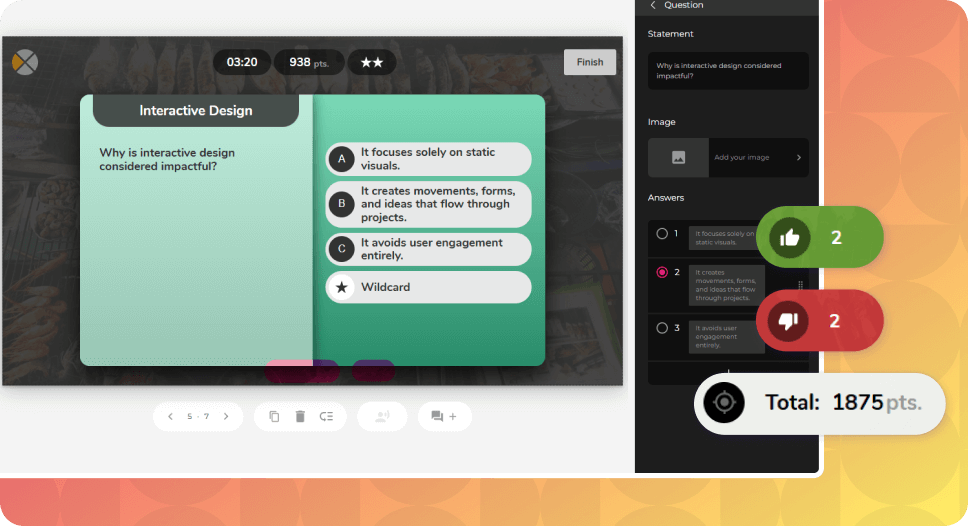
The practical solution is to design icebreakers as individual interactive activities with automated feedback. Authoring tools like isEazy Author include interactive elements — Swipe, Matching, Multiple Choice — that work perfectly in this context without requiring facilitator intervention.
An icebreaker should not be evaluated in isolation: its value lies in what it produces in the rest of the course. These are the metrics that allow you to assess whether the icebreaker is working:

Talking about icebreakers in e-learning is one thing, but what really matters to an instructional designer is knowing which tool to use and how to configure it. With isEazy Author, these are the elements you can use directly as activation dynamics at the start of a course — no coding, in a matter of minutes:
| Author interactive | How to use it as an icebreaker | Activation effect |
|---|---|---|
| Swipe | Show statements about the course topic. The learner swipes right if they think they are true, left if false, before seeing the content. | Activates critical thinking and surfaces pre-existing misconceptions |
| Match | Present key course terms and their definitions mixed up. The learner connects them before starting. Not an assessment — contextualisation. | Reduces cognitive barrier to new vocabulary |
| Order | Show the steps of a process in the wrong order. The learner tries to order them from prior knowledge. | Creates curiosity and commitment to the content that follows |
| ABC (multiple choice) | Pose a dilemma or provocative question about the topic before explaining anything. An incorrect answer carries no penalty. | Generates emotional engagement with a real situation before the theoretical content |
| Cards (flip cards) | Each card shows a concept on the front. The learner predicts the definition before flipping it. | Activates prior recall and prepares the brain to retain new information |
| Embedded Typeform | Embed a brief expectations survey (2-3 questions) directly on the first screen of the course. | Creates explicit learner commitment to the learning journey |
Imagine a course on occupational risk prevention. The first screen is not regulatory text: it’s a Swipe with 5 statements such as “Using a mobile phone during machinery operation is permitted if the call is brief” or “PPE is only mandatory if the supervisor is present”. The learner swipes without consequences. After finishing, they see how many they got right.
What does this achieve? The learner is already engaged, has made mistakes they want to correct and enters the content with an active question in mind. Completion rates for courses with this type of opening are consistently higher than those that begin with text or video without interaction.
This design applies to any topic: sales, safety, soft skills, product knowledge. The key is that the icebreaker uses content directly related to the course — not a generic warm-up.

A poorly designed icebreaker can have the opposite effect to what was intended: generating frustration, wasting time or feeling patronising to experienced learners. These are the most frequent mistakes in corporate training environments:
CASE STUDY
How World Kinect created interactive courses that captivated their entire team


Icebreakers in e-learning are not a decorative detail or a passing trend in instructional design. They are a concrete lever, backed by cognitive evidence and industry data, to improve engagement and completion rates from the very first seconds of the course.
The key is to choose the right dynamic for the type of training, integrate it coherently with the content that follows and make sure it works in the asynchronous format where the majority of corporate e-learning is consumed.
If you want to start designing courses with icebreakers integrated from the first screen, request a demo of isEazy Author and discover how to build learning experiences that learners won’t want to abandon.
An icebreaker in e-learning should last a maximum of 2 to 5 minutes. The goal is to activate attention and reduce initial friction, not to become an extended activity that pulls the learner away from the main content. In asynchronous courses, the most effective icebreakers are those that can be completed in under 3 minutes: a reflection question, a quick survey or a brief introduction activity. The shorter and more focused it is, the more likely the learner is to complete it and continue with the rest of the course.
Yes, icebreakers can be perfectly integrated into asynchronous e-learning courses, although they require a different design from synchronous formats. Instead of real-time group dynamics, asynchronous icebreakers are designed as individual interactive activities with automated feedback: multiple-choice questions, swipe activities, matching exercises or brief reflection prompts. The key is that the activity can be completed independently, at any time, without requiring the presence of other participants. Authoring tools like isEazy Author include interactive elements that work perfectly for this purpose.
Although they share the goal of increasing engagement, icebreakers and gamification are distinct strategies. An icebreaker is a one-off dynamic placed at the start of a course or module, whose purpose is to reduce the barrier to entry and activate learner motivation. Gamification, on the other hand, is a transversal strategy that applies game mechanics (points, badges, leaderboards, challenges) throughout the entire learning journey. In other words: the icebreaker is the starting point; gamification is the engine that maintains engagement throughout the course.
Most modern authoring tools and LMS platforms allow you to create icebreakers without any coding. In isEazy Author, for example, you can insert interactive elements on the first screen of a course — such as Swipe (the learner swipes statements as true or false), the Order exercise (the learner tries to sequence a process before seeing it explained), flip cards or multiple-choice questions — in just a few minutes, without technical knowledge. If your current tool does not support these interaction types natively, you can always embed a third-party form (such as a Typeform) on the first screen as a low-complexity alternative.

WEBINAR ONDEMAND
Games, exercises, and assessments automatically generated with isEazy Author’s AI.
Watch webinar

Create visual, interactive courses that drive real impact
Discover isEazy Author, the most intuitive authoring tool to turn your content into engaging and effective learning experiences.

Create visual, interactive courses that drive real impact
Discover isEazy Author, the most intuitive authoring tool to turn your content into engaging and effective learning experiences.