WHITEPAPER
Change the way you communicate with your team

Brain
The first AI trained to teach

Author
The #1 AI-powered authoring tool on the market

Factory
Custom e-learning content factory

Skills
Comprehensive power skills course catalog

LMS
All-in-one LMS platform with AI

Engage
App for managing frontline teams
Product

What is Brain?
Everything you need to know about the first AI trained to teach.

Learning agent: CompanionNew
Supports learners and answers their questions right inside the course, without breaking the audit trail.

How does it work?
Adaptive, conversational, and contextual. That’s learning with Brain.
FEATURES

AINew
Unlock your full potential and speed up course creation with artificial intelligence.

Accessibility
Automatically meet accessibility guidelines—without sacrificing interactivity!

Interactivity
Boost engagement with interactive, ready-to-use activities that make learning fun.

Course Creation
Reduce the time it takes to create your e-learning courses with our authoring tool.

Distribution
We offer you different distribution options, so that nothing can stop you.

SCORM
Publish your course in SCORM format and share it on any LMS.
SERVICES

Instrucional Design
Surprise your students with multimedia and interactive content.

Custom Courses
We create e-learning courses for you—tailored to your needs and hassle-free!

Virtual Reality
Turn learning into an immersive experience.

Custom Avatars
Give your courses and videos a unique touch with personalized avatars.

Audiovisual FactoryNew
Turn training into something dynamic and visual with engaging videos.
CATALOG

Course catalog
Over 600 skills and competency courses to help you adapt to your team's needs.
Microsoft Copilot AcademyNew
Your professionals will learn how to apply Copilot AI to key processes within your organization.

Artificial Intelligence Academy
Train your teams in the practical use of AI to boost productivity and innovation in your company.

Cybersecurity Academy
Capacita a tu empresa con el catálogo más completo en seguridad digital corporativa.

Use cases
Choose the solution that best fits your needs

Industries
Solutions for all types of industries
USE CASES

Onboarding
Facilitate the onboarding process, productivity and engagement of your new employees.

Upskilling
Boost your team's skills and prepare them for the challenges of the future with upskilling.

Microlearning
Discover all the advantages of microlearning and boost your training results.

Gamification
Enjoy addictive training that will get your professionals hooked.

Internal Communication
Improve communication in your company and enjoy an aligned and committed team.

Mobile learning
Agile, flexible, and interactive learning—built for today’s digital-first workforce.
INDUSTRIES

Banking and financial services
Training in compliance, cybersecurity, customer service, and key skills development.

Pharmaceuticals and healthcare
Digital onboarding, regulatory updates, and ongoing training for healthcare staff.

Retail and consumer
Agile and scalable training for in-store, operational, and customer service teams.

Industry and manufacturing
Training in processes, safety, and corporate culture for distributed teams.

Education and training
Digital solutions for training centers, internal academies, and corporate universities.

Technology and telecommunications
Development of technical talent, digital skills, and upskilling and reskilling programs.
CLIENTS

MAPFRE
How MAPFRE turn e-learning into sales with isEazy

Pepco
A personalised learning experience for a growing team.

BBVA
Digitisation and creation of high quality e-learning content.

Shiseido
We increase the engagement of the training with a social and gamified app.

Telefónica
Large-scale reskilling for the company's digital transformation.

Vodafone
A personalised learning experience for a growing team.
More than 1,000 companies already rely on isEazy.





MEET ISEAZY

Events
Discover our upcoming events and connect with the future of e-learning.

News
Find out the latest news about isEazy: press releases, partnerships, updates...

Contact
Leave us your personal details and we will contact you as soon as possible.
About isEazyNew
Find out more about our company.

Careers
We are looking for the best talent, join our team!

Partners
Become our partner and grow your business.
INTERESTING RESOURCES

Blog
The best content on e-learning: trends, tools and key strategies.

Whitepapers
Gain valuable insights and stay ahead of industry trends.

Product releases
The latest news and releases of our e-learning products and solutions.

Glossary
Definitions of the most commonly used terms and key industry concepts.

Guides
Discover the best step-by-step tips and tricks to optimize your L&D strategy.

Webinars
Video sessions on our products, trends and more

Comparatives
Compare e-learning solutions available on the market and choose the most suitable one.


WEBINAR
Master AI in isEazy Author in under an hour.




GUIDE
Prepare your organization to comply with the new AI regulations

Stay up to date with all our latest news
 Subscribe to our newsletter
 Stay up to date with all our latest news

October 14, 2026

CONTENT CREATED BY:

Table of contents
Internal communication is all the exchange of information, messages, ideas or knowledge between the members of an organization, including both informal conversations and official, strategic announcements. It covers every form of communication that can happen inside a company: vertical, top-down or the other way around, and horizontal, between peers at the same level. Its job is to educate, inform or motivate through internal channels.
Its importance lies in the fact that it makes it possible to align objectives and strategies, improve collaboration between departments, lift morale and foster a culture of transparency. But internal communication can fail quickly if it isn’t given the value it deserves, becoming the organization’s main Achilles heel: it generates misunderstandings, misinformation and a lack of cohesion, which ends up hitting productivity and the working environment. In this article you’ll see which types of internal communication exist, what tools are available for each one, how to choose the right one and how to measure whether it works.
When a company grows, opens new sites or has frontline teams, communication usually gets harder. All of a sudden “informing” is no longer enough and you have to achieve reach, understanding and action. This is where digital tools come in: they don’t just distribute messages, they let you measure impact, encourage participation and create conversation.
Employee engagement isn’t a soft indicator, and it’s getting worse. According to State of the Global Workplace from Gallup (2025), global engagement fell from 23% to 21% during 2024 —the second drop in twelve years— with an estimated cost of $438 billion in lost productivity. The most revealing figure for anyone running internal communication is where the drop was concentrated: among managers, who fell from 30% to 27%, while individual contributors held steady at 18%. In other words, the link that is supposed to pass the message on is the one that is most disconnected.
Digital tools help because they turn internal communication into something constant rather than occasional: news, micro-content, internal campaigns, participation, recognition and feedback. If you want to go deeper into that layer, here is the complete guide to employee engagement.
A typical problem in fast-growing companies: people receive messages through five different channels —email, Teams, WhatsApp, meetings, intranet— and in the end there is no clarity about what matters. Well-designed platforms let you:
The underlying problem usually isn’t the amount of communication, but the distance between what the company believes it is communicating and what the teams actually receive. That distance narrows when the channel lets you confirm receipt, segment by group and collect a response, instead of simply broadcasting.
The hidden cost of poor communication is rework: repeated tasks, badly informed decisions, disconnected processes. There is one figure that sizes it up well: according to the report The social economy from the McKinsey Global Institute (2012), an interaction worker —a skilled office profile— spent on average 28% of their working week managing email, and two-thirds of the potential value the report attributed to social technologies lay precisely in improving communication and collaboration. Microsoft keeps continuous track of these signals in its Work Trend Index.
When people don’t feel connected or don’t understand the vision, turnover rises. And replacing talent isn’t cheap. A well-implemented internal communication tool delivers:
For a project to move forward internally you usually have to justify it with ROI, or at least with a business case. The standard formula is:
ROI (%) = [(benefit – cost) / cost] × 100
And in internal communication, the benefits usually translate into:
A quick example: if your company has 500 employees and an internal communication tool cuts turnover by 1 to 2% a year, the saving usually already justifies a good part of the investment, depending on your cost per replacement. It’s an estimate, not a promise: the real number depends on that cost and on your starting rate, and it’s worth calculating with your own data before taking it to the board.
Almost all the figures circulating about internal communication are American, and the context isn’t the same. The Report on the state of internal communication from Dialenga (2022 edition), based on a survey of 443 HR and internal communication professionals in Spain and Latin America, gives a closer picture. And what it portrays isn’t a problem of tools, but of structure.
| What is measured | Figure | What it implies |
|---|---|---|
| Who runs internal communication | HR in 62% of companies; internal and external communication together in 17% | In most organizations it isn’t anyone’s main job, it’s an added function |
| Companies with a dedicated team | Only 14% | It explains why channels go cold: if publishing depends on someone with other priorities, the channel dies |
| Use of mobile apps as a channel | 16% of organizations | The channel that best solves access for teams without a computer is still a minority |
| Companies with no feedback mechanism at all | 29% | Almost a third communicate in one direction only, which is the origin of "they talk to us but they don’t listen" |
| Most used listening tools | Surveys (59%), suggestion box (33%), working groups (29%) | Listening, where it exists, is occasional and not continuous |
Not all internal communication is the same, and it shouldn’t all be handled through the same channel. Understanding the types helps a lot when choosing tools and formats.
This is the communication that goes from leadership or management to the teams. For example:
Key point: it has to be clear, consistent and measurable (reach plus readership).
This is the communication that travels from the teams up to the company. For example:
Key point: if there are no real channels for this, the company goes deaf. And as we saw above, 29% of organizations have none.
This happens between people and teams at the same level. For example:
Key point: this is where chat tools and collaborative channels perform best.
Alongside the types above, two other forms coexist and constantly complement each other: the formal, more structured and official, and the informal, more spontaneous and social. Understanding the difference matters because each serves a different purpose: while formal communication secures alignment and consistency, informal communication is what keeps the culture alive and sustains the daily connection between teams. The goal isn’t to choose one or the other, but to know when to use each and how to balance them.
| Aspect | Formal communication | Informal communication |
|---|---|---|
| What it looks like | Planned, official and corporate | Spontaneous, social and more human |
| Main objective | Inform, align and ensure consistency | Connect, reinforce culture and build closeness |
| Typical examples | Internal newsletter, official announcements, manuals and procedures, HR campaigns | Congratulations, team posts, comments, internal memes |
| When it works best | Major changes, strategic messages, policies | Day to day, climate, community, sense of belonging |
| Risks if misused | Cold, one-way, "nobody reads it" | Noise, lack of control, scattered attention |
The arrival of digital internal communication tools has been a big step for organizations: they make access to information far simpler and encourage active participation from employees. The report The social economy from the McKinsey Global Institute (2012) estimated that fully implementing social technologies could raise the productivity of interaction workers —skilled office profiles, including managers and professionals— by 20 to 25%. That figure deserves to be read carefully: it’s an estimated potential with full implementation, not a measured result, and it refers to one specific employee profile. Even with that caveat, it remains the sector’s most cited reference. These are the main categories of tools:
An intranet is an internal online platform that lets employees access documents, resources and internal announcements. It’s very similar to a website, but with access restricted to employees, and it is also used to distribute information about campaigns, events, notices and training resources. It has been popular for years, especially in larger organizations.
Email is one of the most traditional forms of communication and it remains relevant for written communication: important information, internal announcements, motivational messages and event invitations. It lets you share anything from plain text to images, infographics or documents.
Almost every company uses some video conferencing tool such as Zoom or Google Meet. They make it possible to hold face-to-face meetings across distance and time zones, which is especially valuable in remote teams. They are also the right format when the message is sensitive: an organizational change explained live, with questions, is interpreted far better than the same change sent by email.
Chat channels speed up real-time communication and are especially useful for quick questions and informal conversations. They break down distance and, used well, improve collaboration between teams.
Although these are platforms for organizing work, they also function as internal communication tools because they allow interaction between colleagues. Some of the most popular are Asana, Trello and Microsoft Teams, and all of them are useful for keeping team members informed and up to date on the progress or the changes in a shared project.

An internal social network works almost exactly like a conventional social network and takes advantage of the interaction habit those have created. They are spaces where communities form and, in this case, the community is the people in your company. They allow you to share information, encourage participation or run activities, with the advantage that the workforce is already used to that format, so the adoption curve is short. Their distinctive contribution is that they generate upward communication, which is exactly what tends to be missing.
The Dialenga survey on the state of internal communication already cited revealed that the companies performing best at communication had brought in channels that overcome the limitations of email, and that 16% of organizations were using mobile applications. That’s a low percentage for the channel that best solves access for people who don’t work at a computer, and that’s where the opportunity lies.

Right now, company apps are the best way to keep your team members connected, informed and in sync. Describing them only as internal communication tools falls short: the best ones offer training, communication, knowledge and task management in a single place.
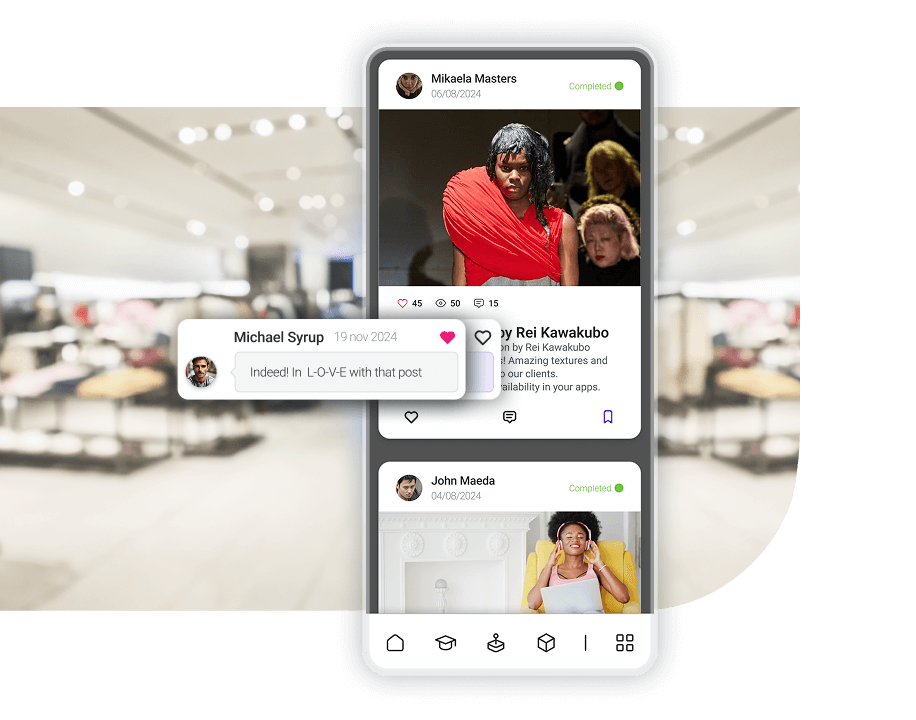
Company apps keep employees aligned and engaged, especially frontline workers or deskless staff, because they let them ask questions, clarify procedures and learn in the flow of work, bridging any distance.
Amara NZero is an example of this scenario: a group present in 11 countries with more than 1,800 employees that needed a direct channel to a very dispersed workforce and solved training and internal communication in a single social, gamified app. See the case study →
Not all tools serve the same purpose: some coordinate daily work, others communicate officially, others listen to the teams or reinforce culture and engagement. That’s why the norm is to combine several rather than relying on a single channel. This table sums up the full landscape of the category —including the specialized platforms that come up in any selection process— and below you’ll find the detail on the seven most common ones.
| Tool | What it is best for | Weak point |
|---|---|---|
| Microsoft Teams | Day-to-day operational coordination in companies already running on Microsoft 365 | It isn’t a corporate communication channel: it generates noise and announcements get lost |
| Slack | Channel-based messaging in digital companies, with plenty of integrations | Poorly suited to mass communication or to frontline groups |
| Google Chat / Spaces | Internal messaging if the company already works with Google Workspace | Less complete on advanced features than Slack or Teams |
| Internal email / newsletter | Official announcements and leadership messages to the whole workforce | A saturated channel: high reach but low real attention and almost no interaction |
| SharePoint and other intranets | Centralizing documentation, policies and corporate knowledge | Low recurrence: people only go in when they need to look something up |
| WhatsApp / Telegram | Urgent notices and immediate coordination, with instant adoption | No control, no corporate privacy, no segmentation and no metrics |
| Staffbase, Workvivo, Simpplr, Happeo | Specialized corporate internal communication: segmented announcements, newsletters and social intranet | They solve communication, but not training or task management; pricing usually on request |
| isEazy Engage | Distributed and frontline workforces: communication, training and tasks in a single mobile app | It doesn’t replace a corporate chat for day-to-day office coordination |
Microsoft Teams is a communication and collaboration tool included in Microsoft 365. It centralizes chats, team channels, meetings and files, which is why it is widely used as the base channel for operational coordination.
Slack is a channel-based internal messaging platform known for how quick it is and how easy it makes organizing conversations by project, topic or team. It is especially popular in digital companies because of its flexibility.
Google Chat is the internal messaging option within Google Workspace. It integrates naturally with Gmail, Drive and Calendar, which makes collaborative work easier.
Email is still one of the most used channels for official announcements, internal newsletters or leadership messages. It’s universal, but it’s also the most saturated channel.
Corporate intranets such as SharePoint are used to centralize official resources: documentation, internal policies, key links, processes and reference announcements.
Although they are not corporate tools designed for the job, many companies use WhatsApp or Telegram for quick notices, coordination or urgent communication.
isEazy Engage is an app designed to manage, connect and train frontline teams from a single place. Unlike other tools more oriented toward the office, it is built for organizations with distributed teams: stores, branches, franchises, logistics centers or professionals who don’t work at a computer.
Its approach is to bring together three pillars that normally sit apart: operations (tasks), communication (newsfeed and social channel) and training (micro-content). That allows an internal campaign or an organizational change to reach the ground quickly, with push notifications and content adapted to the real rhythm of the working day. On top of that it adds a social-network-style environment with likes, comments, surveys and chat, gamification to reinforce the habit of use, a document manager and an analytics module to measure reach, activity and training progress. The roles and permissions system is what makes segmentation possible: each employee receives what affects them and not generic noise.

Features
Benefits
Pricing
Flexible pricing model tailored to your company’s needs. Contact the isEazy Engage team for a personalized quote.
Features
Benefits
Pricing
Flexible pricing model tailored to your company’s needs. Contact the isEazy Engage team for a personalized quote.
Not all internal communication tools solve the same problem. Some are built to connect and align frontline teams, others focus on engagement and gamification, and others come from closer to training and learning management. So before choosing a solution, it’s worth understanding what each one brings and the context it fits best.
Centrical is a platform aimed at improving employee performance and engagement through gamification, microlearning and performance management. More than a pure internal communication tool, its proposition centers on motivating teams, reinforcing behaviors and aligning business objectives with recognition, feedback and continuous learning, especially in customer service, sales or contact center environments.

Features
Advantages
Pricing
Features
Advantages
Pricing
TalentLMS is a learning management system (LMS) focused on making online training management simple and flexible. Although it isn’t born as an internal communication tool in the strict sense, it can support learning-related communication thanks to its course, notification, tracking and user administration features. It’s an interesting option for organizations that above all need to structure and scale their digital training.

Features
Benefits
Technology, compatibility, and integration
Pricing
Features
Benefits
Technology, compatibility, and integration
Pricing
When choosing an internal communication tool, the two most common mistakes are deciding based on “what everyone else uses” or settling for whatever already exists in the company —Teams, email, intranet— even when it doesn’t really solve the problem.
So before comparing platforms, it’s worth asking a very simple question: what do you want to achieve with internal communication? Because looking for a channel for daily coordination isn’t the same as wanting to align frontline teams, launch measurable internal campaigns or reinforce culture and engagement. These are the criteria with the biggest impact on the decision:
This is criterion number one. If a significant part of the team doesn’t work at a computer, tools like the intranet or email lose their power. In those cases you need a mobile-first solution, with simple access and formats adapted to the daily routine: short content, notifications and quick interaction.
A good tool should make communication relevant. The bigger and more diverse the company, the more important it is to be able to segment by site, store, role, area, country, shift or language. If everybody receives everything, the inevitable happens: noise, disconnection and low readership.
Some companies only need to inform: announcements, policies, changes. But more and more organizations are after something else —conversation, feedback and participation— and in that case it pays to prioritize tools that allow comments, reactions, surveys, chats and collaborative activities, not just posts.
If you can’t measure, you can’t improve. And without data it’s hard to justify the investment to leadership. Before choosing, make sure the tool includes metrics for reach, read rate, interaction by group, CTR and adoption of internal campaigns.
A point that often gets forgotten: who is going to publish the content? In internal communication, if publishing takes effort, the channel goes cold. And this criterion weighs more than it seems: as we saw, only 14% of companies have a dedicated team, so in most of them publishing will fall to someone with other priorities. The tool has to let HR, training or the managers themselves publish easily and without depending on a technical team.
Many companies start out thinking about “sending internal news”, but before long they want segmented campaigns, onboarding, microlearning, gamification, recognition and analytics. It’s worth choosing a tool that won’t fall short when the project grows.
The criteria above are useful, but the practical question is a different one: which specific combination to put together. Almost no company solves its internal communication with a single tool, and how the functions get divided up depends above all on what the workforce looks like. This table is a starting point, not a recipe: what matters is that each channel has an explicit function assigned to it and that everybody knows what it is.
| Type of workforce | Recommended mix | The typical mistake |
|---|---|---|
| Fully office-based, under 100 people | Corporate chat for the day to day + email for the official stuff. Not much else is needed | Setting up an intranet nobody will visit, because the information fits in two channels |
| Office or hybrid, over 300 people | Chat + intranet for documentation + a segmented formal channel with read metrics | Using the chat as the corporate channel: announcements get lost in the scroll |
| Mostly frontline: stores, plant, field | Mobile app as the main channel, with push, segmentation and integrated training. Email stays for head office | Assuming the information gets through because "it’s on the intranet" |
| Multi-site, franchises or several countries | Mobile app with segmentation by site, role and language + a formal channel for leadership + a space for upward listening | Sending everything to everyone and ending up with a channel people mute |
| Any size, with no internal communication team | The minimum two people can sustain: one main channel, a fixed cadence and one read metric | Launching a powerful platform nobody has time to feed |

One of the most important shifts in modern internal communication is that it’s no longer just about informing, but about measuring whether the message arrives, is understood and produces action. And that only happens with clear KPIs. In practice, the most useful approach is to measure it at four levels: reach, consumption, interaction and impact.
They validate whether your channel is alive: monthly active users, reach by group (country, site, role, store) and percentage of the workforce reached. This is the decisive level if you have dispersed or frontline teams, because you can have plenty of posts and a tiny real reach if the channel isn’t properly rolled out.
Read or view rate, average reading time and CTR on internal links. A high CTR indicates relevant, well-targeted content; a low one is usually a segmentation or format problem, not a quantity problem.
Comments per post, likes or reactions, content shared and participation in surveys. They reflect real engagement rather than passive receipt, and when they grow the internal culture usually improves, because conversation and visibility between teams start to happen.
This is the level that connects communication with business results: adoption of internal initiatives (compliance, training, HR campaigns), fewer incidents caused by poor communication, how eNPS or climate evolves, and turnover in critical groups. This is the block that lets you defend the investment: when you can show that communication improves adoption, reduces incidents or affects turnover, the conversation stops being “comms” and becomes organizational performance.
| KPI | Rough threshold | Warning sign |
|---|---|---|
| % of workforce reached | >90% of the workforce with active access | <70% → the channel isn’t rolled out; it isn’t a content problem |
| Monthly active users | >60% of registered users | <30% → the channel is seen as irrelevant or hard to access |
| Read rate on key announcements | >50% within the first 7 days | <25% → review segmentation, headline and timing |
| CTR on internal links | >10% on content with a call to action | <3% → the content doesn’t connect with that group’s day to day |
| Interaction (comments, reactions, surveys) | >15% of those reached | <5% → the channel is a noticeboard, not a conversation |
| Adoption of internal initiatives | >80% on mandatory campaigns | <60% → the message arrives but isn’t understood as actionable |

Many projects fail not because of the technology, but because of how the strategy and the adoption are set up. These are the most common mistakes.
The first is choosing the tool because it’s fashionable or because IT recommends it, without taking into account how the workforce will actually use it. A platform can be technically excellent, but if it doesn’t fit the type of user —frontline teams without a computer, for example— it will end up underused.
Another frequent mistake is expecting a single tool to do everything: turning Teams into an intranet, WhatsApp into a corporate channel or email into a social network always ends in an inconsistent experience. There are also two extremes that keep coming up:
On top of that comes not segmenting: when everything is sent to everyone it creates noise and relevance drops. And the biggest of all, not measuring anything, because without metrics you can neither optimize nor justify the investment. Related to this, many companies forget to activate upward communication, which produces a very dangerous feeling: “they only talk to us, they don’t listen to us”. It isn’t a theoretical risk: 29% of the organizations surveyed by Dialenga had no feedback mechanism at all.
Now that you know the tools available and the criteria for choosing between them, the next step is deciding which mix fits your workforce. If a significant part of your team doesn’t work at a computer, that’s where isEazy Engage contributes most: it’s the app that keeps your employees aligned and engaged through a straightforward internal communication channel.
Your employees will find all the notifications, news, announcements and information they need day to day, along with social and collaborative features, as if it were their favorite social network. isEazy Engage is far more than a communication app: it brings together knowledge, training, communication and task management in a single place. And if what you need right now is to work on the strategy before the channel, here’s how to master your company’s internal communication step by step.
Internal communication is all the exchange of information, messages, ideas and knowledge between the members of an organization: from the official leadership announcement to the informal conversation between colleagues. It can be vertical, when it travels from leadership down to the teams or from the teams up to leadership, and horizontal, when it happens between people at the same level. It’s essential because it is the mechanism a company uses to align objectives, coordinate work across areas and sustain the culture. When it fails, it doesn’t fail visibly: it shows up as rework, badly informed decisions, initiatives that don’t get adopted and turnover in the worst-connected groups. That’s why it has stopped being treated as a “comms” matter and started being measured as organizational performance.
There is no single list, because each tool solves a different problem. For daily coordination there are corporate chats such as Microsoft Teams, Slack or Google Chat. For official communication, internal email and intranets like SharePoint. For informal communication, instant messaging, although using it without control has a cost in privacy and traceability. And for reaching distributed or frontline workforces, employee apps, which combine communication, training and task management on the phone. The norm isn’t to choose one, but to build a mix and assign each channel an explicit function. The most expensive mistake is trying to make a single tool do everything: turning Teams into an intranet or email into a social network always ends in an inconsistent experience.
They solve immediacy and distance, which are two problems no formal channel covers well. Video conferencing makes it possible to hold face-to-face conversations between remote teams or across time zones, and it’s the right format when the message is sensitive or needs nuance: an organizational change explained by email is interpreted worse than the same change explained live with questions. Internal chat speeds up quick queries and day-to-day operational coordination. That said, don’t confuse them with a corporate communication channel: in a chat, announcements get lost in the scroll, there is no real segmentation and no metric of who read what. They’re there to coordinate, not to communicate officially.
Because they solve the problem no other channel solves: reaching people who don’t work at a computer. In a store network, a logistics site or a field team, neither the intranet nor email works, simply because they never get opened. A mobile app with push notifications puts the information in people’s pockets, in the format and at the moment it can be consumed. Internal social networks add something different: they turn communication into conversation, with likes, comments and surveys, and they build on a habit the workforce already has. That participation layer is also what generates upward communication, which is what tends to be missing most. According to Dialenga’s 2022 report, only 16% of organizations were already using mobile apps as a channel, so there is still plenty of room there.
isEazy Engage is built for the specific case of distributed or frontline workforces: stores, branches, franchises, logistics centers or field staff. Its approach is to bring together in a single app three things that normally sit apart: communication, with a newsfeed and a social channel; operations, with task assignment; and training, in micro-content that can be consumed during the working day. That lets a campaign or a procedural change reach the ground quickly and with evidence that it arrived. It also includes segmentation by roles and permissions so each group only receives what affects them, a document manager, and analytics to measure reach, readership and interaction. To be straight about it, it doesn’t replace a corporate chat for office coordination: it solves the layer that Teams, email and the intranet leave uncovered.

Keep your employees aligned and engaged with isEazy.
Request a demoFree trial

Looking for an effective internal communication solution?
Change how you connect with your team. Support your employees with tools designed just for them


Looking for an effective internal communication solution?
Change how you connect with your team. Support your employees with tools designed just for them