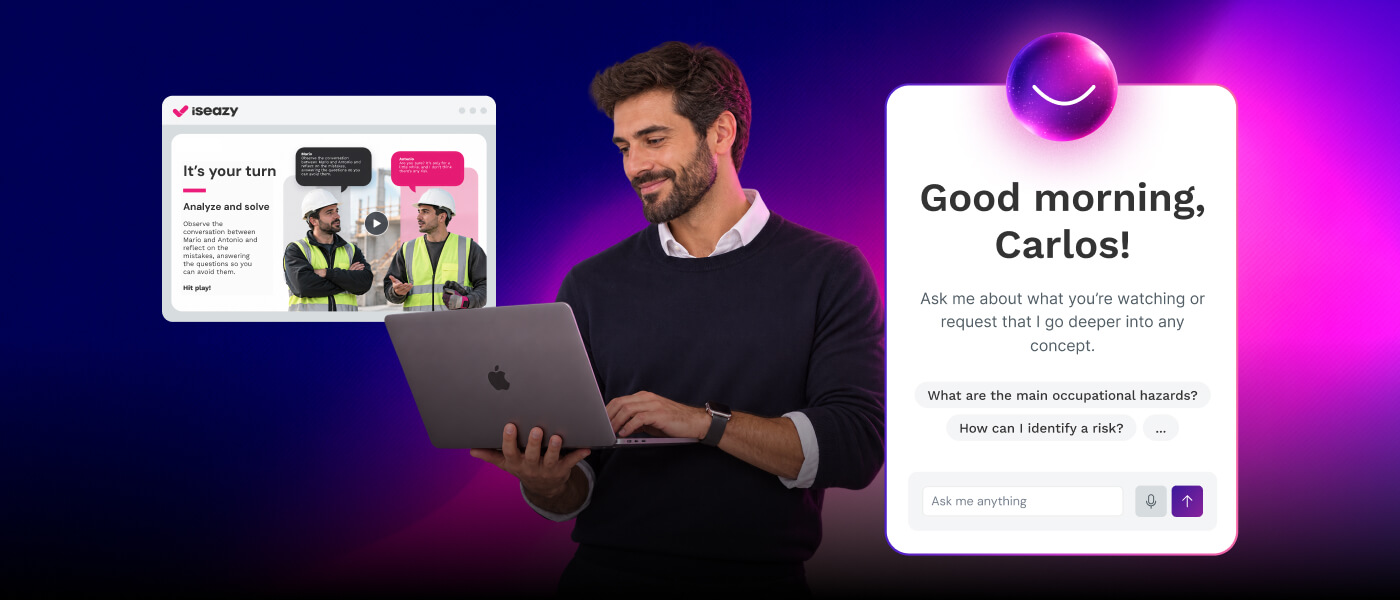
Educational digital tools are online applications, platforms and resources designed to improve teaching and learning in digital environments. In a business context, they allow training teams to create, distribute and measure the impact of corporate training at any scale.
In this guide you’ll learn what types of tools exist, what benefits they bring, how to choose the right ones for your organization and which trends will shape 2026, with practical examples and a comparison table.
Educational digital tools are technology solutions —LMS platforms, authoring tools, gamification apps, mobile platforms and content factories— that allow companies to design, distribute and measure corporate training in a scalable, flexible and measurable way.
x
Why innovation in education and technology matters
Educational digital tools represent a significant transformation in modern education, using technology to improve the quality, effectiveness and reach of learning.
Today, classrooms are no longer limited to a physical space: learning can extend to anywhere with an internet connection. This brings flexibility, enables hybrid education and makes it easier to respond to real needs, such as lack of time, geographical dispersion or the need for constant updating.
These tools also enrich teaching. Trainers and instructors have access to a wide variety of resources such as videos, interactive content, simulations or automated assessments, which improves understanding, motivation and learner participation.
Finally, their relevance grows in a context where technology skills are essential in the world of work. Being comfortable in digital environments, working with collaborative tools or building digital skills is no longer optional: it is a cross-cutting requirement in almost every sector.
Types of educational digital tools (with examples)
There is no single tool that covers every need. In fact, most educational institutions and companies combine several solutions depending on the type of learning they want to drive, the profile of their learners and the level of tracking required.
Below are the main types of educational digital tools in use today.
Learning management systems (LMS)
An LMS (Learning Management System) is the foundation on which digital training is organized: it lets you manage users, assign courses, automate enrollment campaigns, measure progress and generate reports. It is especially useful when learning has to scale to many people and needs full traceability.
Authoring tools (e-learning content creation)
Authoring tools are used to create e-learning courses from scratch or from existing materials. They let you add videos, simulations, interactive resources, exercises and assessments. They are essential when you need your own content and don’t want to depend on external providers every time.
Gamification tools
These tools turn learning into a more motivating experience through dynamics such as challenges, levels, rewards, rankings or points. They are very effective at boosting participation and improving knowledge retention.
Mobile training and communication apps and platforms
In environments with dispersed or frontline teams (retail, logistics, pharma…), a mobile app can be the most effective way to reach everyone, strengthen communication and deliver content in short formats.
When the goal is fully tailored content (brand, tone, business reality, internal use cases…), content factories let you outsource instructional design, creativity and production.
AI-based tools (Artificial Intelligence)
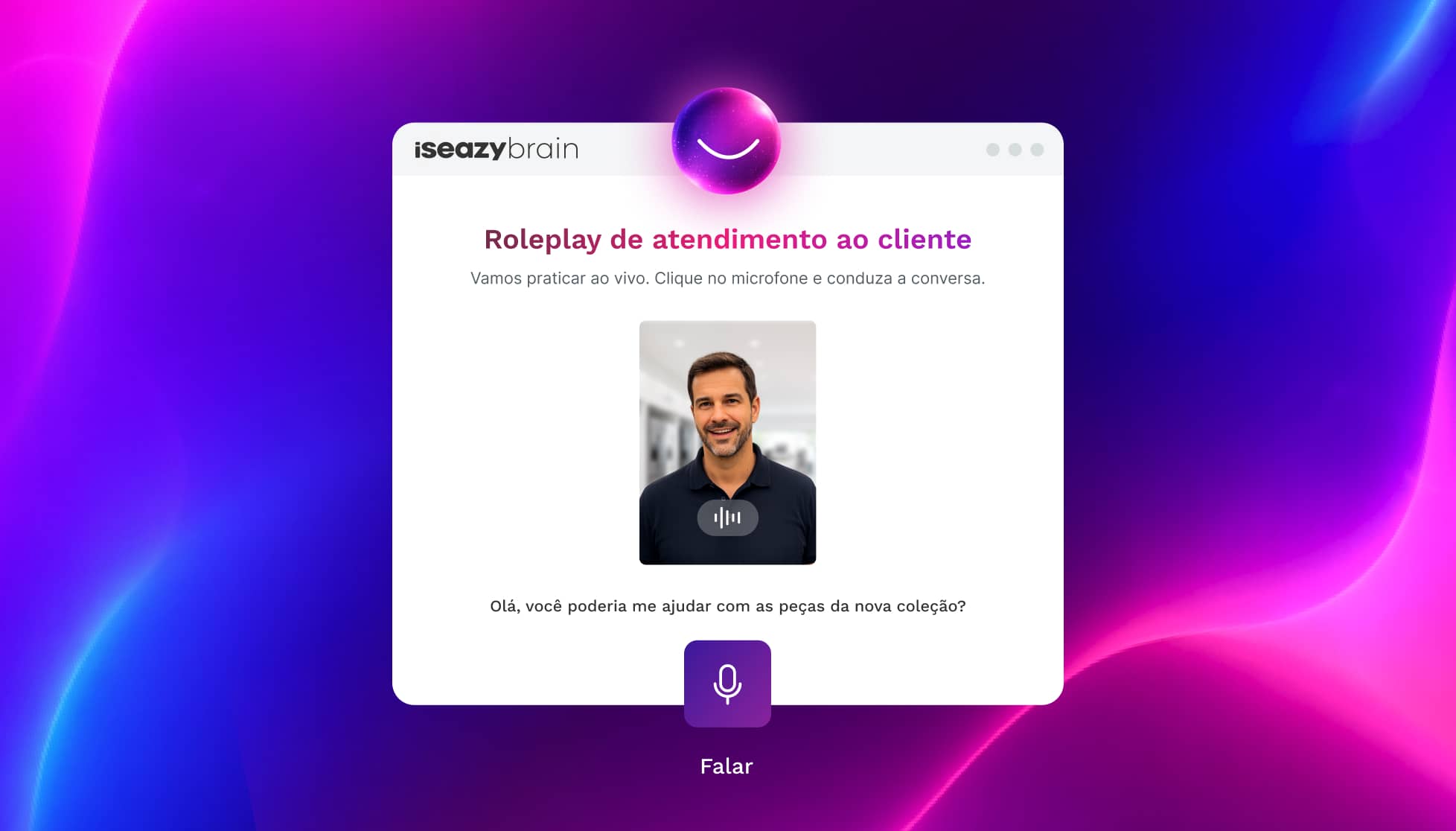
Artificial intelligence in education and training makes it possible to automate tasks that used to be time-consuming: content generation, adaptation to learner profiles, instant feedback, assessment, personalized learning paths, translation, voice-over and even learning engagement.
Benefits of educational digital tools
These tools deliver significant benefits for learners and trainers alike:
1. Personalized learning
They make it possible to adapt teaching to each learner’s individual needs. Many of them can identify areas of strength and weakness, serving up the specific exercises and resources each user needs.
2. Global access to knowledge
These tools provide access to a vast amount of information and online resources, breaking down geographical barriers and opening up access to global knowledge.
3. Interactivity and engagement
One of the most distinctive and important features of educational digital tools is interactivity. Visual elements, simulations and educational games make learning a more engaging and effective process.
4. Instant feedback
These tools give learners instant feedback on their performance, which allows them to correct mistakes and improve their understanding of key concepts.
5. Flexibility and accessibility
Another important advantage is flexibility around when and where learning takes place, which is especially valuable in areas such as distance learning.
How to choose educational digital tools (practical checklist)
Choosing educational digital tools isn’t about stacking up platforms without a strategy, but about building an ecosystem that makes teaching easier, improves the experience and lets you measure results.
Before deciding, it’s worth reviewing these points:
Training objective: onboarding, compliance, reinforcement, assessment, skills development?
Audience: children, university students, employees, frontline teams?
Learning format: long courses, microlearning, gamification, simulations, blended learning.
Support and maintenance: updates, support in your language, response times.
Best educational digital tools
Now that you know what educational digital tools are, why they matter and what benefits they bring, it’s time to look at the best educational digital tools on the market:
Learning management systems
Learning management systems, or LMS platforms, are the best way to simplify both the management and the distribution of training material. These platforms come with features that automate important tasks such as sending enrollment campaigns and reminders, processing data and generating reports.
isEazy LMS
The all-in-one LMS platform powered by AI
Features
Benefits
Subscription plans
Industries
Use cases
All-in-one AI-powered LMS: combines learning management and tracking, a library of over 600 ready-to-use courses, and an AI-powered authoring tool for creating proprietary content in one solution.
Engagement and collaboration: includes gamification, mobile learning, certificates, a knowledge library, social learning, and communication channels for sharing relevant news and content.
Integrations and compatibility: connects the LMS with other business tools through SSO, APIs, and custom integrations. It supports SCORM 1.2 and SCORM 2004.
End-to-end learning management: manages learners, groups, roles, permissions, courses, programs, and learning paths from one environment. It automates training campaigns and engagement actions and supports annual learning plans with dynamic filters by audience, department, or company. It can also support administrative requirements such as FUNDAE-funded training in Spain and DC3 and DC4 records in Mexico.
Analytics and reporting: turns learning data into actionable information through visual dashboards and detailed reports. Organizations can review activity, progress, and results by learner, department, audience, subsidiary, or company.
Learning experience: provides an intuitive, customizable interface with content cards for urgent, new, recommended, or pending courses. It also includes news, announcements, and an AI-powered recommender that helps learners discover relevant content.
Content library: provides unlimited access to over 600 ready-to-use courses covering leadership, compliance, soft skills, productivity, artificial intelligence, cybersecurity, and other key areas. Content is available in 8 languages, multiple formats, and is continuously updated.
Built-in AI authoring tool: enables teams to build courses from scratch or import PowerPoint presentations and turn them into interactive content. AI supports translations, voice-overs, subtitles, images, avatar videos, exercises, and final assessments. Courses can be exported in SCORM format.
One solution for the entire learning cycle: brings management, content creation, delivery, a ready-to-use course catalog, and measurement together in one system, reducing the need for separate tools at each stage.
Proven operational capacity: provides a modern environment that helps learners find, resume, and complete assigned training. Its track record includes more than 1.5 million users, 88 million training hours, 400 learning programs, and 94,000 learning activities.
Time and resource efficiency: automates campaigns, assignments, communications, reminders, and reporting, while its AI-powered authoring tool streamlines content creation and updates. Support, consulting, outsourcing, and LMS management services are also available.
Multi-device access: provides learning access from desktop computers, phones, and tablets. Its multi-format library, available in 8 languages, supports international learning programs.
Scalable and flexible: serves both small and medium-sized businesses and large enterprises, with segmentation by department, role, company, location, or audience and plans ranging from 100 learners to enterprise deployments.
Highly customizable: allows organizations to configure colors, logos, messages, login pages, domains, structures, permissions, and learning environments according to their brand and requirements.
International recognition: isEazy LMS was included in Training Industry’s 2025 Top LMS Companies Watch List and received eLearning Industry’s “Most Effective Implementation of AI for Talent Development and Management 2026” recognition.
Professional: up to 100 users, with unlimited courses, unlimited administrators, and unlimited learning environments.
Business: up to 200 users. Includes all Professional features and adds a dedicated manager dashboard.
Enterprise: from 201 users. Includes all Business features, communication channels, a BI reporting module, a dedicated Customer Success Manager, and custom integrations.
Included capabilities: all plans include support, automation, learning management tools, customization, learning experience features, gamification, mobile learning, certificates, reporting, a training catalog, and a course recommender.
Additional services: outsourcing, consulting, custom training, and Training as a Service can be added according to project requirements.
Banking and financial services: manages compliance, cybersecurity, customer service, sales training, and skills development programs for branches, networks, and corporate teams.
Pharmaceutical and healthcare: centralizes onboarding, regulatory updates, product training, and continuous learning for healthcare, sales, and corporate employees.
Retail and consumer goods: delivers agile, segmented learning to store employees, regional managers, sales networks, operations teams, and customer service staff.
Technology and telecommunications: develops technical and digital capabilities through continuous onboarding, certification, upskilling, and reskilling programs.
Manufacturing: manages training on processes, safety, quality, technical skills, and company culture for plants, factories, and distributed teams.
Transportation and logistics: centralizes onboarding, procedural updates, operational safety, and continuous training for drivers, warehouses, and logistics networks.
Consulting and professional services: supports knowledge updates, technical learning, onboarding, and skills development for project- and client-focused teams.
Education and training: manages training providers, internal academies, certification programs, and corporate universities from a customizable environment.
Government and public sector: supports the management, segmentation, and traceability of learning programs for public employees and complex government organizations.
Insurance: keeps sales networks, agents, and back-office teams up to date on regulations, products, processes, and commercial skills.
Energy: manages safety, regulatory, sustainability, operational, and technical learning for internal teams, contractors, and external networks.
Corporate academies: centralizes programs, learning paths, resources, communications, and learning communities to build an internal academy aligned with the organization’s goals and culture.
Onboarding: creates personalized welcome journeys, automates resource assignments, and ensures each new hire receives the required training from day one.
Mandatory training: manages health and safety, equality, compliance, and regulatory programs with automated assignments, certificates, reminders, and full traceability.
Talent development: creates programs and learning paths for different roles, departments, and responsibility levels to support upskilling and reskilling.
Product training: keeps sales teams, customers, partners, and distributors up to date with practical content about products, services, and procedures.
Skills development: combines LMS management with a library of over 600 courses covering leadership, communication, productivity, digital capabilities, and other professional skills.
Features
All-in-one AI-powered LMS: combines learning management and tracking, a library of over 600 ready-to-use courses, and an AI-powered authoring tool for creating proprietary content in one solution.
Engagement and collaboration: includes gamification, mobile learning, certificates, a knowledge library, social learning, and communication channels for sharing relevant news and content.
Integrations and compatibility: connects the LMS with other business tools through SSO, APIs, and custom integrations. It supports SCORM 1.2 and SCORM 2004.
End-to-end learning management: manages learners, groups, roles, permissions, courses, programs, and learning paths from one environment. It automates training campaigns and engagement actions and supports annual learning plans with dynamic filters by audience, department, or company. It can also support administrative requirements such as FUNDAE-funded training in Spain and DC3 and DC4 records in Mexico.
Analytics and reporting: turns learning data into actionable information through visual dashboards and detailed reports. Organizations can review activity, progress, and results by learner, department, audience, subsidiary, or company.
Learning experience: provides an intuitive, customizable interface with content cards for urgent, new, recommended, or pending courses. It also includes news, announcements, and an AI-powered recommender that helps learners discover relevant content.
Content library: provides unlimited access to over 600 ready-to-use courses covering leadership, compliance, soft skills, productivity, artificial intelligence, cybersecurity, and other key areas. Content is available in 8 languages, multiple formats, and is continuously updated.
Built-in AI authoring tool: enables teams to build courses from scratch or import PowerPoint presentations and turn them into interactive content. AI supports translations, voice-overs, subtitles, images, avatar videos, exercises, and final assessments. Courses can be exported in SCORM format.
Benefits
One solution for the entire learning cycle: brings management, content creation, delivery, a ready-to-use course catalog, and measurement together in one system, reducing the need for separate tools at each stage.
Proven operational capacity: provides a modern environment that helps learners find, resume, and complete assigned training. Its track record includes more than 1.5 million users, 88 million training hours, 400 learning programs, and 94,000 learning activities.
Time and resource efficiency: automates campaigns, assignments, communications, reminders, and reporting, while its AI-powered authoring tool streamlines content creation and updates. Support, consulting, outsourcing, and LMS management services are also available.
Multi-device access: provides learning access from desktop computers, phones, and tablets. Its multi-format library, available in 8 languages, supports international learning programs.
Scalable and flexible: serves both small and medium-sized businesses and large enterprises, with segmentation by department, role, company, location, or audience and plans ranging from 100 learners to enterprise deployments.
Highly customizable: allows organizations to configure colors, logos, messages, login pages, domains, structures, permissions, and learning environments according to their brand and requirements.
International recognition: isEazy LMS was included in Training Industry’s 2025 Top LMS Companies Watch List and received eLearning Industry’s “Most Effective Implementation of AI for Talent Development and Management 2026” recognition.
Subscription plans
Professional: up to 100 users, with unlimited courses, unlimited administrators, and unlimited learning environments.
Business: up to 200 users. Includes all Professional features and adds a dedicated manager dashboard.
Enterprise: from 201 users. Includes all Business features, communication channels, a BI reporting module, a dedicated Customer Success Manager, and custom integrations.
Included capabilities: all plans include support, automation, learning management tools, customization, learning experience features, gamification, mobile learning, certificates, reporting, a training catalog, and a course recommender.
Additional services: outsourcing, consulting, custom training, and Training as a Service can be added according to project requirements.
Industries
Banking and financial services: manages compliance, cybersecurity, customer service, sales training, and skills development programs for branches, networks, and corporate teams.
Pharmaceutical and healthcare: centralizes onboarding, regulatory updates, product training, and continuous learning for healthcare, sales, and corporate employees.
Retail and consumer goods: delivers agile, segmented learning to store employees, regional managers, sales networks, operations teams, and customer service staff.
Technology and telecommunications: develops technical and digital capabilities through continuous onboarding, certification, upskilling, and reskilling programs.
Manufacturing: manages training on processes, safety, quality, technical skills, and company culture for plants, factories, and distributed teams.
Transportation and logistics: centralizes onboarding, procedural updates, operational safety, and continuous training for drivers, warehouses, and logistics networks.
Consulting and professional services: supports knowledge updates, technical learning, onboarding, and skills development for project- and client-focused teams.
Education and training: manages training providers, internal academies, certification programs, and corporate universities from a customizable environment.
Government and public sector: supports the management, segmentation, and traceability of learning programs for public employees and complex government organizations.
Insurance: keeps sales networks, agents, and back-office teams up to date on regulations, products, processes, and commercial skills.
Energy: manages safety, regulatory, sustainability, operational, and technical learning for internal teams, contractors, and external networks.
Use cases
Corporate academies: centralizes programs, learning paths, resources, communications, and learning communities to build an internal academy aligned with the organization’s goals and culture.
Onboarding: creates personalized welcome journeys, automates resource assignments, and ensures each new hire receives the required training from day one.
Mandatory training: manages health and safety, equality, compliance, and regulatory programs with automated assignments, certificates, reminders, and full traceability.
Talent development: creates programs and learning paths for different roles, departments, and responsibility levels to support upskilling and reskilling.
Product training: keeps sales teams, customers, partners, and distributors up to date with practical content about products, services, and procedures.
Skills development: combines LMS management with a library of over 600 courses covering leadership, communication, productivity, digital capabilities, and other professional skills.
LearnWorlds
Designed for course creators and online academies
Features
Benefits
Subscription plans
Interactive course design: interactive videos, quizzes, surveys, custom certificates, and 200+ pre-built AI prompts to speed up content creation.
Artificial intelligence tools: AI assistant for content creation, automatic subtitle generation, course translation, and data analysis via the AI Insights Hub.
Website builder: page editor with customizable templates, custom domain, and white-label option to create learning portals with your own brand identity.
Integrations: with Zoom, Webex, Microsoft Teams, Mailchimp, ActiveCampaign, HubSpot, multiple payment gateways, and 50+ native integrations. API and SSO available from the Learning Center plan.
User management: user segmentation, custom roles, individual progress tracking, and group license management.
E-commerce: sell individual courses, subscriptions, bundles, and installment plans. Support for discounts, coupons, B2B sales, and affiliate programs.
Mobile app: custom-branded app with your own logo and colors to access courses from mobile devices.
Standards compliance: compatible with SCORM and LTI 1.3 to ensure interoperability with other systems.
Advanced interactivity: interactive videos with integrated quizzes, buttons, titles, and annotations to create dynamic learning experiences.
Full customization: white-label with custom domain, logo, and colors. Custom mobile app available from the Learning Center plan.
Process automation: automation engine for workflows based on learner behavior, available from the Learning Center plan.
Detailed analytics: advanced reports on progress, content consumption, course performance, and sales analytics from the Learning Center plan.
Multilingual support: site available in multiple languages via Weglot integration, with AI-powered automatic content translation.
Starter: $24/month. Unlimited paid courses, 3-page website, custom domain, AI tools, and 24/5 email support. Includes $5 per enrollment.
Pro Trainer: $79/month. No transaction fees. Adds unlimited free courses, learning programs, custom certificates, live sessions, subscriptions, affiliate management, and 20 SCORMs.
Learning Center: $249/month. No transaction fees. Adds AI interactive video, automations, custom user roles, API and webhooks, 3 SSO, advanced analytics, and 24/7 priority support.
High Volume & Corporate: custom pricing. Adds premium servers, multiple daily backups, custom number of admins, dedicated success manager, and 24/7 phone support.
30-day free trial available.
Features
Interactive course design: interactive videos, quizzes, surveys, custom certificates, and 200+ pre-built AI prompts to speed up content creation.
Artificial intelligence tools: AI assistant for content creation, automatic subtitle generation, course translation, and data analysis via the AI Insights Hub.
Website builder: page editor with customizable templates, custom domain, and white-label option to create learning portals with your own brand identity.
Integrations: with Zoom, Webex, Microsoft Teams, Mailchimp, ActiveCampaign, HubSpot, multiple payment gateways, and 50+ native integrations. API and SSO available from the Learning Center plan.
User management: user segmentation, custom roles, individual progress tracking, and group license management.
E-commerce: sell individual courses, subscriptions, bundles, and installment plans. Support for discounts, coupons, B2B sales, and affiliate programs.
Mobile app: custom-branded app with your own logo and colors to access courses from mobile devices.
Standards compliance: compatible with SCORM and LTI 1.3 to ensure interoperability with other systems.
Benefits
Advanced interactivity: interactive videos with integrated quizzes, buttons, titles, and annotations to create dynamic learning experiences.
Full customization: white-label with custom domain, logo, and colors. Custom mobile app available from the Learning Center plan.
Process automation: automation engine for workflows based on learner behavior, available from the Learning Center plan.
Detailed analytics: advanced reports on progress, content consumption, course performance, and sales analytics from the Learning Center plan.
Multilingual support: site available in multiple languages via Weglot integration, with AI-powered automatic content translation.
Subscription plans
Starter: $24/month. Unlimited paid courses, 3-page website, custom domain, AI tools, and 24/5 email support. Includes $5 per enrollment.
Pro Trainer: $79/month. No transaction fees. Adds unlimited free courses, learning programs, custom certificates, live sessions, subscriptions, affiliate management, and 20 SCORMs.
Learning Center: $249/month. No transaction fees. Adds AI interactive video, automations, custom user roles, API and webhooks, 3 SSO, advanced analytics, and 24/7 priority support.
High Volume & Corporate: custom pricing. Adds premium servers, multiple daily backups, custom number of admins, dedicated success manager, and 24/7 phone support.
30-day free trial available.
Authoring tools for creating interactive content
Another of the educational digital tools you need to get your training projects off the ground is an authoring tool. This is software that lets you create online training courses which you can then distribute through your LMS.
When choosing your authoring tool, make sure it lets you include resources that improve the learner experience, such as multimedia and interactive resources, exercises or games.
isEazy Author
The Leading AI Authoring Tool on the Market
Features
Benefits
Pricing
Accessibility
Awards
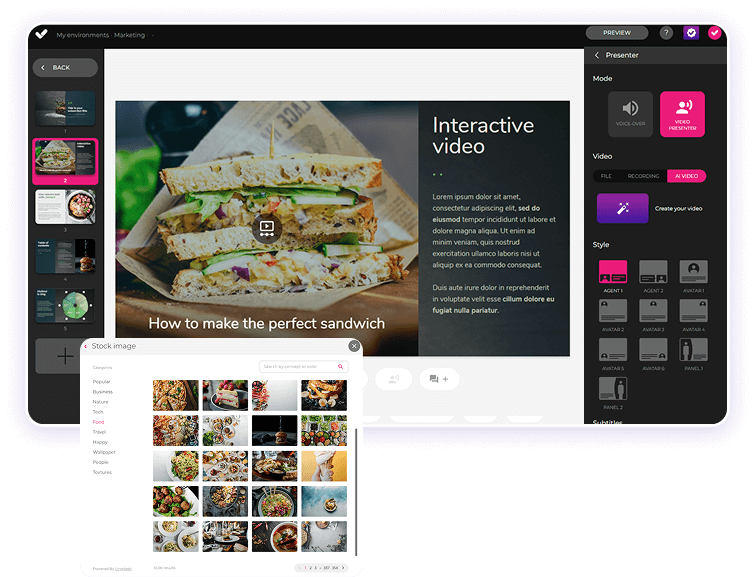
AI features: generate images, games and exercises, automatic subtitles, voiceovers, advanced interactive elements, avatars, and AI video presenters to bring your content to life.
AI Autopilot: automatic course creation from documents or ideas, with pedagogical structure, interactive resources, and applied visual identity. Transform any content into a publish-ready course in minutes.
Templates: over 25 ready-to-use interactive templates, editable and customizable with corporate colors, typography, and logo via the Smart Colors feature.
Drag-and-drop editor: visual editing to create courses with no technical, programming, or design knowledge required.
Automatic responsive design: courses adapt to any device without manual adjustments, with dual mode so each learner can access content in their preferred format.
Multi-format: export in SCORM 1.2, SCORM 2004, xAPI, and HTML5, compatible with any LMS on the market.
Automatic translation: full AI-powered course translation into over 40 languages, with no need for external translators.
Text to speech: professional voiceovers automatically generated from content, with selection of gender, language, and voice variation.
PowerPoint import: convert presentations into interactive e-learning courses in just a couple of clicks.
Real-time collaboration: simultaneous collaborative work on the same course with integrated comments, change tracking, and automatic saving with restore points.
Brand customization: styles, colors, typography, and logo to maintain corporate consistency across all content.
Gamification: points, badges, and leaderboards to motivate learners and increase engagement.
Assessments and quizzes: multiple question types and answer logic, with AI-powered automatic generation of final assessment tests based on course content.
Multimedia library: built-in bank of images, videos, icons, and graphic resources, with AI image generation adapted to your course style.
Integrations: connection with LMS platforms (SCORM, xAPI), external platforms, and management systems. A built-in learning environment is also available without leaving isEazy Author.
AI-powered: automates key creation tasks and drastically reduces production time. Over 36,000 users and 120,000 projects created in more than 90 countries speak for themselves.
Intuitive and visual interface: everything is edited intuitively with no learning curve, with pre-configured ready-to-use resources.
Real collaborative experience: distributed teams can work in parallel with real-time feedback, ideal for content factories and L&D teams.
Total flexibility: ideal for both occasional creators and large-scale production teams. Compatible with any LMS and 100% cloud-based.
Visual and professional courses: no designers or developers needed, with quality results recognized by Training Industry and eLearning Industry 2026.
Cost savings: less need for external resources and greater efficiency in content creation. Calculate your savings with the AI Autopilot ROI calculator.
Constantly evolving: new features released regularly and agile multilingual support, with real accessibility up to WCAG level AA and 80% of level AAA.
FREE plan: free forever. Ideal for exploring the tool with no commitment.
Professional: from €80/month. 1 author and up to 5 GB of storage.
Business: from €208/month. 2 authors and up to 12 GB of storage. The most popular plan.
Enterprise: custom authors and storage. Contact us for pricing.
Real standards compliance: courses compatible with level AA (100%) and up to 80% of level AAA of the Web Content Accessibility Guidelines (WCAG), and with Section 508 of the U.S. Rehabilitation Act.
Dual mode: create a single SCORM course and your learners can access it in their preferred mode, with or without accessibility adaptations, without duplicating production work.
Accessible interactive elements: all interactive resources in isEazy Author are designed to provide the same learning experience to all learners, regardless of their needs.
Contextual editor guidance: tips and guides built into the editor so any author can create quality accessible content easily, with no prior technical knowledge required.
Without sacrificing design or interactivity: accessibility in isEazy Author does not mean compromising visual impact or content richness. Accessible, attractive, and effective courses all at once.
Training Industry 2026: Top 20 AI Content Creation.
eLearning Industry 2026: Best AI-Powered Authoring Tool and Learning & Skills Development.
Training Industry 2025: Top 20 AI Content Creation.
eLearning Industry 2025: Best e-Learning Authoring Tool.
Brandon Hall 2024: Excellence Awards.
eLearning Industry 2024: Best Game Design and AI Watchlist.
G2 2024: Momentum Leader, High Performer, and High Performer Mid-Market.
Crozdesk 2024: Quality Choice, Trusted Vendor, and Happiest Users.
Software Advice 2024: FrontRunners.
Software Suggest 2024: Category Leader.
Features
AI features: generate images, games and exercises, automatic subtitles, voiceovers, advanced interactive elements, avatars, and AI video presenters to bring your content to life.
AI Autopilot: automatic course creation from documents or ideas, with pedagogical structure, interactive resources, and applied visual identity. Transform any content into a publish-ready course in minutes.
Templates: over 25 ready-to-use interactive templates, editable and customizable with corporate colors, typography, and logo via the Smart Colors feature.
Drag-and-drop editor: visual editing to create courses with no technical, programming, or design knowledge required.
Automatic responsive design: courses adapt to any device without manual adjustments, with dual mode so each learner can access content in their preferred format.
Multi-format: export in SCORM 1.2, SCORM 2004, xAPI, and HTML5, compatible with any LMS on the market.
Automatic translation: full AI-powered course translation into over 40 languages, with no need for external translators.
Text to speech: professional voiceovers automatically generated from content, with selection of gender, language, and voice variation.
PowerPoint import: convert presentations into interactive e-learning courses in just a couple of clicks.
Real-time collaboration: simultaneous collaborative work on the same course with integrated comments, change tracking, and automatic saving with restore points.
Brand customization: styles, colors, typography, and logo to maintain corporate consistency across all content.
Gamification: points, badges, and leaderboards to motivate learners and increase engagement.
Assessments and quizzes: multiple question types and answer logic, with AI-powered automatic generation of final assessment tests based on course content.
Multimedia library: built-in bank of images, videos, icons, and graphic resources, with AI image generation adapted to your course style.
Integrations: connection with LMS platforms (SCORM, xAPI), external platforms, and management systems. A built-in learning environment is also available without leaving isEazy Author.
Benefits
AI-powered: automates key creation tasks and drastically reduces production time. Over 36,000 users and 120,000 projects created in more than 90 countries speak for themselves.
Intuitive and visual interface: everything is edited intuitively with no learning curve, with pre-configured ready-to-use resources.
Real collaborative experience: distributed teams can work in parallel with real-time feedback, ideal for content factories and L&D teams.
Total flexibility: ideal for both occasional creators and large-scale production teams. Compatible with any LMS and 100% cloud-based.
Visual and professional courses: no designers or developers needed, with quality results recognized by Training Industry and eLearning Industry 2026.
Cost savings: less need for external resources and greater efficiency in content creation. Calculate your savings with the AI Autopilot ROI calculator.
Constantly evolving: new features released regularly and agile multilingual support, with real accessibility up to WCAG level AA and 80% of level AAA.
Pricing
FREE plan: free forever. Ideal for exploring the tool with no commitment.
Professional: from €80/month. 1 author and up to 5 GB of storage.
Business: from €208/month. 2 authors and up to 12 GB of storage. The most popular plan.
Enterprise: custom authors and storage. Contact us for pricing.
Accessibility
Real standards compliance: courses compatible with level AA (100%) and up to 80% of level AAA of the Web Content Accessibility Guidelines (WCAG), and with Section 508 of the U.S. Rehabilitation Act.
Dual mode: create a single SCORM course and your learners can access it in their preferred mode, with or without accessibility adaptations, without duplicating production work.
Accessible interactive elements: all interactive resources in isEazy Author are designed to provide the same learning experience to all learners, regardless of their needs.
Contextual editor guidance: tips and guides built into the editor so any author can create quality accessible content easily, with no prior technical knowledge required.
Without sacrificing design or interactivity: accessibility in isEazy Author does not mean compromising visual impact or content richness. Accessible, attractive, and effective courses all at once.
Awards
Training Industry 2026: Top 20 AI Content Creation.
eLearning Industry 2026: Best AI-Powered Authoring Tool and Learning & Skills Development.
Training Industry 2025: Top 20 AI Content Creation.
eLearning Industry 2025: Best e-Learning Authoring Tool.
Brandon Hall 2024: Excellence Awards.
eLearning Industry 2024: Best Game Design and AI Watchlist.
G2 2024: Momentum Leader, High Performer, and High Performer Mid-Market.
Crozdesk 2024: Quality Choice, Trusted Vendor, and Happiest Users.
Software Advice 2024: FrontRunners.
Software Suggest 2024: Category Leader.
Gomo
Features
Benefits
Pricing
Cloud-based authoring: access from anywhere with no installation required. Always automatically updated, with no software update interruptions.
Responsive design: courses automatically adapt to mobile, tablet, and desktop, with accessibility support and region-based content controls.
Multilingual management: create and manage versions in over 160 languages and dialects from a single project, with right-to-left language support and automatic AI translation or XLIFF file export and import.
Template and theme library: facilitates visually consistent brand design, with themes customizable by logo and corporate colors, and a custom theme development option.
Multi-channel publishing: distribute content via SCORM, xAPI, web, and app, with optional connection to Bridge LMS as a learning management platform.
Real-time collaboration: simultaneous editing by multiple team members, with integrated review and comment features.
Built-in AI: text generation, content review, and automatic translation via OpenAI integration.
100% cloud-based: eliminates local software dependencies and facilitates remote work, always running the latest version with no IT team intervention required.
Ideal for global teams: simplifies translation and maintenance of localized versions in over 160 languages from a single base course.
Mobile-first design: ensures a great learning experience on all devices, with content variables adaptable by learner role or location.
Flexible publishing: use courses in an LMS, on the web, or in custom apps, with a 21-day free trial available for Small and Medium plans.
Small: for independent authors. 21-day free trial available.
Medium: for teams of 4 or more authors, with the option to add additional users.
Enterprise: for large teams or companies needing greater flexibility and features. Minimum 12-month contract for all plans.
Pricing available on request in USD, GBP, and EUR.
Features
Cloud-based authoring: access from anywhere with no installation required. Always automatically updated, with no software update interruptions.
Responsive design: courses automatically adapt to mobile, tablet, and desktop, with accessibility support and region-based content controls.
Multilingual management: create and manage versions in over 160 languages and dialects from a single project, with right-to-left language support and automatic AI translation or XLIFF file export and import.
Template and theme library: facilitates visually consistent brand design, with themes customizable by logo and corporate colors, and a custom theme development option.
Multi-channel publishing: distribute content via SCORM, xAPI, web, and app, with optional connection to Bridge LMS as a learning management platform.
Real-time collaboration: simultaneous editing by multiple team members, with integrated review and comment features.
Built-in AI: text generation, content review, and automatic translation via OpenAI integration.
Benefits
100% cloud-based: eliminates local software dependencies and facilitates remote work, always running the latest version with no IT team intervention required.
Ideal for global teams: simplifies translation and maintenance of localized versions in over 160 languages from a single base course.
Mobile-first design: ensures a great learning experience on all devices, with content variables adaptable by learner role or location.
Flexible publishing: use courses in an LMS, on the web, or in custom apps, with a 21-day free trial available for Small and Medium plans.
Pricing
Small: for independent authors. 21-day free trial available.
Medium: for teams of 4 or more authors, with the option to add additional users.
Enterprise: for large teams or companies needing greater flexibility and features. Minimum 12-month contract for all plans.
Pricing available on request in USD, GBP, and EUR.
Gamification platforms
Gamification has proven to be a powerful way to increase knowledge retention and boost motivation. So what better educational tool than a gamification app that turns training into a unique and stimulating experience?
isEazy Game
The gamification app your team won't want to stop learning with
Features
Benefits
Subscription plans
Use cases
Game creation (individual, team vs. team, multiplayer). Turn any training content into an addictive quiz that multiplies your training results by 10.
Quizzes with all types of multimedia questions: text, audio, video, images, and 13 different content types to suit any learning objective.
Challenges and knowledge contests to keep your team motivated and constantly improving.
Rankings, levels, and achievements (rewards and prizes) fully customizable to drive healthy competition and engagement.
Dashboard and analytics panel with complete metrics: participation, access, progress, activities, and more. Includes a knowledge radar to track each professional’s level before and after the game.
Progress reports and analysis by knowledge category, to identify strengths and areas for improvement for each professional.
Social and collaborative app (chat, push notifications, comments, collaboration, likes) that turns learning into a shared, connected experience.
Customization (colors, logos, avatars, icons, corporate branding). The app adapts 100% to your brand image and needs.
All types of questions, audio, video, images, etc. to create rich and varied learning experiences.
Mobile access, so your professionals can play and learn from anywhere, at any time.
Real-time feedback, so participants know their results instantly and reinforce their learning.
Ease of use, no technical knowledge required to create and launch corporate games in minutes. Ready in a maximum of 15 business days.
Smart search to find content and activities instantly.
Customer area and dedicated support to accompany you at every step.
Multiple languages (over 23 languages), to reach global teams without barriers.
Multiple uses (training, sales, corporate culture): up to 98% engagement and 90% course completion.
Professional: up to 50 users. 1 game, 100 questions, 1 language, and standard customization (logo and colors).
Business: up to 250 users. 1 game, unlimited questions and languages, and advanced customization. The most popular plan.
Enterprise: from 251 users. Multiple games, all Business plan features plus: custom app in app stores, management autonomy, user integration and SSO, manager dashboards, and an onboarding training session.
All plans include: levels and rankings, push notifications, knowledge challenges, help center and support, progress reports, 13 content types (audio, image, video, quizzes, games…), analysis by knowledge category, and custom help screens.
Employee training: turn your training content into addictive games with rankings, challenges, and rewards. Achieve up to 98% engagement and up to 90% course completion among your professionals.
Sales team enablement: keep your sales network always up to date and motivated. Reinforce product knowledge, sales techniques, and key messaging in a dynamic and competitive way.
Corporate culture: drive a sense of belonging and reinforce your company’s values through collaborative game experiences. Turn your employees into the protagonists and ambassadors of your organization.
Features
Game creation (individual, team vs. team, multiplayer). Turn any training content into an addictive quiz that multiplies your training results by 10.
Quizzes with all types of multimedia questions: text, audio, video, images, and 13 different content types to suit any learning objective.
Challenges and knowledge contests to keep your team motivated and constantly improving.
Rankings, levels, and achievements (rewards and prizes) fully customizable to drive healthy competition and engagement.
Dashboard and analytics panel with complete metrics: participation, access, progress, activities, and more. Includes a knowledge radar to track each professional’s level before and after the game.
Progress reports and analysis by knowledge category, to identify strengths and areas for improvement for each professional.
Social and collaborative app (chat, push notifications, comments, collaboration, likes) that turns learning into a shared, connected experience.
Benefits
Customization (colors, logos, avatars, icons, corporate branding). The app adapts 100% to your brand image and needs.
All types of questions, audio, video, images, etc. to create rich and varied learning experiences.
Mobile access, so your professionals can play and learn from anywhere, at any time.
Real-time feedback, so participants know their results instantly and reinforce their learning.
Ease of use, no technical knowledge required to create and launch corporate games in minutes. Ready in a maximum of 15 business days.
Smart search to find content and activities instantly.
Customer area and dedicated support to accompany you at every step.
Multiple languages (over 23 languages), to reach global teams without barriers.
Multiple uses (training, sales, corporate culture): up to 98% engagement and 90% course completion.
Subscription plans
Professional: up to 50 users. 1 game, 100 questions, 1 language, and standard customization (logo and colors).
Business: up to 250 users. 1 game, unlimited questions and languages, and advanced customization. The most popular plan.
Enterprise: from 251 users. Multiple games, all Business plan features plus: custom app in app stores, management autonomy, user integration and SSO, manager dashboards, and an onboarding training session.
All plans include: levels and rankings, push notifications, knowledge challenges, help center and support, progress reports, 13 content types (audio, image, video, quizzes, games…), analysis by knowledge category, and custom help screens.
Use cases
Employee training: turn your training content into addictive games with rankings, challenges, and rewards. Achieve up to 98% engagement and up to 90% course completion among your professionals.
Sales team enablement: keep your sales network always up to date and motivated. Reinforce product knowledge, sales techniques, and key messaging in a dynamic and competitive way.
Corporate culture: drive a sense of belonging and reinforce your company’s values through collaborative game experiences. Turn your employees into the protagonists and ambassadors of your organization.
Kahoot
Features
Advantages
Plans and pricing
Live sessions and self-paced activities: users can host real-time games or assign activities for participants to complete within a specified deadline.
Results reports: provides data on participation, correct answers, unanswered questions, scores, and individual results. Report availability depends on the selected plan.
Different test formats: users can combine quizzes, true-or-false questions, and other interactive formats. Available question types vary by plan.
Individual and group kahoots: supports individual activities, live sessions, and team-based game modes.
Leaderboards and podium: displays participant scores and rankings during the activity and shows a final podium when the game ends.
Content cloning and duplication: users can create an editable copy of their own kahoots or certain public kahoots shared by other users.
Social and collaborative area: teams can share, organize, and edit content in collaborative workspaces, as well as distribute updates and internal communication resources through certain business solutions.
AI-assisted generator: creates questions and content from a topic or source material. Availability and supported source formats depend on the selected plan.
Access to shared content: users can search for publicly shared kahoots created by other users, use them as inspiration, or duplicate them when the creator’s settings allow it.
Easy participant access: the administrator or creator launches the activity, and participants can join using a PIN, direct link, or QR code from a browser or the mobile app. Downloading the app is not required.
Multimedia content: supports different question formats, videos, and images to create interactive activities.
Multiple languages: the interface is available in several languages, and users can create questions and content for international teams.
Ease of use: its visual editor is designed to create, duplicate, and launch activities without advanced technical knowledge.
Multiple use cases: it can be used for training, sales, meetings, presentations, internal communications, and customer service activities.
Kahoot! 360 Pro Start: USD 19 per month per presenter, billed annually at USD 228.
Kahoot! 360 Pro Standard: standard price of USD 29 per month per presenter, billed annually at USD 348.
Kahoot! 360 Pro Plus: USD 49 per month per presenter, billed annually at USD 588.
Kahoot! 360 Pro Max: standard price of USD 79 per month per presenter, billed annually at USD 948.
Kahoot! 360 Pro Ultra: standard price of USD 99 per month per presenter, billed annually at USD 1,188.
Kahoot! 360 for Enterprises: a solution for organizations that require multiple licenses, centralized administration, and tailored terms. Pricing is available upon request.
Licensing model: professional plans require a separate license for each person who creates, presents, or assigns kahoots. Participants joining with a PIN do not need an account or license.
Pricing terms: professional plans are available with annual billing. Prices exclude VAT or applicable taxes and may vary by country, currency, and current promotions.
Features
Live sessions and self-paced activities: users can host real-time games or assign activities for participants to complete within a specified deadline.
Results reports: provides data on participation, correct answers, unanswered questions, scores, and individual results. Report availability depends on the selected plan.
Different test formats: users can combine quizzes, true-or-false questions, and other interactive formats. Available question types vary by plan.
Individual and group kahoots: supports individual activities, live sessions, and team-based game modes.
Leaderboards and podium: displays participant scores and rankings during the activity and shows a final podium when the game ends.
Content cloning and duplication: users can create an editable copy of their own kahoots or certain public kahoots shared by other users.
Social and collaborative area: teams can share, organize, and edit content in collaborative workspaces, as well as distribute updates and internal communication resources through certain business solutions.
AI-assisted generator: creates questions and content from a topic or source material. Availability and supported source formats depend on the selected plan.
Advantages
Access to shared content: users can search for publicly shared kahoots created by other users, use them as inspiration, or duplicate them when the creator’s settings allow it.
Easy participant access: the administrator or creator launches the activity, and participants can join using a PIN, direct link, or QR code from a browser or the mobile app. Downloading the app is not required.
Multimedia content: supports different question formats, videos, and images to create interactive activities.
Multiple languages: the interface is available in several languages, and users can create questions and content for international teams.
Ease of use: its visual editor is designed to create, duplicate, and launch activities without advanced technical knowledge.
Multiple use cases: it can be used for training, sales, meetings, presentations, internal communications, and customer service activities.
Plans and pricing
Kahoot! 360 Pro Start: USD 19 per month per presenter, billed annually at USD 228.
Kahoot! 360 Pro Standard: standard price of USD 29 per month per presenter, billed annually at USD 348.
Kahoot! 360 Pro Plus: USD 49 per month per presenter, billed annually at USD 588.
Kahoot! 360 Pro Max: standard price of USD 79 per month per presenter, billed annually at USD 948.
Kahoot! 360 Pro Ultra: standard price of USD 99 per month per presenter, billed annually at USD 1,188.
Kahoot! 360 for Enterprises: a solution for organizations that require multiple licenses, centralized administration, and tailored terms. Pricing is available upon request.
Licensing model: professional plans require a separate license for each person who creates, presents, or assigns kahoots. Participants joining with a PIN do not need an account or license.
Pricing terms: professional plans are available with annual billing. Prices exclude VAT or applicable taxes and may vary by country, currency, and current promotions.
Training, communication and management apps
Among educational digital tools, employee apps are one of the most effective modern training solutions.
isEazy Engage
The app to manage, connect, and train your frontline teams
Features
Benefits
Pricing
Task management: ultra-simple task creation and assignment, real-time campaign planning and deployment, progress tracking at each location, and instant validation and feedback.
Instant communication: interactive newsfeed, push notifications, chats and surveys, likes and comments. Launch your own communication channel to keep all your teams aligned with campaigns, promotions, and company news.
On-the-go training: training microbursts, knowledge library, games and challenges, and training tracking. Agile and engaging training adapted to the daily workflow of frontline teams.
Analytics: comprehensive dashboard with key metrics on tasks, communication, and training. Access detailed reports instantly or schedule them to make strategic decisions in real time.
Document manager: all documentation in one place, organized by areas, folders, or tags and available at every professional’s fingertips.
Gamification: points, rankings, and rewards every time employees review a document, interact with content, or take part in a game.
Collaborative environment: employees can create and share their own content, adding images, videos, and all types of external resources.
Roles and permissions: restrict visibility of content, announcements, and tasks through role and permission settings by department, region, or profile.
Integrated Artificial Intelligence: manage your project more easily and find any content in seconds, even within your multimedia resources.
Everything in one place: operational management, instant communication, and on-the-go training centralized in a single app, with no need for multiple tools.
Always-aligned teams: keep all your frontline professionals up to date with everything happening in your business, from campaigns and promotions to internal procedures.
Multi-location management: supervise teams and tasks across multiple stores or franchises from a single platform, with real-time visibility of all operations.
Higher engagement and knowledge retention: the combination of training and gamification has achieved over 90% knowledge retention for clients like Shiseido.
Full customization: set up the app with your corporate identity and segment content, communications, and tasks by department, region, or employee profile.
Real-time decisions: a comprehensive dashboard that lets you visualize key metrics and access detailed reports on team performance whenever you need them.
Built for frontline workers: 80% of today’s workforce are frontline workers. 78% prefer mobile to access information, and 68% consume content better through microbursts that fit their daily pace.
Flexible pricing model tailored to your company’s needs. Contact the isEazy Engage team for a personalized quote.
Features
Task management: ultra-simple task creation and assignment, real-time campaign planning and deployment, progress tracking at each location, and instant validation and feedback.
Instant communication: interactive newsfeed, push notifications, chats and surveys, likes and comments. Launch your own communication channel to keep all your teams aligned with campaigns, promotions, and company news.
On-the-go training: training microbursts, knowledge library, games and challenges, and training tracking. Agile and engaging training adapted to the daily workflow of frontline teams.
Analytics: comprehensive dashboard with key metrics on tasks, communication, and training. Access detailed reports instantly or schedule them to make strategic decisions in real time.
Document manager: all documentation in one place, organized by areas, folders, or tags and available at every professional’s fingertips.
Gamification: points, rankings, and rewards every time employees review a document, interact with content, or take part in a game.
Collaborative environment: employees can create and share their own content, adding images, videos, and all types of external resources.
Roles and permissions: restrict visibility of content, announcements, and tasks through role and permission settings by department, region, or profile.
Integrated Artificial Intelligence: manage your project more easily and find any content in seconds, even within your multimedia resources.
Benefits
Everything in one place: operational management, instant communication, and on-the-go training centralized in a single app, with no need for multiple tools.
Always-aligned teams: keep all your frontline professionals up to date with everything happening in your business, from campaigns and promotions to internal procedures.
Multi-location management: supervise teams and tasks across multiple stores or franchises from a single platform, with real-time visibility of all operations.
Higher engagement and knowledge retention: the combination of training and gamification has achieved over 90% knowledge retention for clients like Shiseido.
Full customization: set up the app with your corporate identity and segment content, communications, and tasks by department, region, or employee profile.
Real-time decisions: a comprehensive dashboard that lets you visualize key metrics and access detailed reports on team performance whenever you need them.
Built for frontline workers: 80% of today’s workforce are frontline workers. 78% prefer mobile to access information, and 68% consume content better through microbursts that fit their daily pace.
Pricing
Flexible pricing model tailored to your company’s needs. Contact the isEazy Engage team for a personalized quote.
Centrical
Features
Advantages
Pricing
Onboarding based on continuous learning and gamification: personal challenges, tiered competitions with prizes, and gamified adventure stories to make onboarding a motivating and dynamic experience.
Personalized onboarding journeys and missions: microlearning personalized by employee profile, role, and performance, adapted to the daily workflow.
Progress tracking and real-time analytics: gamified dashboard with visibility of goals, performance, and team progress, updated with real-time performance data.
Interactive elements to improve engagement: points, levels, missions, and AI-powered knowledge refresh quizzes to maintain long-term engagement.
LMS and corporate system integrations: compatible with SAP SuccessFactors, Microsoft Teams, Salesforce, and other enterprise systems to gamify existing workflows.
Pre-onboarding checklists: structured guides and checklists to ensure every new hire receives the right training from day one.
Improves motivation and engagement: advanced gamification mechanics that emotionally connect employees with their goals, team, and role within the company.
AI-powered knowledge refresh quizzes: AI-optimized microlearning to ensure knowledge retention and real-world application in daily work.
Real-time data to assess performance and engagement: advanced analytics for managers with real-time visibility of individual and team progress.
Focused on continuous development: platform specifically designed for frontline employees and contact centers, trusted by clients like Microsoft and Verizon.
Interactivity and dynamism: experience available on any device — desktop, tablet, or mobile — integrated into the systems and workflows employees already use.
Custom pricing based on each organization’s needs. A form must be completed to obtain information on plans and pricing.
Features
Onboarding based on continuous learning and gamification: personal challenges, tiered competitions with prizes, and gamified adventure stories to make onboarding a motivating and dynamic experience.
Personalized onboarding journeys and missions: microlearning personalized by employee profile, role, and performance, adapted to the daily workflow.
Progress tracking and real-time analytics: gamified dashboard with visibility of goals, performance, and team progress, updated with real-time performance data.
Interactive elements to improve engagement: points, levels, missions, and AI-powered knowledge refresh quizzes to maintain long-term engagement.
LMS and corporate system integrations: compatible with SAP SuccessFactors, Microsoft Teams, Salesforce, and other enterprise systems to gamify existing workflows.
Pre-onboarding checklists: structured guides and checklists to ensure every new hire receives the right training from day one.
Advantages
Improves motivation and engagement: advanced gamification mechanics that emotionally connect employees with their goals, team, and role within the company.
AI-powered knowledge refresh quizzes: AI-optimized microlearning to ensure knowledge retention and real-world application in daily work.
Real-time data to assess performance and engagement: advanced analytics for managers with real-time visibility of individual and team progress.
Focused on continuous development: platform specifically designed for frontline employees and contact centers, trusted by clients like Microsoft and Verizon.
Interactivity and dynamism: experience available on any device — desktop, tablet, or mobile — integrated into the systems and workflows employees already use.
Pricing
Custom pricing based on each organization’s needs. A form must be completed to obtain information on plans and pricing.
Educational digital tools compared
Type of tool
isEazy
Other tools
LMS / learning platform
isEazy LMS: management, content creation and training catalog integrated in a single AI-powered environment
Moodle, Docebo or Canvas: solutions focused mainly on learning management
Authoring tool
isEazy Author: fast AI-assisted creation, interactivity, accessibility and multi-format publishing
Articulate, Captivate or iSpring: tools specialized in e-learning content creation
Gamification
isEazy Game: gamified campaigns, challenges, analytics and knowledge tracking
Kahoot or Classcraft: solutions geared towards gamification and participation dynamics
Mobile app
isEazy Engage: training, communication and task management for frontline teams
EdApp / Viva Learning: microlearning and content distribution in a mobile environment
Content factory
isEazy Factory: end-to-end production with instructional design, creativity and scalability
Agencies or freelancers: more fragmented alternatives depending on provider and scope
Success story: Telefónica España and reskilling at scale
When we talk about educational digital tools, it’s not just about digitizing content, but about building an ecosystem capable of training thousands of people, measuring progress and accelerating the development of new skills. A good example is Telefónica España, one of the world’s leading telecommunications companies, which faced the challenge of driving a large-scale reskilling plan to respond to the transformation of its sector.
With the shift towards digital services such as cybersecurity, Big Data and cloud, and with geographically distributed teams, Telefónica needed a training approach that was comprehensive, flexible and scalable. To achieve this, it chose isEazy as its technology and methodology partner, building on three pillars: agile content, effective methodology and state-of-the-art technology.
The impact was clear: more than 18,000 professionals took part in training initiatives, 93% of the team received training, and online learning was consolidated as a key format. A real case that shows how educational digital tools can become a direct lever for transforming talent and business.
CASE STUDY
How Telefónica trained its employees in new skills with a large-scale reskilling plan
How to implement educational digital tools in your company
Choosing the right tool is only the first step. Most training digitization projects don’t fail because of the technology, but because of the lack of a clear adoption plan. These are the steps that work in practice:
1. Define the learning objective before choosing the tool
Don’t start with the tool catalog: start with the question. What behavior or skill do you want to change? How many people does it affect? How urgent is it? The answers determine whether you need an LMS, an authoring tool, a mobile app or a combination.
2. Audit your current technology ecosystem
Many companies have tools that aren’t integrated and that generate duplicated work. Before adding a new solution, map what you already use (HRIS, intranet, SSO) and make sure the new tool can connect to it. A poorly planned integration can sabotage adoption.
3. Involve middle managers from the start
The main reason digital training projects fail isn’t technical: it’s the lack of support from direct managers. If managers don’t see the value, neither will their teams. Involve them in the design, not just the launch.
4. Start with a measurable pilot
Launch with a limited group, define 2–3 clear metrics (completion rate, satisfaction, impact on a business KPI) and set an evaluation deadline. A well-instrumented pilot is the best way to secure budget for scaling up.
5. Measure and adjust, not just at the beginning
Continuous measurement is what separates a training strategy from a one-off action. Use data from your LMS and your tools to identify bottlenecks, content with high drop-off rates and profiles that don’t complete. Adjust before you scale.
Educational digital tool trends for 2026–2027 (with data)
In 2026 and 2027, the evolution of educational digital tools is no longer only about digitizing training. Organizations are looking for solutions that can integrate artificial intelligence, develop new skills on an ongoing basis, personalize learning and deliver data that connects training to real business needs.
These are the main trends shaping the evolution of digital learning:
AI moves from assistant to part of the learning experience: artificial intelligence is no longer limited to generating text or speeding up content creation. New tools use AI to build activities and assessments, personalize learning paths, make knowledge easier to access and deliver adaptive, conversational experiences. According to the World Economic Forum, 86% of employers expect AI and information processing technologies to transform their business by 2030.
Upskilling and reskilling become continuous processes: companies need to update their teams’ capabilities more frequently as roles and technologies change. The World Economic Forum estimates that around 40% of the core skills required at work will change before 2030, while 77% of employers plan to upskill their workforce in response to AI adoption. That’s why educational tools are evolving towards models that can identify needs, structure learning paths and track skills development.
Learning is increasingly embedded in the flow of work: rather than isolated training programs, microlearning, mobile learning and short, accessible on-demand resources are gaining ground. The goal is for professionals to be able to resolve doubts, reinforce knowledge or learn a procedure exactly when they need it, which is especially relevant for distributed teams and frontline workers.
Analytics evolves from measuring activity to measuring impact: access, progress and completion rates still matter, but they are no longer enough. L&D teams are looking for tools that can detect drop-off points, identify knowledge areas that need reinforcement and connect training to skills and business objectives. The ability to turn learning data into decisions will be one of the main criteria for choosing educational technology.
Accessibility becomes a design criterion from day one: keyboard navigation, compatibility with assistive technologies, subtitles, text alternatives and clear content structures are no longer treated as add-on features. In Europe, the application of the European Accessibility Act since 28 June 2025 has further reinforced the importance of building accessibility into digital products and services, raising expectations around the technologies used in corporate environments too.
Integration and interoperability outweigh isolated tools: companies are looking for ecosystems in which LMS platforms, authoring tools, content libraries, mobile apps and corporate systems can work together. Integrations with HRIS, SSO, APIs and e-learning standards reduce manual work, keep data in sync and deliver a more coherent learning experience.
In short: looking ahead to 2027, the best educational digital tools will be those able to combine AI, personalization, continuous skills development, accessibility, analytics and integration with the company’s technology ecosystem. The goal is no longer simply to offer online training, but to make learning more relevant, more accessible and more connected to everyday work.
Now you know: isEazy brings together e-learning solutions covering the full range of corporate training needs, from content creation and management to skills development, frontline team training and new AI-powered learning experiences.
Find the educational digital tool that best fits your company
Educational digital tools have become a key piece in creating learning experiences that are faster, more accessible and better adapted to each organization’s real needs. From content creation and training management to skills development, gamification or frontline team training, choosing the right technology lets you build a more efficient and scalable learning ecosystem.
At isEazy we bring together specialized solutions covering the full corporate training cycle, helping you combine technology, content and learning in line with your objectives. If you want to find out which tools best fit your organization’s needs, request an isEazy demo and discover how we can help you simplify and strengthen your training strategy.
Frequently asked questions about educational digital tools
What are educational digital tools?
Educational digital tools are online applications, platforms, software and resources designed specifically to improve the teaching and learning experience. These tools use technology to deliver advantages for both learners and trainers, going beyond what traditional educational methods can offer.
Why does innovation in education and technology matter?
Innovation in education and technology is crucial because it transforms the way knowledge is delivered and acquired. Educational digital tools allow classrooms to extend beyond physical boundaries, bringing flexibility and adaptability to the learning process. They also enrich teaching and learning through a variety of online resources that make lessons more engaging. In today’s context, these tools are essential for developing the technology skills that are increasingly valued in the world of work.
What are the benefits of educational digital tools?
Educational digital tools offer many benefits. They enable personalized learning by adapting teaching to each learner’s individual needs. They provide global access to knowledge, breaking down geographical barriers. They encourage interactivity and engagement through visual elements, simulations and educational games, making learning more appealing. They also deliver instant feedback, allowing learners to correct mistakes and improve their understanding. Finally, they bring flexibility and accessibility, which is especially valuable in distance learning.
What is an LMS and how does it support digital education?
A learning management system (LMS) is a platform that simplifies the management and distribution of educational material. An LMS automates important tasks such as sending enrollment campaigns, running engagement activities and generating reports. isEazy LMS, for example, combines the features of a learning experience platform (LXP) with a powerful LMS to deliver a unique, personalized user experience, optimizing the management of training projects and improving learning effectiveness.
How does gamification improve learning and which tool stands out?
Gamification improves learning by increasing knowledge retention and boosting motivation. isEazy Game is a standout tool in this field, turning training into a unique and stimulating experience through effective gamification dynamics such as challenges, games, levels and rankings. It helps significantly improve training results by making learning more engaging and participative.
Here you can assess and customize the services that we'd like to use on this website. You're in charge! Enable or disable services as you see fit. To learn more, please read our .
We have to include them in order for certain web pages to function securely. These cookies are strictly necessary, so they cannot be rejected or modified.
Cookie
Duration
Description
_ga
2 years
The _ga cookie, installed by Google Analytics, calculates visitor, session and campaign data and also keeps track of site usage for the site's analytics report. The cookie stores information anonymously and assigns a randomly generated number to recognize unique visitors.
_ga_YW3LY84JY6
2 years
This cookie is installed by Google Analytics.
_gat_gtag_UA_90425332_3
1 minute
Set by Google to distinguish users.
_gat_UA-26043609-7
1 minute
A variation of the _gat cookie set by Google Analytics and Google Tag Manager to allow website owners to track visitor behaviour and measure site performance. The pattern element in the name contains the unique identity number of the account or website it relates to.
_gat_UA-90425332-3
1 minute
A variation of the _gat cookie set by Google Analytics and Google Tag Manager to allow website owners to track visitor behaviour and measure site performance. The pattern element in the name contains the unique identity number of the account or website it relates to.
_gcl_au
3 months
Provided by Google Tag Manager to experiment advertisement efficiency of websites using their services.
_gid
1 day
Installed by Google Analytics, _gid cookie stores information on how visitors use a website, while also creating an analytics report of the website's performance. Some of the data that are collected include the number of visitors, their source, and the pages they visit anonymously.
_icl_visitor_lang_js
1 day
This cookie is stored by WPML WordPress plugin. The purpose of the cookie is to store the redirected language.
Bootstrap
11 months
Bootstrap code
cookielawinfo-checkbox-advertisement
1 year
Set by the GDPR Cookie Consent plugin, this cookie is used to record the user consent for the cookies in the "Advertisement" category .
cookielawinfo-checkbox-analytics
11 months
This cookie is set by GDPR Cookie Consent plugin. The cookie is used to store the user consent for the cookies in the category "Analytics".
cookielawinfo-checkbox-functional
11 months
The cookie is set by GDPR cookie consent to record the user consent for the cookies in the category "Functional".
cookielawinfo-checkbox-nece
1 year
Cookie law info
cookielawinfo-checkbox-necessary
11 months
This cookie is set by GDPR Cookie Consent plugin. The cookies is used to store the user consent for the cookies in the category "Necessary".
cookielawinfo-checkbox-others
11 months
This cookie is set by GDPR Cookie Consent plugin. The cookie is used to store the user consent for the cookies in the category "Other.
cookielawinfo-checkbox-performance
11 months
This cookie is set by GDPR Cookie Consent plugin. The cookie is used to store the user consent for the cookies in the category "Performance".
CookieLawInfoConsent
1 year
Records the default button state of the corresponding category & the status of CCPA. It works only in coordination with the primary cookie.
Google Font API
11 months
Google Font API
IDE
1 year 24 days
Google DoubleClick IDE cookies are used to store information about how the user uses the website to present them with relevant ads and according to the user profile.
Pardot
11 months
The pardot cookie is set while the visitor is logged in as a Pardot user. The cookie indicates an active session and is not used for tracking.
test_cookie
15 minutes
The test_cookie is set by doubleclick.net and is used to determine if the user's browser supports cookies.
viewed_cookie_policy
11 months
The cookie is set by the GDPR Cookie Consent plugin and is used to store whether or not user has consented to the use of cookies. It does not store any personal data.
wp-wpml_current_language
session
Language cookies
wpml_browser_redirect_test
session
This cookie is set by WPML WordPress plugin and is used to test if cookies are enabled on the browser.
They collect information in order to measure, evaluate performance, and improve the quality of your experience on our site.
Cookie
Duration
Description
_ga
2 years
The _ga cookie, installed by Google Analytics, calculates visitor, session and campaign data and also keeps track of site usage for the site's analytics report. The cookie stores information anonymously and assigns a randomly generated number to recognize unique visitors.
_ga_YW3LY84JY6
2 years
This cookie is installed by Google Analytics.
_gat_gtag_UA_90425332_3
1 minute
Set by Google to distinguish users.
_gat_UA-26043609-7
1 minute
A variation of the _gat cookie set by Google Analytics and Google Tag Manager to allow website owners to track visitor behaviour and measure site performance. The pattern element in the name contains the unique identity number of the account or website it relates to.
_gat_UA-90425332-3
1 minute
A variation of the _gat cookie set by Google Analytics and Google Tag Manager to allow website owners to track visitor behaviour and measure site performance. The pattern element in the name contains the unique identity number of the account or website it relates to.
_gcl_au
3 months
Provided by Google Tag Manager to experiment advertisement efficiency of websites using their services.
_gid
1 day
Installed by Google Analytics, _gid cookie stores information on how visitors use a website, while also creating an analytics report of the website's performance. Some of the data that are collected include the number of visitors, their source, and the pages they visit anonymously.
_icl_visitor_lang_js
1 day
This cookie is stored by WPML WordPress plugin. The purpose of the cookie is to store the redirected language.
wpml_browser_redirect_test
session
This cookie is set by WPML WordPress plugin and is used to test if cookies are enabled on the browser.
We use them to provide you with efficient and personalized advertisements that we believe are relevant to your interests. You may see them on other sites that you visit.
Cookie
Duration
Description
IDE
1 year 24 days
Google DoubleClick IDE cookies are used to store information about how the user uses the website to present them with relevant ads and according to the user profile.
test_cookie
15 minutes
The test_cookie is set by doubleclick.net and is used to determine if the user's browser supports cookies.













 Subscribe to our newsletter