CASE STUDY
How Pepco was able to comprehensively manage employee training with an LMS

Brain
The first AI trained to teach

Author
The #1 AI-powered authoring tool on the market

Factory
Custom e-learning content factory

Skills
Comprehensive power skills course catalog

LMS
All-in-one LMS platform with AI

Engage
App for managing frontline teams
Product

What is Brain?
Everything you need to know about the first AI trained to teach.

Learning agent: CompanionNew
Supports learners and answers their questions right inside the course, without breaking the audit trail.

How does it work?
Adaptive, conversational, and contextual. That’s learning with Brain.
FEATURES

AINew
Unlock your full potential and speed up course creation with artificial intelligence.

Accessibility
Automatically meet accessibility guidelines—without sacrificing interactivity!

Interactivity
Boost engagement with interactive, ready-to-use activities that make learning fun.

Course Creation
Reduce the time it takes to create your e-learning courses with our authoring tool.

Distribution
We offer you different distribution options, so that nothing can stop you.

SCORM
Publish your course in SCORM format and share it on any LMS.
SERVICES

Instrucional Design
Surprise your students with multimedia and interactive content.

Custom Courses
We create e-learning courses for you—tailored to your needs and hassle-free!

Virtual Reality
Turn learning into an immersive experience.

Custom Avatars
Give your courses and videos a unique touch with personalized avatars.

Audiovisual FactoryNew
Turn training into something dynamic and visual with engaging videos.
CATALOG

Course catalog
Over 600 skills and competency courses to help you adapt to your team's needs.
Microsoft Copilot AcademyNew
Your professionals will learn how to apply Copilot AI to key processes within your organization.

Artificial Intelligence Academy
Train your teams in the practical use of AI to boost productivity and innovation in your company.

Cybersecurity Academy
Capacita a tu empresa con el catálogo más completo en seguridad digital corporativa.

Use cases
Choose the solution that best fits your needs

Industries
Solutions for all types of industries
USE CASES

Onboarding
Facilitate the onboarding process, productivity and engagement of your new employees.

Upskilling
Boost your team's skills and prepare them for the challenges of the future with upskilling.

Microlearning
Discover all the advantages of microlearning and boost your training results.

Gamification
Enjoy addictive training that will get your professionals hooked.

Internal Communication
Improve communication in your company and enjoy an aligned and committed team.

Mobile learning
Agile, flexible, and interactive learning—built for today’s digital-first workforce.
INDUSTRIES

Banking and financial services
Training in compliance, cybersecurity, customer service, and key skills development.

Pharmaceuticals and healthcare
Digital onboarding, regulatory updates, and ongoing training for healthcare staff.

Retail and consumer
Agile and scalable training for in-store, operational, and customer service teams.

Industry and manufacturing
Training in processes, safety, and corporate culture for distributed teams.

Education and training
Digital solutions for training centers, internal academies, and corporate universities.

Technology and telecommunications
Development of technical talent, digital skills, and upskilling and reskilling programs.
CLIENTS

MAPFRE
How MAPFRE turn e-learning into sales with isEazy

Pepco
A personalised learning experience for a growing team.

BBVA
Digitisation and creation of high quality e-learning content.

Shiseido
We increase the engagement of the training with a social and gamified app.

Telefónica
Large-scale reskilling for the company's digital transformation.

Vodafone
A personalised learning experience for a growing team.
More than 1,000 companies already rely on isEazy.





MEET ISEAZY

Events
Discover our upcoming events and connect with the future of e-learning.

News
Find out the latest news about isEazy: press releases, partnerships, updates...

Contact
Leave us your personal details and we will contact you as soon as possible.
About isEazyNew
Find out more about our company.

Careers
We are looking for the best talent, join our team!

Partners
Become our partner and grow your business.
INTERESTING RESOURCES

Blog
The best content on e-learning: trends, tools and key strategies.

Whitepapers
Gain valuable insights and stay ahead of industry trends.

Product releases
The latest news and releases of our e-learning products and solutions.

Glossary
Definitions of the most commonly used terms and key industry concepts.

Guides
Discover the best step-by-step tips and tricks to optimize your L&D strategy.

Webinars
Video sessions on our products, trends and more

Comparatives
Compare e-learning solutions available on the market and choose the most suitable one.


WEBINAR
Master AI in isEazy Author in under an hour.




GUIDE
Prepare your organization to comply with the new AI regulations


AUTHORING TOOL
Create courses automatically and generate interactive activities, games, translations, and multimedia resources in seconds.

Stay up to date with all our latest news
 Subscribe to our newsletter
 Stay up to date with all our latest news

September 3, 2026

CONTENT CREATED BY:

Table of contents
A custom LMS is the answer when a generic platform no longer fits the way your organization learns. If your company needs tailored learning paths, integrations with internal systems, and real analytics on training impact, a configurable LMS makes the difference between a tool that gets used and one that transforms learning.
A custom LMS (Learning Management System) is a learning management platform adapted to the specific processes, culture, and training objectives of an organization. Unlike a standard, preconfigured LMS, it allows you to adjust learning flows, integrations with corporate systems, reporting dashboards, and content structures so that training works exactly the way your company needs it to.
According to LinkedIn Learning’s Workplace Learning Report 2024, 90% of organizations believe that personalized learning improves employee engagement with training. Personalization is not an add-on: it is the factor that determines whether a platform gets adopted or abandoned.
It is important to distinguish two concepts that are often confused: functional and operational customization — custom learning paths, integrations, advanced analytics — and visual or white-label customization — logo, colors, custom domain. This article focuses on the former. If you are looking for complete visual customization, you can explore our white-label LMS guide for a detailed comparison.
The choice between a standard LMS and a custom one depends on the level of control your organization needs over the learning experience. The table below summarizes the most relevant differences from a functional perspective:
| Criteria | Standard LMS | Custom LMS |
|---|---|---|
| Learning flows | Predefined by the vendor | Configurable to match company processes |
| Integrations | Limited generic connectors | Native integration with HR, CRM, ERP |
| Analytics | Basic progress reports | Custom KPIs and role-specific dashboards |
| Visual identity | Vendor branding | Configurable (or full white-label) |
| Implementation time | Immediate (out of the box) | Variable depending on configuration complexity |
| Scalability | Limited to vendor catalog | Grows with organizational needs |

Opting for a custom LMS allows L&D teams to design a training strategy that responds precisely to business needs — not to the limitations of a generic platform. Here are the most significant benefits:
With a configurable LMS, your organization defines its own learning paths, content access conditions, and progression rules. This allows training to align with actual business processes: role-based onboarding, department-level reskilling, or individual development plans.
The ability to connect the LMS with HR software, CRM, and ERP eliminates data duplication and automates tasks such as training assignment by role change, certificate generation, or org chart synchronization. Our LMS integrations guide covers the most common connectors and how to plan them.
According to Brandon Hall Group (2023), companies with personalized learning platforms report training completion rates 40% higher than those using generic LMS solutions. A platform that adapts to the employee’s context — their role, language, and device — creates a more relevant and therefore more effective experience.
A custom LMS allows you to configure specific dashboards by department, manager, or training type. Tracking goes beyond completion rates: it measures impact on performance, identifies skills gaps, and enables real-time adjustment of the training plan. Explore our guide on LMS analytics to go deeper into key metrics.
A well-configured platform grows with your organization: new departments, new languages, new content flows — without needing to switch tools every time the structure changes.
While the initial investment may be higher than a standard LMS, the reduction in manual management hours, the automation of certifications, and the improved training effectiveness deliver a clear return. For an investment reference, consult our LMS pricing guide.
Pepco, the Polish-origin retail chain operating in more than 20 European countries, implemented isEazy LMS to centralize and customize training for its store teams. The challenge was managing a large volume of employees with very different training needs depending on the country, role, and experience level. With isEazy, they achieved a platform tailored to their actual structure, with differentiated learning paths and centralized tracking from a single environment. Discover how Pepco manages training at scale →
Implementing a custom LMS does not have to take months. At isEazy, we guide every client through the entire implementation process: from objective-setting to launch and continuous platform evolution. Here is how we do it:
Before configuring anything, we work with you to answer three key questions: what skills do your employees need to develop?, which formats fit your company’s operational reality? and how will we measure success? Without these answers, any LMS — however powerful — will be underutilized.
Together with your L&D team, we identify the functional core that solves the most urgent needs and plan the expansion progressively. You can browse the full catalog of isEazy LMS features for a complete reference of what is available.

Our team configures the interface to match your company’s culture: menus, notifications, role-based access flows, and dashboards for each user type (administrator, training manager, employee). This personalization layer is what turns isEazy LMS into a tool your teams recognize as their own from day one.
We handle the integration with your HR software, active directory, or internal communication tools, ensuring training is aligned with your company’s operational reality. If you are starting from another platform, we manage the complete transition process. Our LMS migration guide covers each phase so training is not disrupted during the switch.
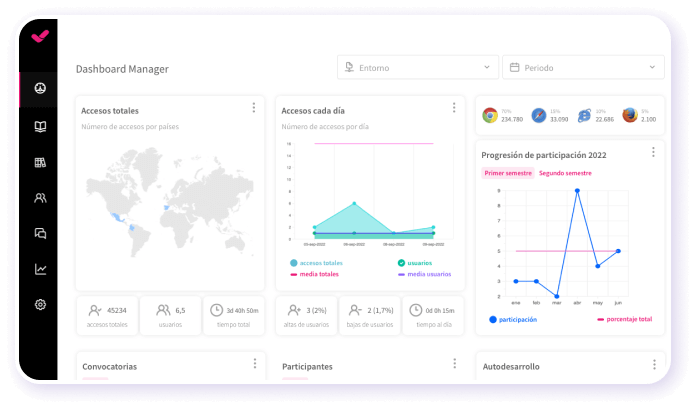
Before the official launch, we run a pilot with a representative group of users. We gather feedback on usability, load speed, and learning path clarity, and adjust the configuration together with your team. This step reduces post-launch issues and ensures strong adoption from day one.
Implementation does not end at launch. Our team supports you in tracking the platform: we help you interpret the data, identify which programs have lower completion rates, and adjust the training plan based on results. LMS learning reports are the key tool for this ongoing improvement.
The market offers dozens of platforms that describe themselves as “customizable.” Before making a decision, here are the criteria that really matter from an L&D perspective:
| Criteria | What to look for | Why it matters |
|---|---|---|
| Integration capability | Native connectors for HR, SSO, SCORM, open REST API | Avoids data silos and manual user management |
| Flow configuration | Custom paths, access conditions, and progression without code | Training should adapt to processes, not the other way around |
| Analytics and reporting | Configurable KPIs, data exports, role-based dashboards | Without reliable data, continuous improvement is impossible |
| Support and SLA | Guaranteed response time, support in your language, dedicated team | A platform failure stops training across the entire organization |
| Scalability | No active user limit, multilingual, multi-entity | The platform must grow without penalizing cost |
| Pricing model | Transparent, predictable, no surprises by user or module | Total project cost must be calculable from the start |
For an LMS to truly deliver value, it must be more than a course repository: it needs to be integrated into the company’s digital ecosystem. At isEazy, we ensure that integration is smooth, well-documented, and scalable from day one.
Our team defines the role structure each user needs together with you. Administrators manage the catalog and global reports; team managers track their team members’ progress; employees access their personalized learning paths. This role segmentation eliminates information overload and accelerates adoption.
If you already have an LMS in use, we handle the planning and execution of the transfer of users, training histories, and SCORM content before activating the new platform. Our LMS migration guide covers what each stage involves.
We configure automations alongside your team that eliminate repetitive tasks: training assignment by role change, reminders, certificate generation, and org chart updates. This frees the L&D team to focus on what really matters: designing impactful training. Discover the isEazy LMS features that make this possible.
The relationship with isEazy does not end with platform delivery. We have a dedicated support team that accompanies the evolution of the LMS: new features, security updates, and incident resolution within agreed timeframes. Find out what our LMS support service includes before making your decision.
Custom LMS implementation fails more often due to planning decisions than technological limitations. These are the most frequent mistakes we identify at isEazy when supporting implementation projects:
Configuring roles, learning paths, and automations before having a clear picture of the company’s actual training flows produces a technically correct but functionally useless platform. Processes first, then configuration.
A new LMS does not adopt itself. Without internal communication, administrator training, and a structured launch plan, usage rates fall below 30% within the first few months. Technology is only one part of the project.
Uploading PDFs of manuals or converting PowerPoint presentations into SCORM modules is not digitalizing training — it is archiving it. A custom LMS delivers value when the content is also designed for the digital environment.
Adding HR, SSO, or communication tool integrations after the fact is more costly and generates data inconsistencies. The integration architecture must be designed in phase 0 of the project.
License cost is only part of the total cost. Implementation time, post-launch support, and the platform’s capacity to evolve determine the real return on investment over 3 to 5 years.
A custom LMS generates data that, when properly interpreted, lets you demonstrate the value of training to leadership and continuously improve the L&D strategy. These are the metrics that should always appear in your dashboard:
| Metric | What it measures | Industry benchmark |
|---|---|---|
| Completion rate | Percentage of employees completing each learning path | >70% for mandatory training; >50% for voluntary training |
| Average time to completion | Actual speed of content consumption | Useful for identifying content that is too long or poorly structured |
| Training NPS | Employee satisfaction with the learning experience | Benchmark: >40 in organizations with a custom LMS |
| Performance impact | Correlation between completed training and business KPIs | Requires LMS-HR integration to cross-reference data |
| Cost per learner | Total investment / number of trained employees | Enables efficiency comparison across different training formats |
To go deeper into building a useful training reporting system, explore our articles on LMS analytics and LMS learning reports.
isEazy LMS is not just a platform — it is an implementation project in which our team works alongside you from day one. We handle the technical configuration, integrations with your systems, experience personalization, and post-launch support, so your L&D team can focus on what truly matters: designing training that makes an impact.
Want to see how it works in practice? Explore all isEazy LMS features or browse the best enterprise LMS comparison to weigh your options.
A custom LMS differs from a standard LMS primarily in its degree of flexibility. While a standard LMS offers predefined functionality with limited room for adaptation, a custom LMS allows organizations to tailor the interface, learning modules, integrations, and reporting dashboards to their specific processes and culture. The result is a platform that fits how the company actually works — not one that forces it to change.
A custom LMS can be integrated with various enterprise systems through APIs and standards such as SCORM. This enables synchronization with HR, CRM, ERP, and Business Intelligence platforms, streamlining training management and optimizing processes. isEazy LMS simplifies these integrations through native connectors, and our implementation team handles the technical configuration from day one.
A custom LMS is ideal for organizations that need training closely aligned with their culture and internal processes. Sectors such as banking, healthcare, retail, technology, and manufacturing benefit greatly from this approach, as they often require role-specific training, regulatory certifications, and continuous learning programs. Organizations with large workforces or complex learning structures also benefit from the scalability and flexibility a custom LMS provides.
The cost of a custom LMS depends on the model chosen. A configurable SaaS LMS like isEazy LMS is priced based on the number of active users and contracted features, with no upfront infrastructure investment. You can consult our LMS pricing guide for a detailed reference. If you are migrating from another platform, our LMS migration guide walks you through the process step by step.

Automate processes, access 600+ ready-to-use courses, or create your own content with the help of AI.
Request a demoContact us


Streamline your training management
Experience the power of AI in an LMS that has it all


Streamline your training management
Experience the power of AI in an LMS that has it all