Moodle and isEazy LMS are two very different LMS platforms in terms of origin, deployment model, and target user. Moodle is the historic benchmark for open-source learning, with over 200 million users across 240 countries. isEazy LMS is a corporate SaaS platform with built-in AI, designed so that a training team can launch, manage, and analyze their entire learning strategy without depending on the IT department. Choosing between the two is not a question of which one is “better,” but of which one fits your organization’s model, your team, and your training goals.
Moodle is a powerful, highly customizable open-source platform, ideal for organizations with their own technical team. isEazy LMS is a corporate SaaS solution with built-in AI, designed for L&D professionals who need results without technical overhead. The choice depends on your management model and your team's profile.
What is isEazy LMS?
isEazy LMS is a SaaS learning management platform designed specifically for corporate training. Unlike Moodle, it requires no server installation or configuration. As a SaaS solution, getting started is straightforward, with guided onboarding and support from day one.
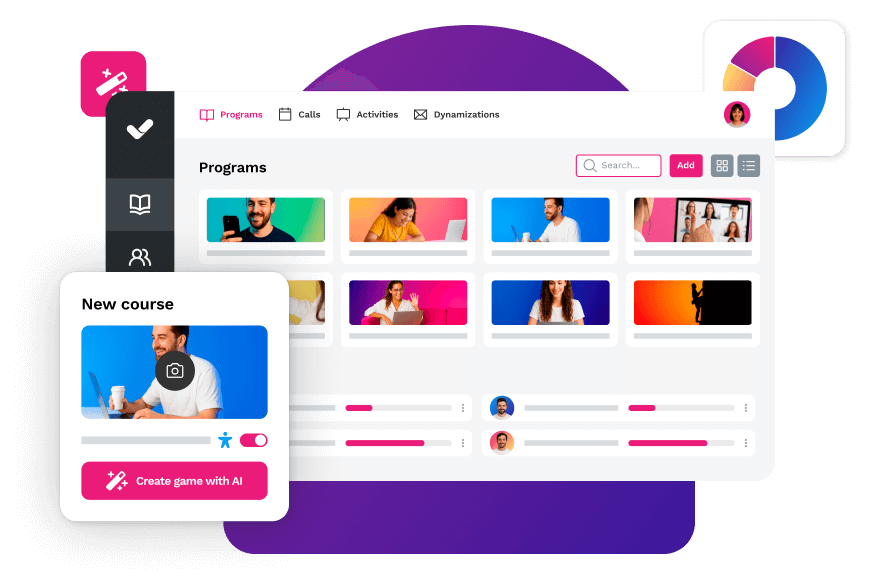
It combines learning path management, advanced analytics, AI-powered personalized recommendations, and an integrated library of over 600 ready-to-use courses. Its user experience is designed with a streaming-style interface, reducing adoption friction for both administrators and learners.
Key features of isEazy LMS:
SaaS model: no infrastructure to own, no technical maintenance
Built-in AI for learning recommendations and personalized training paths
Library of 600+ ready-to-use corporate courses
Compatible with SCORM 1.2, SCORM 2004, and xAPI
Real-time analytics with dashboards by learner, team, and department
Native integrations with SSO, HRIS, Salesforce, and Microsoft Teams
Multilingual support for international deployments
Included support and automatic updates
What is Moodle and what was it designed for?
Moodle (Modular Object-Oriented Dynamic Learning Environment) is an open-source learning management system created in 2002 by Australian developer Martin Dougiamas. It was born with an academic purpose: enabling online teaching in universities and educational institutions, and that DNA is still reflected in its architecture and interface.
With over 200 million registered users in more than 240 countries and available in over 100 languages, Moodle is the most widely used open-source LMS in the world. Its latest release, Moodle 5.0 (April 2025), introduces integrated artificial intelligence, a shared question bank, and a migration to Bootstrap 5.
Its main strengths are:
Full flexibility and customization through community plugins and modules
An active global community that contributes to development and support
Compatibility with standards such as SCORM 1.2, SCORM 2004, and xAPI
No license cost for the base software
Suitable for academic environments and technically mature organizations
Its main limitations in a corporate context:
Requires a technical team for installation, configuration, and ongoing maintenance
Steep learning curve for non-technical administrators
Academic-first UX, which can hinder adoption among corporate employees
Total cost of ownership (TCO) often underestimated
Direct comparison: Moodle vs isEazy LMS
Choosing between Moodle and isEazy LMS is not just a matter of features: it involves weighing the deployment model, the true total cost, the technical requirements, and your organization’s profile. Below, we compare the key criteria to help you decide which option best fits your needs.
Technical comparison
Criteria
Moodle
isEazy LMS
Deployment model
Open source (self-hosted or cloud)
SaaS (100% cloud)
License cost
No license cost
Monthly/annual subscription
Setup & configuration
Requires technical team
Fast and straightforward
Maintenance
Client's responsibility
Included in the plan
User interface
Functional, steep learning curve
Intuitive, streaming-style
Built-in AI
Basic (Moodle 5.0)
Native: recommendations & personalization
Own technical team
Recommended to manage and customize the installation
Not required for day-to-day management
Organization profile
Best suited when deep technical control and extensive customization are needed
Designed for organizations that want centralized training without managing infrastructure
Feature comparison
To see a detailed feature-by-feature breakdown, here is the full comparison:
Moodle
Designed for open source and higher education
Features
Benefits
Technology, compatibility, and integration
Pricing
Activity panel, with resources and interactive elements for creating online courses.
Notifications, search filters, student portal, and assessment management, including a gradebook and individual student progress tracking.
Online and in-person modes (higher education, vocational training, and corporate).
Analytics and reports to analyze student progress and course performance.
Social learning, gamification, and mobile learning: forums, workshops, peer review, badges, and mobile app.
Customization: visual themes with corporate colors and logo.
Competency frameworks and learning plans, assignable to individuals or groups.
Moodle Technology
Integrations with Microsoft 365, Google Workspace, H5P, BigBlueButton, and Meta.
SaaS available through MoodleCloud.
SCORM compatible.
Open source.
Open source: free download with self-hosting.
MoodleCloud: tiered paid plans by number of users for small teams and growing organizations.
Moodle Workplace: price based on hosting and contracted services, available through certified partners.
Features
Activity panel, with resources and interactive elements for creating online courses.
Notifications, search filters, student portal, and assessment management, including a gradebook and individual student progress tracking.
Online and in-person modes (higher education, vocational training, and corporate).
Analytics and reports to analyze student progress and course performance.
Benefits
Social learning, gamification, and mobile learning: forums, workshops, peer review, badges, and mobile app.
Customization: visual themes with corporate colors and logo.
Competency frameworks and learning plans, assignable to individuals or groups.
Technology, compatibility, and integration
Moodle Technology
Integrations with Microsoft 365, Google Workspace, H5P, BigBlueButton, and Meta.
SaaS available through MoodleCloud.
SCORM compatible.
Open source.
Pricing
Open source: free download with self-hosting.
MoodleCloud: tiered paid plans by number of users for small teams and growing organizations.
Moodle Workplace: price based on hosting and contracted services, available through certified partners.
isEazy LMS
The all-in-one LMS platform powered by AI
Features
Benefits
Subscription plans
Industries
Use cases
All-in-one AI-powered LMS: combines learning management and tracking, a library of over 600 ready-to-use courses, and an AI-powered authoring tool for creating proprietary content in one solution.
Engagement and collaboration: includes gamification, mobile learning, certificates, a knowledge library, social learning, collaborative tools, and communication channels for sharing relevant news and content.
Integrations and compatibility: connects the LMS with HRIS, ERP, CRM, and other business systems through SSO, APIs, and custom integrations. It supports e-learning standards such as SCORM, xAPI, and cmi5.
End-to-end learning management: manages learners, groups, roles, permissions, courses, programs, and learning paths from one environment. It automates training campaigns and engagement actions and supports annual learning plans with dynamic filters by audience, department, or company. It can also support administrative requirements such as FUNDAE-funded training in Spain and DC3 and DC4 records in Mexico.
Analytics and reporting: turns learning data into actionable information through visual dashboards and detailed reports. Organizations can review activity, progress, and results by learner, department, audience, subsidiary, or company.
Learning experience: provides an intuitive, customizable interface with content cards for urgent, new, recommended, or pending courses. It also includes news, announcements, and an AI-powered recommender that helps learners discover relevant content.
Content library: provides unlimited access to over 600 ready-to-use courses covering leadership, compliance, soft skills, productivity, artificial intelligence, cybersecurity, and other key areas. Content is available in 8 languages, multiple formats, and is continuously updated.
Built-in AI authoring tool: enables teams to build courses from scratch or import PowerPoint presentations and turn them into interactive content. AI supports translations, voice-overs, subtitles, images, avatar videos, exercises, and final assessments. Courses can be exported in SCORM or xAPI format.
One solution for the entire learning cycle: brings management, content creation, delivery, a ready-to-use course catalog, and measurement together in one system, reducing the need for separate tools at each stage.
Proven operational capacity: provides a modern environment that helps learners find, resume, and complete assigned training. Its track record includes more than 1.5 million users, 88 million training hours, 400 learning programs, and 94,000 learning activities.
Time and resource efficiency: automates campaigns, assignments, communications, reminders, and reporting, while its AI-powered authoring tool streamlines content creation and updates. Support, consulting, outsourcing, and LMS management services are also available.
Multi-device access: provides learning access from desktop computers, phones, and tablets. Its multi-format library, available in 8 languages, supports international learning programs.
Scalable and flexible: serves both small and medium-sized businesses and large enterprises, with segmentation by department, role, company, location, or audience and plans ranging from 100 learners to enterprise deployments.
Highly customizable: allows organizations to configure colors, logos, messages, login pages, domains, structures, permissions, and learning environments according to their brand and requirements.
International recognition: isEazy LMS was included in Training Industry’s 2025 Top LMS Companies Watch List and received eLearning Industry’s “Most Effective Implementation of AI for Talent Development and Management 2026” recognition.
Professional: up to 100 users, with unlimited courses, unlimited administrators, and unlimited learning environments.
Business: up to 200 users. Includes all Professional features and adds a dedicated manager dashboard.
Enterprise: from 201 users. Includes all Business features, communication channels, a BI reporting module, a dedicated Customer Success Manager, and custom integrations.
Included capabilities: all plans include support, automation, learning management tools, customization, learning experience features, gamification, mobile learning, certificates, reporting, a training catalog, and a course recommender.
Additional services: outsourcing, consulting, custom training, and Training as a Service can be added according to project requirements.
Banking and financial services: manages compliance, cybersecurity, customer service, sales training, and skills development programs for branches, networks, and corporate teams.
Pharmaceutical and healthcare: centralizes onboarding, regulatory updates, product training, and continuous learning for healthcare, sales, and corporate employees.
Retail and consumer goods: delivers agile, segmented learning to store employees, regional managers, sales networks, operations teams, and customer service staff.
Technology and telecommunications: develops technical and digital capabilities through continuous onboarding, certification, upskilling, and reskilling programs.
Manufacturing: manages training on processes, safety, quality, technical skills, and company culture for plants, factories, and distributed teams.
Transportation and logistics: centralizes onboarding, procedural updates, operational safety, and continuous training for drivers, warehouses, and logistics networks.
Consulting and professional services: supports knowledge updates, technical learning, onboarding, and skills development for project- and client-focused teams.
Education and training: manages training providers, internal academies, certification programs, and corporate universities from a customizable environment.
Government and public sector: supports the management, segmentation, and traceability of learning programs for public employees and complex government organizations.
Insurance: keeps sales networks, agents, and back-office teams up to date on regulations, products, processes, and commercial skills.
Energy: manages safety, regulatory, sustainability, operational, and technical learning for internal teams, contractors, and external networks.
Corporate academies: centralizes programs, learning paths, resources, communications, and learning communities to build an internal academy aligned with the organization’s goals and culture.
Onboarding: creates personalized welcome journeys, automates resource assignments, and ensures each new hire receives the required training from day one.
Mandatory training: manages health and safety, equality, compliance, and regulatory programs with automated assignments, certificates, reminders, and full traceability.
Talent development: creates programs and learning paths for different roles, departments, and responsibility levels to support upskilling and reskilling.
Product training: keeps sales teams, customers, partners, and distributors up to date with practical content about products, services, and procedures.
Skills development: combines LMS management with a library of over 600 courses covering leadership, communication, productivity, digital capabilities, and other professional skills.
Features
All-in-one AI-powered LMS: combines learning management and tracking, a library of over 600 ready-to-use courses, and an AI-powered authoring tool for creating proprietary content in one solution.
Engagement and collaboration: includes gamification, mobile learning, certificates, a knowledge library, social learning, collaborative tools, and communication channels for sharing relevant news and content.
Integrations and compatibility: connects the LMS with HRIS, ERP, CRM, and other business systems through SSO, APIs, and custom integrations. It supports e-learning standards such as SCORM, xAPI, and cmi5.
End-to-end learning management: manages learners, groups, roles, permissions, courses, programs, and learning paths from one environment. It automates training campaigns and engagement actions and supports annual learning plans with dynamic filters by audience, department, or company. It can also support administrative requirements such as FUNDAE-funded training in Spain and DC3 and DC4 records in Mexico.
Analytics and reporting: turns learning data into actionable information through visual dashboards and detailed reports. Organizations can review activity, progress, and results by learner, department, audience, subsidiary, or company.
Learning experience: provides an intuitive, customizable interface with content cards for urgent, new, recommended, or pending courses. It also includes news, announcements, and an AI-powered recommender that helps learners discover relevant content.
Content library: provides unlimited access to over 600 ready-to-use courses covering leadership, compliance, soft skills, productivity, artificial intelligence, cybersecurity, and other key areas. Content is available in 8 languages, multiple formats, and is continuously updated.
Built-in AI authoring tool: enables teams to build courses from scratch or import PowerPoint presentations and turn them into interactive content. AI supports translations, voice-overs, subtitles, images, avatar videos, exercises, and final assessments. Courses can be exported in SCORM or xAPI format.
Benefits
One solution for the entire learning cycle: brings management, content creation, delivery, a ready-to-use course catalog, and measurement together in one system, reducing the need for separate tools at each stage.
Proven operational capacity: provides a modern environment that helps learners find, resume, and complete assigned training. Its track record includes more than 1.5 million users, 88 million training hours, 400 learning programs, and 94,000 learning activities.
Time and resource efficiency: automates campaigns, assignments, communications, reminders, and reporting, while its AI-powered authoring tool streamlines content creation and updates. Support, consulting, outsourcing, and LMS management services are also available.
Multi-device access: provides learning access from desktop computers, phones, and tablets. Its multi-format library, available in 8 languages, supports international learning programs.
Scalable and flexible: serves both small and medium-sized businesses and large enterprises, with segmentation by department, role, company, location, or audience and plans ranging from 100 learners to enterprise deployments.
Highly customizable: allows organizations to configure colors, logos, messages, login pages, domains, structures, permissions, and learning environments according to their brand and requirements.
International recognition: isEazy LMS was included in Training Industry’s 2025 Top LMS Companies Watch List and received eLearning Industry’s “Most Effective Implementation of AI for Talent Development and Management 2026” recognition.
Subscription plans
Professional: up to 100 users, with unlimited courses, unlimited administrators, and unlimited learning environments.
Business: up to 200 users. Includes all Professional features and adds a dedicated manager dashboard.
Enterprise: from 201 users. Includes all Business features, communication channels, a BI reporting module, a dedicated Customer Success Manager, and custom integrations.
Included capabilities: all plans include support, automation, learning management tools, customization, learning experience features, gamification, mobile learning, certificates, reporting, a training catalog, and a course recommender.
Additional services: outsourcing, consulting, custom training, and Training as a Service can be added according to project requirements.
Industries
Banking and financial services: manages compliance, cybersecurity, customer service, sales training, and skills development programs for branches, networks, and corporate teams.
Pharmaceutical and healthcare: centralizes onboarding, regulatory updates, product training, and continuous learning for healthcare, sales, and corporate employees.
Retail and consumer goods: delivers agile, segmented learning to store employees, regional managers, sales networks, operations teams, and customer service staff.
Technology and telecommunications: develops technical and digital capabilities through continuous onboarding, certification, upskilling, and reskilling programs.
Manufacturing: manages training on processes, safety, quality, technical skills, and company culture for plants, factories, and distributed teams.
Transportation and logistics: centralizes onboarding, procedural updates, operational safety, and continuous training for drivers, warehouses, and logistics networks.
Consulting and professional services: supports knowledge updates, technical learning, onboarding, and skills development for project- and client-focused teams.
Education and training: manages training providers, internal academies, certification programs, and corporate universities from a customizable environment.
Government and public sector: supports the management, segmentation, and traceability of learning programs for public employees and complex government organizations.
Insurance: keeps sales networks, agents, and back-office teams up to date on regulations, products, processes, and commercial skills.
Energy: manages safety, regulatory, sustainability, operational, and technical learning for internal teams, contractors, and external networks.
Use cases
Corporate academies: centralizes programs, learning paths, resources, communications, and learning communities to build an internal academy aligned with the organization’s goals and culture.
Onboarding: creates personalized welcome journeys, automates resource assignments, and ensures each new hire receives the required training from day one.
Mandatory training: manages health and safety, equality, compliance, and regulatory programs with automated assignments, certificates, reminders, and full traceability.
Talent development: creates programs and learning paths for different roles, departments, and responsibility levels to support upskilling and reskilling.
Product training: keeps sales teams, customers, partners, and distributors up to date with practical content about products, services, and procedures.
Skills development: combines LMS management with a library of over 600 courses covering leadership, communication, productivity, digital capabilities, and other professional skills.
The real cost of Moodle: beyond “it’s free”
One of the most repeated arguments in favor of Moodle is that it’s free. But “free” refers only to the license cost of the base software — not to the total cost of ownership (TCO) of running the platform in a corporate environment.
According to 2026 market analyses, a mid-sized organization implementing self-hosted Moodle may face the following recurring costs:
Cost component
Estimated monthly range
VPS or cloud hosting
$30–$80/month
Technical maintenance and updates
$40–$100/month
Premium plugins and customizations
$20–$60/month
Systems administrator hours
$50–$100/month
To this must be added the opportunity cost: the time that L&D professionals spend coordinating with IT, managing incidents, or waiting for an external developer to apply a change. According to analyses by e-learning consultancies, some organizations that chose Moodle “because it’s free” ended up investing more than if they had contracted a SaaS platform from the start.
The total cost of ownership for Moodle can range from $500 per year for minimal deployments to over $50,000 per year for robust corporate rollouts with thousands of users, based on industry estimates from 2026. For a comprehensive breakdown of LMS pricing factors, check out our LMS pricing guide.
Ease of use and implementation: what does getting started actually involve?
Ease of implementation is one of the factors with the greatest impact on the real return of an LMS — and it’s where the difference between Moodle and isEazy LMS is most visible.
With Moodle, the typical process involves: selecting a hosting provider, installing and configuring the platform, customizing the visual theme, installing and setting up the necessary plugins (some paid), and training the admin team. In organizations without a dedicated technical team, this process can take weeks or even months before the first learner accesses a course.
With isEazy LMS, the activation process is radically different: the platform is available as a cloud service, onboarding is guided, and support is included from day one. An L&D professional without a technical background can manage the entire setup in an agile way, with guided onboarding and support from the very start.
For the L&D Manager profile — someone responsible for training strategy but not for IT infrastructure — the difference in time-to-value between both platforms is substantial. Our LMS implementation guide walks through the key steps for a successful rollout.
Key features for corporate training in 2026
The LMS market has evolved significantly over the past three years. In 2026, evaluation criteria for corporate training no longer stop at “manage courses and certifications.” These are the factors that carry the most weight in an L&D decision-maker’s choice:
Artificial intelligence: personalized recommendations, adaptive learning paths, and predictive dropout analysis. isEazy LMS integrates AI natively; Moodle 5.0 incorporates basic AI features.
SCORM compatibility: the SCORM 1.2 and SCORM 2004 standard determines what content you can import and reuse in your platform. Check our SCORM-compliant LMS comparison.
Advanced analytics: real-time dashboards by learner, team, and department. Essential for demonstrating ROI to the business.
Mobile learning: access from any device, with a native app or responsive design. Critical when the workforce includes field employees or non-desk workers.
Integrations: native connectivity with SSO, HRIS, Salesforce, and Microsoft Teams. See our LMS integrations guide for full details.
Multilingual support: key for companies operating across multiple countries.
When to choose Moodle and when to choose isEazy LMS?
There is no universal answer. The right choice depends on your organization’s profile, your team, and your priorities. This table summarizes the most common scenarios:
Choose...
If your situation is...
Moodle
You have an in-house technical team to install, configure, and maintain the platform
Moodle
You need deep customization beyond standard configuration
Moodle
You work in an academic environment where Moodle is already the institutional standard
Moodle
Your license budget is zero and you can absorb infrastructure costs
isEazy LMS
You are an L&D or HR professional without a dedicated IT team
isEazy LMS
You need an agile SaaS deployment without managing technical infrastructure
isEazy LMS
You want AI to personalize learning paths and increase completion rates
isEazy LMS
You want support, updates, and maintenance included in the plan
isEazy LMS
Your training strategy involves scaling to multiple countries, languages, or departments
If you still have doubts about which type of platform you need, our comprehensive guide to what an LMS is can help you define your criteria before making a decision.
Pepco, one of Europe’s fastest-growing retail groups, needed to manage training for thousands of employees spread across hundreds of stores in multiple countries — with multilingual content and real-time metrics for each market’s managers. With isEazy LMS, Pepco was able to centralize all training management on a single platform, scale learning at the pace of their expansion, and obtain real-time tracking data without requiring their own technical infrastructure. Find out how they did it →
CASE STUDY
How Pepco transformed training using top learning tools
Migrating from Moodle to isEazy LMS: what does the switch involve?
One of the most common questions among organizations evaluating a move away from Moodle is: what happens to everything we already have? The short answer is that most content and data can be migrated without losing what has been invested.
What can be migrated?
SCORM content: SCORM 1.2 and SCORM 2004 packages created in or for Moodle are compatible with isEazy LMS and can be imported directly
Users and groups: user data can be imported via CSV or connected through SSO/HRIS
Training history: completion records and certifications can be migrated in standard formats
Course catalog: compatible-format courses transfer directly; courses using Moodle-specific modules may require adaptation
The migration process varies in complexity depending on the volume of content and the degree of customization in the source Moodle installation. For organizations with complex deployments, isEazy offers a structured migration service. Our LMS migration guide covers the key steps in detail.
Integrations and compatibility: connecting your LMS to the enterprise ecosystem
An LMS’s ability to integrate with the rest of a company’s technology stack is a decisive factor, especially in mid-sized and large organizations where training must connect with HR, sales, and operations.
Moodle has an extensive catalog of community plugins for third-party integrations, but configuring and maintaining each integration falls on the organization’s own technical team. Integrations with Microsoft Teams, Google Workspace, or HRIS systems require manual installation and configuration of the relevant modules.
isEazy LMS offers native integrations with the main enterprise ecosystems: SSO (Single Sign-On), HRIS, Salesforce, Microsoft Teams, and other productivity tools — available without additional development and managed by the isEazy team.
Both platforms are compatible with e-learning standards (SCORM 1.2, SCORM 2004, xAPI), which determines what content can be imported and reused. For a detailed overview, see our SCORM-compliant LMS comparison and our LMS integrations guide.
LMS pricing: factors to consider beyond the license
The price of an LMS is not limited to the license or subscription cost. When evaluating the true cost of any platform, an L&D professional should consider at least these factors:
License model: per active user, by total volume, per contracted module, or flat rate. The model determines how costs scale as the organization grows.
Implementation costs: initial setup, customization, admin team training, and content loading.
Maintenance and updates: included in SaaS models like isEazy LMS; an additional cost to manage with Moodle.
Support: incident response, guaranteed SLA, support availability.
Hidden costs: premium plugins, custom development, IT hours, ongoing technical team training.
For a full assessment of all these factors applied to your organization, check our LMS pricing guide.
Moodle vs isEazy LMS in 2026: which is the best option for your company?
Moodle and isEazy LMS serve different organizational profiles. Moodle is a powerful, flexible platform with a massive community, but its true total cost, steep technical learning curve, and academic roots make it better suited for organizations with in-house technical resources and a desire for deep customization.
isEazy LMS is designed for the corporate L&D professional who needs agile implementation, built-in AI, included support, and no need to manage LMS technical infrastructure.
If you want to compare isEazy LMS with other market alternatives, check our best LMS comparison or request a demo to see the platform in action with your organization’s specific use cases.
Final comparison: isEazy LMS vs Moodle
This table summarizes the evaluation of both platforms across the most relevant criteria for corporate training:
Feature
isEazy LMS
Moodle
Ease of use without technical knowledge
⭐⭐⭐⭐⭐
⭐⭐⭐
Built-in AI for corporate training
⭐⭐⭐⭐⭐
⭐⭐⭐
User experience (learners)
⭐⭐⭐⭐⭐
⭐⭐⭐
Advanced analytics and reporting
⭐⭐⭐⭐⭐
⭐⭐⭐
Technical customization
⭐⭐⭐
⭐⭐⭐⭐⭐
SCORM compatibility
⭐⭐⭐⭐⭐
⭐⭐⭐⭐⭐
License cost
⭐⭐⭐
⭐⭐⭐⭐⭐
Included support at no extra cost
⭐⭐⭐⭐⭐
⭐⭐
Frequently asked questions about Moodle and isEazy LMS
Is Moodle really free for businesses?
Moodle’s software has no license cost, but deploying it in a corporate environment involves real costs that many organizations underestimate. Server or hosting, technical maintenance, premium plugins, customizations, and administrator hours can add up to between $150 and $370 per month for a mid-sized organization, based on 2026 industry estimates. There is also the opportunity cost of the time your team spends on technical management instead of training strategy. For organizations without a dedicated technical team, the SaaS model often turns out to be more cost-effective in the medium term once the full TCO is calculated.
Can I migrate my Moodle courses to isEazy LMS?
Yes. Content in SCORM 1.2 and SCORM 2004 format — the most common standard in Moodle — is directly compatible with isEazy LMS and can be imported without conversion. Users, groups, and training history records can also be migrated via CSV or through standard integration protocols. The isEazy team provides a structured migration service to guide the process and minimize risk.
What LMS is best for a company without an IT team?
For an organization without a dedicated technical team, a SaaS LMS like isEazy LMS is the most suitable option. SaaS platforms eliminate the need to manage infrastructure, installations, updates, and security patches, as everything is included in the service. This allows the L&D professional to focus on strategy and content rather than the platform’s technical management. Moodle, which requires its own installation and maintenance, adds an operational burden that can become a real obstacle for organizations without in-house technical capacity.
How long does it take to implement isEazy LMS compared to Moodle?
With isEazy LMS, an L&D professional can have the platform configured and the first learning path published in a short time. Onboarding is guided and support is available from day one. With self-hosted Moodle, in contrast, implementation typically involves selecting a hosting provider, installing and configuring the platform, customizing the theme, setting up plugins, and training the admin team — a process that can take weeks or months in organizations without an in-house technical team.
The power of AI in a fully integrated training platform
Automate processes, access 600+ ready-to-use courses, or create your own content with the help of AI.
Here you can assess and customize the services that we'd like to use on this website. You're in charge! Enable or disable services as you see fit. To learn more, please read our .
We have to include them in order for certain web pages to function securely. These cookies are strictly necessary, so they cannot be rejected or modified.
Cookie
Duration
Description
_ga
2 years
The _ga cookie, installed by Google Analytics, calculates visitor, session and campaign data and also keeps track of site usage for the site's analytics report. The cookie stores information anonymously and assigns a randomly generated number to recognize unique visitors.
_ga_YW3LY84JY6
2 years
This cookie is installed by Google Analytics.
_gat_gtag_UA_90425332_3
1 minute
Set by Google to distinguish users.
_gat_UA-26043609-7
1 minute
A variation of the _gat cookie set by Google Analytics and Google Tag Manager to allow website owners to track visitor behaviour and measure site performance. The pattern element in the name contains the unique identity number of the account or website it relates to.
_gat_UA-90425332-3
1 minute
A variation of the _gat cookie set by Google Analytics and Google Tag Manager to allow website owners to track visitor behaviour and measure site performance. The pattern element in the name contains the unique identity number of the account or website it relates to.
_gcl_au
3 months
Provided by Google Tag Manager to experiment advertisement efficiency of websites using their services.
_gid
1 day
Installed by Google Analytics, _gid cookie stores information on how visitors use a website, while also creating an analytics report of the website's performance. Some of the data that are collected include the number of visitors, their source, and the pages they visit anonymously.
_icl_visitor_lang_js
1 day
This cookie is stored by WPML WordPress plugin. The purpose of the cookie is to store the redirected language.
Bootstrap
11 months
Bootstrap code
cookielawinfo-checkbox-advertisement
1 year
Set by the GDPR Cookie Consent plugin, this cookie is used to record the user consent for the cookies in the "Advertisement" category .
cookielawinfo-checkbox-analytics
11 months
This cookie is set by GDPR Cookie Consent plugin. The cookie is used to store the user consent for the cookies in the category "Analytics".
cookielawinfo-checkbox-functional
11 months
The cookie is set by GDPR cookie consent to record the user consent for the cookies in the category "Functional".
cookielawinfo-checkbox-nece
1 year
Cookie law info
cookielawinfo-checkbox-necessary
11 months
This cookie is set by GDPR Cookie Consent plugin. The cookies is used to store the user consent for the cookies in the category "Necessary".
cookielawinfo-checkbox-others
11 months
This cookie is set by GDPR Cookie Consent plugin. The cookie is used to store the user consent for the cookies in the category "Other.
cookielawinfo-checkbox-performance
11 months
This cookie is set by GDPR Cookie Consent plugin. The cookie is used to store the user consent for the cookies in the category "Performance".
CookieLawInfoConsent
1 year
Records the default button state of the corresponding category & the status of CCPA. It works only in coordination with the primary cookie.
Google Font API
11 months
Google Font API
IDE
1 year 24 days
Google DoubleClick IDE cookies are used to store information about how the user uses the website to present them with relevant ads and according to the user profile.
Pardot
11 months
The pardot cookie is set while the visitor is logged in as a Pardot user. The cookie indicates an active session and is not used for tracking.
test_cookie
15 minutes
The test_cookie is set by doubleclick.net and is used to determine if the user's browser supports cookies.
viewed_cookie_policy
11 months
The cookie is set by the GDPR Cookie Consent plugin and is used to store whether or not user has consented to the use of cookies. It does not store any personal data.
wp-wpml_current_language
session
Language cookies
wpml_browser_redirect_test
session
This cookie is set by WPML WordPress plugin and is used to test if cookies are enabled on the browser.
They collect information in order to measure, evaluate performance, and improve the quality of your experience on our site.
Cookie
Duration
Description
_ga
2 years
The _ga cookie, installed by Google Analytics, calculates visitor, session and campaign data and also keeps track of site usage for the site's analytics report. The cookie stores information anonymously and assigns a randomly generated number to recognize unique visitors.
_ga_YW3LY84JY6
2 years
This cookie is installed by Google Analytics.
_gat_gtag_UA_90425332_3
1 minute
Set by Google to distinguish users.
_gat_UA-26043609-7
1 minute
A variation of the _gat cookie set by Google Analytics and Google Tag Manager to allow website owners to track visitor behaviour and measure site performance. The pattern element in the name contains the unique identity number of the account or website it relates to.
_gat_UA-90425332-3
1 minute
A variation of the _gat cookie set by Google Analytics and Google Tag Manager to allow website owners to track visitor behaviour and measure site performance. The pattern element in the name contains the unique identity number of the account or website it relates to.
_gcl_au
3 months
Provided by Google Tag Manager to experiment advertisement efficiency of websites using their services.
_gid
1 day
Installed by Google Analytics, _gid cookie stores information on how visitors use a website, while also creating an analytics report of the website's performance. Some of the data that are collected include the number of visitors, their source, and the pages they visit anonymously.
_icl_visitor_lang_js
1 day
This cookie is stored by WPML WordPress plugin. The purpose of the cookie is to store the redirected language.
wpml_browser_redirect_test
session
This cookie is set by WPML WordPress plugin and is used to test if cookies are enabled on the browser.
We use them to provide you with efficient and personalized advertisements that we believe are relevant to your interests. You may see them on other sites that you visit.
Cookie
Duration
Description
IDE
1 year 24 days
Google DoubleClick IDE cookies are used to store information about how the user uses the website to present them with relevant ads and according to the user profile.
test_cookie
15 minutes
The test_cookie is set by doubleclick.net and is used to determine if the user's browser supports cookies.