In any organisation, training programmes are designed to drive change — whether in employee behaviour, skills, or overall performance. However, without a structured monitoring and review process, it becomes very difficult to gather the data needed to measure effectiveness, make adjustments, and continuously improve.
Training tracking is the process of monitoring and recording the progress and completion of training activities. It involves reviewing key touchpoints such as attendance, programme completion status, learning style responses, assessment scores, and engagement levels — ensuring that employees meet their training requirements and that learning programmes genuinely address organisational needs.
Today, there are several effective methods for tracking training. In this post, we explore the most impactful approaches, the key metrics you should be measuring, and the best tools available to implement training tracking in your organisation.
Training tracking is the systematic process of monitoring, recording, and analysing employee learning progress. It enables organisations to identify skills gaps, measure the real impact of training, and make data-driven decisions to optimise learning programmes.
Why is training tracking important in an organisation?
Beyond monitoring, training tracking is about managing and documenting all learning and development activities within an organisation. This process ensures that employees receive the right training — aligned with the latest industry trends, delivered through the most effective and innovative methodologies — while giving L&D teams a clear picture of how learning programmes impact the business.
According to LinkedIn Learning’s 2024 Workplace Learning Report, 90% of L&D professionals say measuring the impact of training is a strategic priority — yet only 43% have sufficient data to demonstrate it to senior leadership. This gap between intention and execution is precisely where training tracking makes a difference.
Training tracking also helps organisations:
Identify skills and knowledge gaps: by monitoring training progress, it becomes easy to pinpoint areas that need reinforcement. This analysis enables the design of more focused and personalised learning programmes, closing talent retention challenges rooted in skill deficiencies and ensuring employees acquire the competencies needed to perform at their best.
Improve training programme quality: by collecting data on course effectiveness and employee performance, L&D managers can identify what works and what doesn’t, enabling continuous improvements to the quality and relevance of learning content.
Increase accountability and engagement: when employees know their progress is being monitored, they tend to engage more actively with learning activities. Tracking fosters a culture of accountability that drives achievement of learning objectives.
Ensure regulatory compliance: in regulated sectors (healthcare, finance, manufacturing), training tracking guarantees that all employees complete mandatory training within required timeframes, minimising legal and compliance risks.
Demonstrate the ROI of training: without tracking data, calculating the return on training investment is impossible. With an active tracking system, L&D teams can directly link learning outcomes to business metrics such as productivity, talent retention, and error reduction.
Best methods for tracking employee training effectively
There are several approaches your organisation can use to implement effective training tracking. Here are the most recommended:
1. Data collection and analysis
Collecting and analysing data on completion rates, assessment results, and other key performance indicators (KPIs) is the most traditional approach to effective tracking. By recording this data, you can identify patterns — such as which courses have high completion rates or where employees tend to struggle.
Cloud-based training solutions make this data collection significantly easier: information is centralised in real time, accessible from any device, and eliminates the need for manual spreadsheets. With these insights, L&D teams can make strategic adjustments to training programmes, aligning them with business needs and desired outcomes.
2. Pre- and post-training assessments
Pre- and post-training evaluations are one of the most common methods for measuring employee knowledge levels before and after a programme. The difference between both scores is a direct indicator of genuine learning acquired — and allows content difficulty or format to be adjusted if progress falls short of expectations.
3. Direct observation and manager feedback
In many operational environments, learning cannot be measured through questionnaires alone. Direct observation by managers or supervisors — combined with structured feedback — allows assessment of whether employees are genuinely applying what they’ve learned on the job. This method is preferred in onboarding environments or for soft skills training across different workforce generations.
4. LMS-based tracking
A Learning Management System (LMS) automates the entire tracking process: it records who completed what, when, and with what score. Reports are generated automatically and can be exported for leadership presentations. It is the most scalable and efficient method for organisations with dispersed teams or continuous learning programmes. To explore the differences between available platforms, see our guide on onboarding process best practices and how LMS tools support them.
5. Self-assessments and satisfaction surveys
Complementing quantitative tracking with qualitative data is essential for a complete picture. Post-training satisfaction surveys (following Kirkpatrick’s Model, Level 1) and self-assessments help detect motivational issues, accessibility barriers, or perceived relevance problems that numerical data alone cannot capture.
Key training KPIs and metrics for better tracking
As mentioned earlier, optimising training programmes, demonstrating their value, and justifying investment requires measuring progress through key indicators. According to the Association for Talent Development (ATD), organisations that actively measure the impact of their training are 24% more likely to achieve their business objectives than those that do not.
Below are the most important KPIs, along with reference benchmarks and guidance on how to improve each one:
KPI
What it measures
Reference benchmark
Completion rate
% of employees who complete a course or module
Industry average: 70–80% (LinkedIn Learning 2024)
Pass rate
% of employees who pass assessments
Optimal: >85%; alert if below 60%
Knowledge retention
How much employees remember after 30–90 days
Without reinforcement, 70% is forgotten within 24h (Ebbinghaus Curve)
Time to competency
Days from training start to full role autonomy
Fast onboarding: <30 days for operational roles
Active participation rate
% of employees engaging (forums, exercises, videos)
Optimal: >75% for interactive formats
Learner NPS
Training programme satisfaction and recommendation score
NPS >50 is considered excellent in L&D
Training ROI
Economic return vs. total programme cost
Phillips Model: target >100% at 12 months
A low completion rate typically signals issues with accessibility, excessive length, or perceived lack of relevance. Low knowledge retention, on the other hand, points to overly theoretical content with insufficient practical application. Cross-referencing these KPIs enables L&D teams to act with precision on the actual root cause.
Vodafone is an excellent example of what a well-implemented tracking system can achieve at scale. Using isEazy Author, Vodafone’s L&D team tripled their productivity in e-learning course creation — allowing them to launch more training in less time, with greater manager visibility and tracking capability. Find out how they did it →
CASE STUDY
We multiplied x3 the productivity in the creation of e-learning courses at Vodafone
How to implement a training tracking system step by step
Implementing an effective tracking system doesn’t require significant upfront investment, but it does call for a structured approach. Here is the 5-step framework we recommend at isEazy:
Define your learning objectives clearly: before measuring anything, you need to know what you want to achieve. Objectives should be specific, measurable, and tied to concrete business outcomes (e.g. reduce onboarding time by 20%, improve compliance pass rates to 90%, etc.).
Select the KPIs relevant to each programme: not all KPIs apply to every programme. An onboarding course will prioritise time to competency; a compliance training will prioritise pass rates; a soft skills programme will prioritise learner NPS and direct observation.
Choose and integrate the right tool: an LMS with robust analytics capabilities is the backbone of effective tracking. Ensure the platform generates automatic reports, integrates with your HRMS, and allows data filtering by team, location, or role. For sales and role-play training scenarios, look for tools that track simulation performance specifically.
Collect data systematically and continuously: point-in-time tracking (only at course completion) is not enough. Implement intermediate checkpoints, spaced assessments, and follow-up surveys at 30 and 90 days to measure genuine retention.
Analyse, share, and act on the data: data without action has no value. Generate periodic reports for leadership, share results with line managers, and use the insights to continuously optimise training programmes.
Best tools for tracking employee training
Choosing the right tool depends on the size of your organisation, the volume of training, and the maturity of your L&D team. Here are the main options available on the market:
LMS (Learning Management System) — The most complete option for tracking
An LMS is the most widely adopted solution for training tracking in medium and large organisations. It centralises all training information effectively, enabling managers to monitor employee progress and generate comprehensive reports on completion rates, assessment scores, and participation levels. All data is stored in one place, facilitating decision-making. Many platforms also send automatic reminders when an employee needs to complete a course or renew a certification.
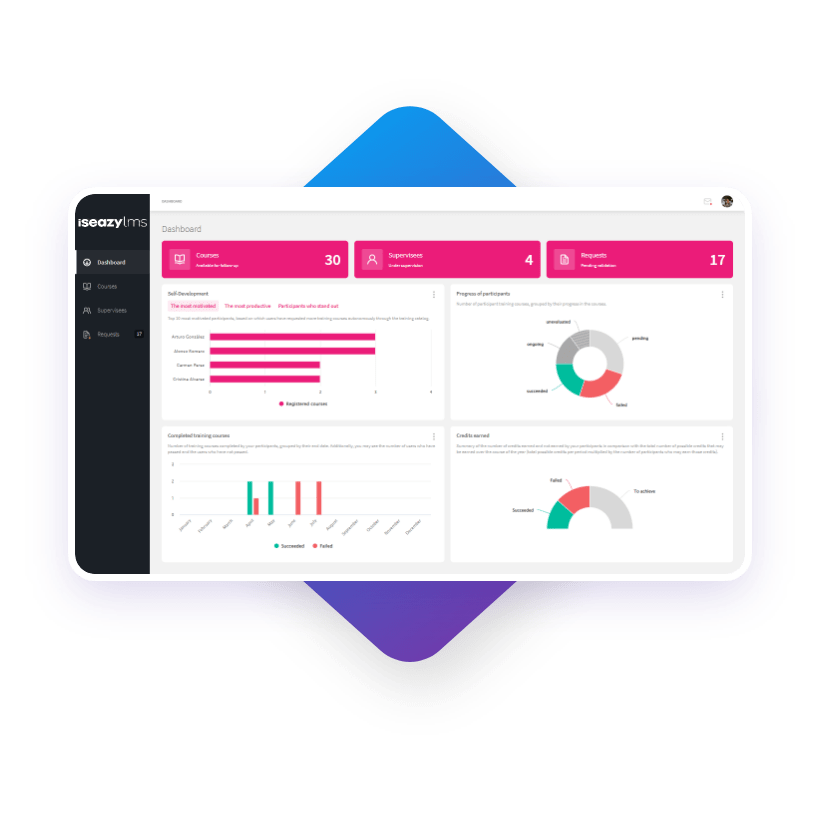
isEazy LMS includes real-time tracking dashboards, department-level exportable reports, and automated non-compliance alerts — significantly easing the workload of training managers. Request a free demo and discover how it can transform learning oversight in your organisation.
Training Management System (TMS) — Advanced logistics tracking
A Training Management System (TMS) focuses primarily on the logistical management of training: session planning, trainer assignment, resource management, and attendance recording. Unlike an LMS — which manages both learning content and learner progress — a TMS is used more for coordinating face-to-face or blended learning. In many cases, both tools complement each other: the TMS handles logistics while the LMS manages digital learning.
Spreadsheets — The basic starting point
For small organisations or those in early stages of digitalisation, spreadsheets (Excel, Google Sheets) can be a valid starting point. However, they have significant limitations: they are prone to human error, don’t update automatically, and don’t allow real-time analysis. As an organisation grows, transitioning to an LMS or TMS becomes essential.
HR platforms with training modules
Some HRMS platforms such as SAP SuccessFactors, Workday, or BambooHR include training management modules. These are useful when you want to integrate training tracking directly with performance management and employee development, though they are generally less specialised than a dedicated LMS. For specialist content delivery, pairing an HRMS with a dedicated e-learning authoring tool like isEazy Author delivers the best results.
Best Learning Management Systems (LMS)
If you’re considering adopting LMS technology for your corporate training programme but aren’t sure where to start, here is a comparison of the best Learning Management Systems to help you make the best decision:
isEazy LMS
The all-in-one LMS platform powered by AI
Features
Benefits
Subscription plans
Industries
Use cases
All-in-one AI-powered LMS: combines learning management and tracking, a library of over 600 ready-to-use courses, and an AI-powered authoring tool for creating proprietary content in one solution.
Engagement and collaboration: includes gamification, mobile learning, certificates, a knowledge library, social learning, and communication channels for sharing relevant news and content.
Integrations and compatibility: connects the LMS with other business tools through SSO, APIs, and custom integrations. It supports SCORM 1.2 and SCORM 2004.
End-to-end learning management: manages learners, groups, roles, permissions, courses, programs, and learning paths from one environment. It automates training campaigns and engagement actions and supports annual learning plans with dynamic filters by audience, department, or company. It can also support administrative requirements such as FUNDAE-funded training in Spain and DC3 and DC4 records in Mexico.
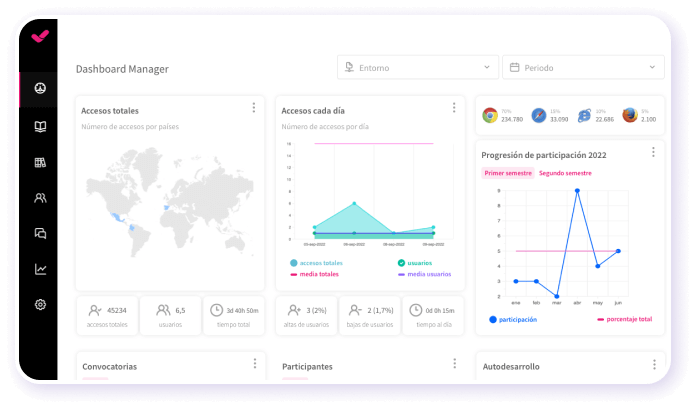
Analytics and reporting: turns learning data into actionable information through visual dashboards and detailed reports. Organizations can review activity, progress, and results by learner, department, audience, subsidiary, or company.
Learning experience: provides an intuitive, customizable interface with content cards for urgent, new, recommended, or pending courses. It also includes news, announcements, and an AI-powered recommender that helps learners discover relevant content.
Content library: provides unlimited access to over 600 ready-to-use courses covering leadership, compliance, soft skills, productivity, artificial intelligence, cybersecurity, and other key areas. Content is available in 8 languages, multiple formats, and is continuously updated.
Built-in AI authoring tool: enables teams to build courses from scratch or import PowerPoint presentations and turn them into interactive content. AI supports translations, voice-overs, subtitles, images, avatar videos, exercises, and final assessments. Courses can be exported in SCORM format.
One solution for the entire learning cycle: brings management, content creation, delivery, a ready-to-use course catalog, and measurement together in one system, reducing the need for separate tools at each stage.
Proven operational capacity: provides a modern environment that helps learners find, resume, and complete assigned training. Its track record includes more than 1.5 million users, 88 million training hours, 400 learning programs, and 94,000 learning activities.
Time and resource efficiency: automates campaigns, assignments, communications, reminders, and reporting, while its AI-powered authoring tool streamlines content creation and updates. Support, consulting, outsourcing, and LMS management services are also available.
Multi-device access: provides learning access from desktop computers, phones, and tablets. Its multi-format library, available in 8 languages, supports international learning programs.
Scalable and flexible: serves both small and medium-sized businesses and large enterprises, with segmentation by department, role, company, location, or audience and plans ranging from 100 learners to enterprise deployments.
Highly customizable: allows organizations to configure colors, logos, messages, login pages, domains, structures, permissions, and learning environments according to their brand and requirements.
International recognition: isEazy LMS was included in Training Industry’s 2025 Top LMS Companies Watch List and received eLearning Industry’s “Most Effective Implementation of AI for Talent Development and Management 2026” recognition.
Professional: up to 100 users, with unlimited courses, unlimited administrators, and unlimited learning environments.
Business: up to 200 users. Includes all Professional features and adds a dedicated manager dashboard.
Enterprise: from 201 users. Includes all Business features, communication channels, a BI reporting module, a dedicated Customer Success Manager, and custom integrations.
Included capabilities: all plans include support, automation, learning management tools, customization, learning experience features, gamification, mobile learning, certificates, reporting, a training catalog, and a course recommender.
Additional services: outsourcing, consulting, custom training, and Training as a Service can be added according to project requirements.
Banking and financial services: manages compliance, cybersecurity, customer service, sales training, and skills development programs for branches, networks, and corporate teams.
Pharmaceutical and healthcare: centralizes onboarding, regulatory updates, product training, and continuous learning for healthcare, sales, and corporate employees.
Retail and consumer goods: delivers agile, segmented learning to store employees, regional managers, sales networks, operations teams, and customer service staff.
Technology and telecommunications: develops technical and digital capabilities through continuous onboarding, certification, upskilling, and reskilling programs.
Manufacturing: manages training on processes, safety, quality, technical skills, and company culture for plants, factories, and distributed teams.
Transportation and logistics: centralizes onboarding, procedural updates, operational safety, and continuous training for drivers, warehouses, and logistics networks.
Consulting and professional services: supports knowledge updates, technical learning, onboarding, and skills development for project- and client-focused teams.
Education and training: manages training providers, internal academies, certification programs, and corporate universities from a customizable environment.
Government and public sector: supports the management, segmentation, and traceability of learning programs for public employees and complex government organizations.
Insurance: keeps sales networks, agents, and back-office teams up to date on regulations, products, processes, and commercial skills.
Energy: manages safety, regulatory, sustainability, operational, and technical learning for internal teams, contractors, and external networks.
Corporate academies: centralizes programs, learning paths, resources, communications, and learning communities to build an internal academy aligned with the organization’s goals and culture.
Onboarding: creates personalized welcome journeys, automates resource assignments, and ensures each new hire receives the required training from day one.
Mandatory training: manages health and safety, equality, compliance, and regulatory programs with automated assignments, certificates, reminders, and full traceability.
Talent development: creates programs and learning paths for different roles, departments, and responsibility levels to support upskilling and reskilling.
Product training: keeps sales teams, customers, partners, and distributors up to date with practical content about products, services, and procedures.
Skills development: combines LMS management with a library of over 600 courses covering leadership, communication, productivity, digital capabilities, and other professional skills.
Features
All-in-one AI-powered LMS: combines learning management and tracking, a library of over 600 ready-to-use courses, and an AI-powered authoring tool for creating proprietary content in one solution.
Engagement and collaboration: includes gamification, mobile learning, certificates, a knowledge library, social learning, and communication channels for sharing relevant news and content.
Integrations and compatibility: connects the LMS with other business tools through SSO, APIs, and custom integrations. It supports SCORM 1.2 and SCORM 2004.
End-to-end learning management: manages learners, groups, roles, permissions, courses, programs, and learning paths from one environment. It automates training campaigns and engagement actions and supports annual learning plans with dynamic filters by audience, department, or company. It can also support administrative requirements such as FUNDAE-funded training in Spain and DC3 and DC4 records in Mexico.
Analytics and reporting: turns learning data into actionable information through visual dashboards and detailed reports. Organizations can review activity, progress, and results by learner, department, audience, subsidiary, or company.
Learning experience: provides an intuitive, customizable interface with content cards for urgent, new, recommended, or pending courses. It also includes news, announcements, and an AI-powered recommender that helps learners discover relevant content.
Content library: provides unlimited access to over 600 ready-to-use courses covering leadership, compliance, soft skills, productivity, artificial intelligence, cybersecurity, and other key areas. Content is available in 8 languages, multiple formats, and is continuously updated.
Built-in AI authoring tool: enables teams to build courses from scratch or import PowerPoint presentations and turn them into interactive content. AI supports translations, voice-overs, subtitles, images, avatar videos, exercises, and final assessments. Courses can be exported in SCORM format.
Benefits
One solution for the entire learning cycle: brings management, content creation, delivery, a ready-to-use course catalog, and measurement together in one system, reducing the need for separate tools at each stage.
Proven operational capacity: provides a modern environment that helps learners find, resume, and complete assigned training. Its track record includes more than 1.5 million users, 88 million training hours, 400 learning programs, and 94,000 learning activities.
Time and resource efficiency: automates campaigns, assignments, communications, reminders, and reporting, while its AI-powered authoring tool streamlines content creation and updates. Support, consulting, outsourcing, and LMS management services are also available.
Multi-device access: provides learning access from desktop computers, phones, and tablets. Its multi-format library, available in 8 languages, supports international learning programs.
Scalable and flexible: serves both small and medium-sized businesses and large enterprises, with segmentation by department, role, company, location, or audience and plans ranging from 100 learners to enterprise deployments.
Highly customizable: allows organizations to configure colors, logos, messages, login pages, domains, structures, permissions, and learning environments according to their brand and requirements.
International recognition: isEazy LMS was included in Training Industry’s 2025 Top LMS Companies Watch List and received eLearning Industry’s “Most Effective Implementation of AI for Talent Development and Management 2026” recognition.
Subscription plans
Professional: up to 100 users, with unlimited courses, unlimited administrators, and unlimited learning environments.
Business: up to 200 users. Includes all Professional features and adds a dedicated manager dashboard.
Enterprise: from 201 users. Includes all Business features, communication channels, a BI reporting module, a dedicated Customer Success Manager, and custom integrations.
Included capabilities: all plans include support, automation, learning management tools, customization, learning experience features, gamification, mobile learning, certificates, reporting, a training catalog, and a course recommender.
Additional services: outsourcing, consulting, custom training, and Training as a Service can be added according to project requirements.
Industries
Banking and financial services: manages compliance, cybersecurity, customer service, sales training, and skills development programs for branches, networks, and corporate teams.
Pharmaceutical and healthcare: centralizes onboarding, regulatory updates, product training, and continuous learning for healthcare, sales, and corporate employees.
Retail and consumer goods: delivers agile, segmented learning to store employees, regional managers, sales networks, operations teams, and customer service staff.
Technology and telecommunications: develops technical and digital capabilities through continuous onboarding, certification, upskilling, and reskilling programs.
Manufacturing: manages training on processes, safety, quality, technical skills, and company culture for plants, factories, and distributed teams.
Transportation and logistics: centralizes onboarding, procedural updates, operational safety, and continuous training for drivers, warehouses, and logistics networks.
Consulting and professional services: supports knowledge updates, technical learning, onboarding, and skills development for project- and client-focused teams.
Education and training: manages training providers, internal academies, certification programs, and corporate universities from a customizable environment.
Government and public sector: supports the management, segmentation, and traceability of learning programs for public employees and complex government organizations.
Insurance: keeps sales networks, agents, and back-office teams up to date on regulations, products, processes, and commercial skills.
Energy: manages safety, regulatory, sustainability, operational, and technical learning for internal teams, contractors, and external networks.
Use cases
Corporate academies: centralizes programs, learning paths, resources, communications, and learning communities to build an internal academy aligned with the organization’s goals and culture.
Onboarding: creates personalized welcome journeys, automates resource assignments, and ensures each new hire receives the required training from day one.
Mandatory training: manages health and safety, equality, compliance, and regulatory programs with automated assignments, certificates, reminders, and full traceability.
Talent development: creates programs and learning paths for different roles, departments, and responsibility levels to support upskilling and reskilling.
Product training: keeps sales teams, customers, partners, and distributors up to date with practical content about products, services, and procedures.
Skills development: combines LMS management with a library of over 600 courses covering leadership, communication, productivity, digital capabilities, and other professional skills.
Canvas LMS
Pensada para educación superior
Funcionalidades
Ventajas
Tecnología, compatibilidad e integración
Precios
Modalidad online, blended y presencial (aulas individuales, universidades y empresas), con acceso desde cualquier dispositivo en cualquier momento.
Evaluaciones con tipos flexibles, retroalimentación personalizada, calificación con rúbricas y seguimiento del progreso de cada estudiante.
Análisis y reportes para medir el progreso y el éxito de los estudiantes e informar las decisiones de enseñanza.
Gestión de competencias y planes de aprendizaje personalizados adaptados al ritmo de cada alumno.
Mobile learning y gamificación para mantener a los estudiantes comprometidos con su aprendizaje.
Personalización de cursos, rutas de aprendizaje y experiencia del alumno.
Interfaz intuitiva con flujo de comunicación bidireccional entre educadores y estudiantes.
LMS de código abierto, con API abierta para integrar nuevas aplicaciones sin modificar la plataforma.
Integraciones de terceros con más de 600 socios de tecnología educativa, incluyendo Google Classroom, Microsoft Teams, Zoom y Adobe, mediante LTI.
Soporte dedicado para instituciones.
SaaS, respaldada por Amazon Web Services.
Basado en suscripción, varía según el tamaño de la institución.
Canvas Free-for-Teacher: versión gratuita con funcionalidades básicas para educadores.
Funcionalidades
Modalidad online, blended y presencial (aulas individuales, universidades y empresas), con acceso desde cualquier dispositivo en cualquier momento.
Evaluaciones con tipos flexibles, retroalimentación personalizada, calificación con rúbricas y seguimiento del progreso de cada estudiante.
Análisis y reportes para medir el progreso y el éxito de los estudiantes e informar las decisiones de enseñanza.
Gestión de competencias y planes de aprendizaje personalizados adaptados al ritmo de cada alumno.
Ventajas
Mobile learning y gamificación para mantener a los estudiantes comprometidos con su aprendizaje.
Personalización de cursos, rutas de aprendizaje y experiencia del alumno.
Interfaz intuitiva con flujo de comunicación bidireccional entre educadores y estudiantes.
Tecnología, compatibilidad e integración
LMS de código abierto, con API abierta para integrar nuevas aplicaciones sin modificar la plataforma.
Integraciones de terceros con más de 600 socios de tecnología educativa, incluyendo Google Classroom, Microsoft Teams, Zoom y Adobe, mediante LTI.
Soporte dedicado para instituciones.
SaaS, respaldada por Amazon Web Services.
Precios
Basado en suscripción, varía según el tamaño de la institución.
Canvas Free-for-Teacher: versión gratuita con funcionalidades básicas para educadores.
Blackboard Learn
Pensada para aprendizaje colaborativo
Funcionalidades
Ventajas
Tecnología, compatibilidad e integración
Precios
Modalidad online, presencial y blended (colegios y universidades, empresas), con acceso a cursos desde cualquier dispositivo.
Flujos de trabajo intuitivos para educadores y alumnos, con gestión centralizada desde el desarrollo de cursos hasta las evaluaciones.
Evaluaciones, certificaciones y panel de actividades, con seguimiento del progreso del alumno y retroalimentación personalizada.
Análisis y reportes con información en tiempo real para mejorar los resultados del aprendizaje.
Mobile learning y gamificación para aumentar el engagement de los alumnos.
Interfaz intuitiva, diseñada en colaboración con la comunidad educativa.
Funcionalidades de IA para diseño: asistente de diseño de cursos, generación de evaluaciones y rúbricas.
Comprobador de accesibilidad con tecnología de Anthology Ally, que detecta problemas de accesibilidad en los contenidos del curso.
Integraciones de terceros vía LTI 1.3 y APIs REST, incluyendo Turnitin, Zoom, Microsoft Teams y plataformas SIS.
Soporte dedicado para instituciones.
SaaS, basado en la web.
Precios de Blackboard Learn
Varía según la institución y el número de usuarios.
Funcionalidades
Modalidad online, presencial y blended (colegios y universidades, empresas), con acceso a cursos desde cualquier dispositivo.
Flujos de trabajo intuitivos para educadores y alumnos, con gestión centralizada desde el desarrollo de cursos hasta las evaluaciones.
Evaluaciones, certificaciones y panel de actividades, con seguimiento del progreso del alumno y retroalimentación personalizada.
Análisis y reportes con información en tiempo real para mejorar los resultados del aprendizaje.
Ventajas
Mobile learning y gamificación para aumentar el engagement de los alumnos.
Interfaz intuitiva, diseñada en colaboración con la comunidad educativa.
Funcionalidades de IA para diseño: asistente de diseño de cursos, generación de evaluaciones y rúbricas.
Comprobador de accesibilidad con tecnología de Anthology Ally, que detecta problemas de accesibilidad en los contenidos del curso.
Tecnología, compatibilidad e integración
Integraciones de terceros vía LTI 1.3 y APIs REST, incluyendo Turnitin, Zoom, Microsoft Teams y plataformas SIS.
Soporte dedicado para instituciones.
SaaS, basado en la web.
Precios
Precios de Blackboard Learn
Varía según la institución y el número de usuarios.
Moodle
Pensada para código abierto y educación superior
Funcionalidades
Ventajas
Tecnología, compatibilidad e integración
Precios
Panel de actividades, con recursos e interactivos para crear cursos online.
Notificaciones, filtros de búsqueda, portal estudiantil y gestión de la evaluación, incluyendo libro de calificaciones y seguimiento del progreso de cada alumno.
Modalidad online y presencial (educación superior, formación profesional y corporativa).
Análisis y reportes personalizados para analizar el progreso de los alumnos y el rendimiento de los cursos.
Social learning, gamificación y mobile learning: foros, talleres, revisión por pares, insignias y app móvil.
Personalización: temas visuales con colores y logotipo corporativo.
Creación de competencias y marcos de aprendizaje, con planes de aprendizaje asignables a individuos o grupos.
Integraciones con Microsoft 365, Google Workspace, H5P, BigBlueButton y Meta.
SaaS disponible a través de MoodleCloud.
Compatible con SCORM.
Código abierto.
Código abierto: descarga gratuita con autoalojamiento.
MoodleCloud: planes de pago escalonados por número de usuarios para pequeños equipos y organizaciones en crecimiento.
Moodle Workplace: precio basado en el alojamiento y los servicios contratados, disponible a través de socios certificados.
Funcionalidades
Panel de actividades, con recursos e interactivos para crear cursos online.
Notificaciones, filtros de búsqueda, portal estudiantil y gestión de la evaluación, incluyendo libro de calificaciones y seguimiento del progreso de cada alumno.
Modalidad online y presencial (educación superior, formación profesional y corporativa).
Análisis y reportes personalizados para analizar el progreso de los alumnos y el rendimiento de los cursos.
Ventajas
Social learning, gamificación y mobile learning: foros, talleres, revisión por pares, insignias y app móvil.
Personalización: temas visuales con colores y logotipo corporativo.
Creación de competencias y marcos de aprendizaje, con planes de aprendizaje asignables a individuos o grupos.
Tecnología, compatibilidad e integración
Integraciones con Microsoft 365, Google Workspace, H5P, BigBlueButton y Meta.
SaaS disponible a través de MoodleCloud.
Compatible con SCORM.
Código abierto.
Precios
Código abierto: descarga gratuita con autoalojamiento.
MoodleCloud: planes de pago escalonados por número de usuarios para pequeños equipos y organizaciones en crecimiento.
Moodle Workplace: precio basado en el alojamiento y los servicios contratados, disponible a través de socios certificados.
Conclusion: why an LMS is the key to effective training tracking
Effective training tracking is not just about metrics and dashboards — it is the foundation for building a continuous learning culture that delivers real business impact. And to achieve this at scale, consistently, and without excessive operational cost, nothing beats a well-implemented LMS.
Here are the key advantages of relying on an LMS for training tracking in organisations:
Centralisation of all learning activity: an LMS consolidates each employee’s complete training history — completed courses, scores, certifications, and time invested — in one place, eliminating data fragmentation across spreadsheets, emails, or standalone systems.
Automatic, real-time reports: L&D managers and line managers can access up-to-the-minute dashboards without manually exporting data. This accelerates decision-making and simplifies accountability to senior leadership.
Frictionless regulatory compliance: the LMS automatically records which employees have completed mandatory training and when, generating audit-ready compliance evidence at any time.
Scalability for any organisation size: whether you have 50 employees or 5,000, the LMS adapts tracking capabilities without increasing the workload on your training team.
Integration with the employee lifecycle: by connecting with your HRMS, the LMS links learning progress with performance, promotion, and professional development — transforming tracking into a strategic talent management tool.
Training ROI measurement: with centralised data, calculating the return on training investment moves from estimation to precise analysis based on real figures.
isEazy LMS is built precisely for L&D teams that want to move beyond spreadsheet-based training management and start making data-driven decisions. With customisable reports, automatic non-compliance alerts, and an intuitive interface for both administrators and employees, it is the solution that turns training tracking into a genuine competitive advantage. Request a personalised demo and discover how it can transform learning management in your organisation.
Frequently asked questions about training tracking
What metrics should be prioritized when tracking employee training?
How is employee attendance at training tracked?
How are training records maintained in the workplace?
How is staff training audited?
How can employee feedback be collected and used effectively in training programmes?
Here you can assess and customize the services that we'd like to use on this website. You're in charge! Enable or disable services as you see fit. To learn more, please read our .
We have to include them in order for certain web pages to function securely. These cookies are strictly necessary, so they cannot be rejected or modified.
Cookie
Duration
Description
_ga
2 years
The _ga cookie, installed by Google Analytics, calculates visitor, session and campaign data and also keeps track of site usage for the site's analytics report. The cookie stores information anonymously and assigns a randomly generated number to recognize unique visitors.
_ga_YW3LY84JY6
2 years
This cookie is installed by Google Analytics.
_gat_gtag_UA_90425332_3
1 minute
Set by Google to distinguish users.
_gat_UA-26043609-7
1 minute
A variation of the _gat cookie set by Google Analytics and Google Tag Manager to allow website owners to track visitor behaviour and measure site performance. The pattern element in the name contains the unique identity number of the account or website it relates to.
_gat_UA-90425332-3
1 minute
A variation of the _gat cookie set by Google Analytics and Google Tag Manager to allow website owners to track visitor behaviour and measure site performance. The pattern element in the name contains the unique identity number of the account or website it relates to.
_gcl_au
3 months
Provided by Google Tag Manager to experiment advertisement efficiency of websites using their services.
_gid
1 day
Installed by Google Analytics, _gid cookie stores information on how visitors use a website, while also creating an analytics report of the website's performance. Some of the data that are collected include the number of visitors, their source, and the pages they visit anonymously.
_icl_visitor_lang_js
1 day
This cookie is stored by WPML WordPress plugin. The purpose of the cookie is to store the redirected language.
Bootstrap
11 months
Bootstrap code
cookielawinfo-checkbox-advertisement
1 year
Set by the GDPR Cookie Consent plugin, this cookie is used to record the user consent for the cookies in the "Advertisement" category .
cookielawinfo-checkbox-analytics
11 months
This cookie is set by GDPR Cookie Consent plugin. The cookie is used to store the user consent for the cookies in the category "Analytics".
cookielawinfo-checkbox-functional
11 months
The cookie is set by GDPR cookie consent to record the user consent for the cookies in the category "Functional".
cookielawinfo-checkbox-nece
1 year
Cookie law info
cookielawinfo-checkbox-necessary
11 months
This cookie is set by GDPR Cookie Consent plugin. The cookies is used to store the user consent for the cookies in the category "Necessary".
cookielawinfo-checkbox-others
11 months
This cookie is set by GDPR Cookie Consent plugin. The cookie is used to store the user consent for the cookies in the category "Other.
cookielawinfo-checkbox-performance
11 months
This cookie is set by GDPR Cookie Consent plugin. The cookie is used to store the user consent for the cookies in the category "Performance".
CookieLawInfoConsent
1 year
Records the default button state of the corresponding category & the status of CCPA. It works only in coordination with the primary cookie.
Google Font API
11 months
Google Font API
IDE
1 year 24 days
Google DoubleClick IDE cookies are used to store information about how the user uses the website to present them with relevant ads and according to the user profile.
Pardot
11 months
The pardot cookie is set while the visitor is logged in as a Pardot user. The cookie indicates an active session and is not used for tracking.
test_cookie
15 minutes
The test_cookie is set by doubleclick.net and is used to determine if the user's browser supports cookies.
viewed_cookie_policy
11 months
The cookie is set by the GDPR Cookie Consent plugin and is used to store whether or not user has consented to the use of cookies. It does not store any personal data.
wp-wpml_current_language
session
Language cookies
wpml_browser_redirect_test
session
This cookie is set by WPML WordPress plugin and is used to test if cookies are enabled on the browser.
They collect information in order to measure, evaluate performance, and improve the quality of your experience on our site.
Cookie
Duration
Description
_ga
2 years
The _ga cookie, installed by Google Analytics, calculates visitor, session and campaign data and also keeps track of site usage for the site's analytics report. The cookie stores information anonymously and assigns a randomly generated number to recognize unique visitors.
_ga_YW3LY84JY6
2 years
This cookie is installed by Google Analytics.
_gat_gtag_UA_90425332_3
1 minute
Set by Google to distinguish users.
_gat_UA-26043609-7
1 minute
A variation of the _gat cookie set by Google Analytics and Google Tag Manager to allow website owners to track visitor behaviour and measure site performance. The pattern element in the name contains the unique identity number of the account or website it relates to.
_gat_UA-90425332-3
1 minute
A variation of the _gat cookie set by Google Analytics and Google Tag Manager to allow website owners to track visitor behaviour and measure site performance. The pattern element in the name contains the unique identity number of the account or website it relates to.
_gcl_au
3 months
Provided by Google Tag Manager to experiment advertisement efficiency of websites using their services.
_gid
1 day
Installed by Google Analytics, _gid cookie stores information on how visitors use a website, while also creating an analytics report of the website's performance. Some of the data that are collected include the number of visitors, their source, and the pages they visit anonymously.
_icl_visitor_lang_js
1 day
This cookie is stored by WPML WordPress plugin. The purpose of the cookie is to store the redirected language.
wpml_browser_redirect_test
session
This cookie is set by WPML WordPress plugin and is used to test if cookies are enabled on the browser.
We use them to provide you with efficient and personalized advertisements that we believe are relevant to your interests. You may see them on other sites that you visit.
Cookie
Duration
Description
IDE
1 year 24 days
Google DoubleClick IDE cookies are used to store information about how the user uses the website to present them with relevant ads and according to the user profile.
test_cookie
15 minutes
The test_cookie is set by doubleclick.net and is used to determine if the user's browser supports cookies.













 Subscribe to our newsletter